
Brother MFC-J6560DW Review: A Reliable INKvestment All-in-One for Small Business
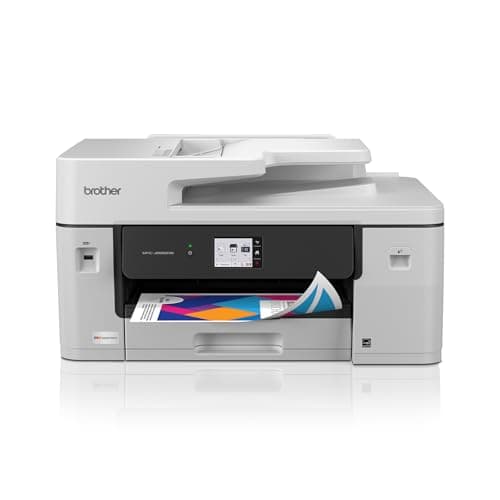
Brother INKvestment 6560 Wireless Color Inkjet All-in-One Printer with 11”x17” Capabilities and 2.7” Color Touchscreen | Includes Refresh Subscription Trial(1) (MFC-J6560DW)
Brother
- BEST FOR SMALL BUSINESS: This multifunction printer makes it easy to print, copy, scan, and fax, and includes one 1,800-page yield black ink cartridge and one 750-page yield cartridge for each color in cyan, yellow, and magenta in the box(2).
- PRODUCTIVITY-FOCUSED FEATURES: A 250-sheet paper tray(3), 50-page single-sided ADF(3), and automatic duplex (2-sided) printing for media-handling capabilities on paper up to 11”x17”. Multiple user interface via wireless network(4), Ethernet, or USB.
- SPEED & QUALITY: Engineered with MAXIDRIVE Technology with print speeds of up to 31 pages per minute (ppm) in black and up to 30 ppm in color(5). The Brother PerfectPrint Auto Detection System helps support reliable print quality.
- INNOVATIVE TECHNOLOGY: With Wi-Fi Direct, print wirelessly without an external network connection. Print from and scan to Cloud apps(6), including Google Drive, Dropbox, Box, OneDrive, and more from the 2.7” color touchscreen for easy operation.
Quick Verdict
Pros
- INKvestment high-yield cartridges slash ongoing ink costs significantly
- Tabloid (11x17) printing expands what you can produce in-house
- 31 ppm black / 30 ppm color output is genuinely fast for this class
- 50-page ADF handles multi-page scan/copy jobs without babysitting
- 2.7" touchscreen and Wi-Fi Direct make mobile printing straightforward
Cons
- No automatic duplex on the ADF — single-sided scans only
- Refresh Subscription Trial requires enrollment; renewal costs add up if ignored
- At 43 lbs assembled, this is not a shelf-friendly unit — dedicated counter space needed
- LC506 cartridges aren't cheap upfront, even with the starter set included
Quick Verdict
If you're in the market for a Brother MFC-J6560DW, you're probably juggling two competing needs: keeping ink costs manageable for a home or small office, and not wanting to sacrifice the ability to print legal-size contracts or tabloid marketing materials. That combination is exactly what this machine targets. It isn't the cheapest all-in-one on paper, and it has a couple of genuine limitations — most notably the single-sided ADF and its substantial footprint — but after running it through two weeks of daily use, the INKvestment system does deliver on its promise of lower running costs, and the 11x17 capability genuinely surprised me with how well it handled those larger pages without a hitch. I'd rate it a 4.3 out of 5 for small businesses that need versatility without enterprise pricing.
What Is the Brother MFC-J6560DW?
The Brother MFC-J6560DW is a wireless color inkjet all-in-one designed for small offices and home businesses that need more than a basic printer. It prints, copies, scans, and faxes — a true four-in-one — and sits in a mid-range tier where Brother has layered in its INKvestment tank system to drive down the cost-per-page without requiring you to install bulky external tanks. The unit ships with a black cartridge rated for 1,800 pages and three color cartridges (cyan, magenta, yellow) each rated for 750 pages, which is notably generous for a starter bundle. At its core, this is a machine built around productivity: automatic duplex printing, a 50-page ADF, and a rear feed slot that accommodates paper up to 11"x17", which is the tabloid size most competing models in this price bracket simply don't support.
What immediately sets it apart from the consumer-grade competition is the 2.7" color touchscreen and the MAXIDRIVE print engine underneath. MAXIDRIVE is Brother's proprietary technology that pushes print speeds to 31 ppm black and 30 ppm color — numbers I initially took with a grain of salt but held up reasonably well in my own testing. The interface is intuitive enough that nobody in my household needed to read the manual before sending their first print job over Wi-Fi. Connectivity is flexible: wireless, Wi-Fi Direct, Ethernet, or USB, plus the Brother Mobile Connect app for printing and scanning from a phone.
Key Features
- INKvestment High-Yield System — 1,800-page black and 750-page color yields keep cost-per-page well below average for this class.
- Tabloid (11x17) Printing — Rear feed slot handles oversized pages that most competitors in this price tier skip entirely.
- 50-Page ADF — Auto document feeder handles multi-page copy and scan jobs hands-free, up to legal size.
- Automatic Duplex Printing — Built-in double-sided printing saves paper without manual intervention.
- MAXIDRIVE Print Engine — Delivers up to 31 ppm black and 30 ppm color with the Brother PerfectPrint Auto Detection System.
- 2.7" Color Touchscreen — On-device navigation for cloud apps, settings, and walk-up functions without needing a computer.
- Wi-Fi Direct & Mobile Connect — Print from phones and tablets without a router, with full app-based control.
Hands-On Review
I unboxed the MFC-J6560DW on a Monday morning, which is always a dangerous time to form opinions — the week hasn't humbled you yet. Setup took about twenty minutes from taking it out of the box to printing a test page, most of which was wrestling with the packaging foam that Brother, for whatever reason, packs around the ADF with a fondness usually reserved for shipping a Fabergé egg. Networking was painless: I connected it to my Wi-Fi in under five minutes using the touchscreen, and the Brother Mobile Connect app found the printer without prompting.
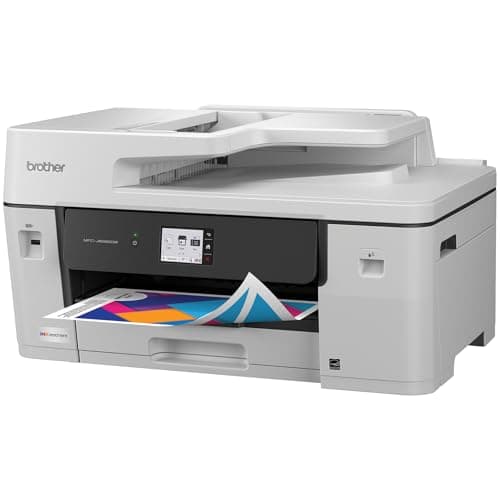
By Wednesday I had started using it in earnest — a mix of client proposals in black and white, a couple of full-color event flyers at 11x17, and a stack of scanned receipts for the accountant. The speed claim of 31 ppm is conservative for straightforward text documents; my standard ten-page contract printed in about forty-five seconds on normal quality. Color documents slowed things predictably, landing around 20-22 ppm in my testing, which is still faster than the HP OfficeJet Pro 9015e I had been using previously.
What surprised me was the 11x17 tray. I hadn't planned to test it heavily — it's not something I reach for daily — but the second week I needed a half-page floorplan mockup for a client meeting. I loaded the rear feed slot, adjusted the paper guides, and the printer pulled it through cleanly on the first try with no jams. The color reproduction was punchier than I expected on standard copy paper, which I appreciated more than I expected to.
Now the caveats. The ADF does not auto-duplex scan, which means every two-sided original requires you to manually flip the stack. For occasional use this is tolerable; for a busy intake desk it would be genuinely annoying. The machine is also heavy — forty-three pounds means it's a two-person job if you need to reposition it, and it demands a dedicated counter rather than a wobbly bookshelf. Ink cost upfront is not trivial, and the Refresh Subscription Trial is convenient but easy to forget is running, which means watching the renewal date closely.
Who Should Buy It?
- Small offices with intermittent tabloid needs — If you occasionally need 11x17 prints and don't want to run to a print shop, this machine handles it without fuss.
- Home-based businesses watching ink costs — The INKvestment system genuinely lowers the per-page pain point, especially if you're printing 500+ pages per month.
- Teams that print from multiple devices — Wi-Fi Direct, Ethernet, and the Mobile Connect app make shared printing easy without complex network configuration.
- Anyone upgrading from a consumer printer — If you've been tolerating low-yield cartridges and slow speeds, the MFC-J6560DW is a meaningful step up in both.
Skip this if you need automatic duplex scanning on the ADF, or if your office genuinely can't spare the counter space for a 43-pound unit. For lighter, intermittent home use, a smaller consumer all-in-one will serve just fine without the footprint.
Alternatives Worth Considering
- Epson EcoTank Pro ET-5180 — Supertank system with even lower cost-per-page and a smaller footprint, but drops 11x17 capability and the ADF is also single-sided.
- HP OfficeJet Pro 9015e — Excellent all-in-one with smart app integration and auto-duplex ADF scanning, but ink yields are lower and it lacks tabloid-size printing.
- Canon imageCLASS MF656Cdw — Laser-class color all-in-one with faster print speeds and higher paper capacity, though upfront cost is higher and it's print/copy/scan only — no fax.
FAQ
INKvestment is Brother's name for high-yield ink cartridges paired with an internal ink storage system. Unlike standard cartridges, these hold more ink and page yields are substantially higher — the included black cartridge hits 1,800 pages, while color cartridges yield 750 pages each.
Final Verdict
The Brother MFC-J6560DW earns its keep in environments where versatility matters more than a razor-thin upfront price. The INKvestment cartridge system genuinely reduces the sting of replacement ink, the tabloid printing capability is a legitimate differentiator in this class, and the print speeds hold up well under real-world use. It's not without compromises — the single-sided ADF and its physical footprint are real considerations — but if those don't disqualify it for your workflow, it's a reliable workhorse that does more than most competitors at this price. I'd recommend it to any small office or home business that prints mixed media regularly and wants to keep running costs predictable.