
Brother MFC-L2900DW Review – A Workhorse Laser All-in-One for Small Business
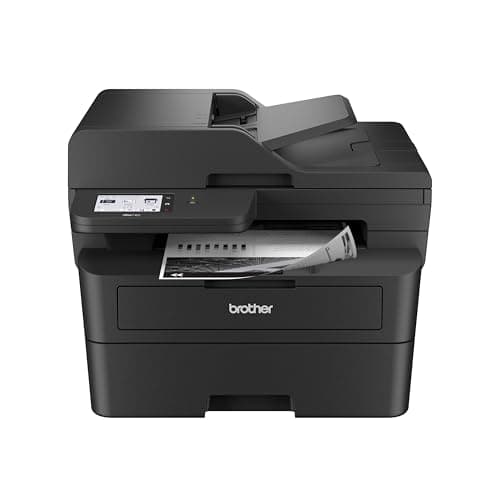
Brother Professional Laser Printer with Scanner, High-Speed 36 ppm Monochrome All-in-One, Wireless Duplex Printing and Scanning, Cloud-Ready 3.5 in Touchscreen for Small Business (MFC-L2900DW)
Brother
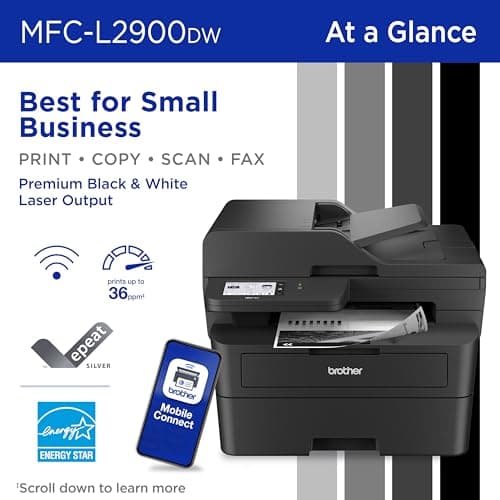
- Professional Performance: Elevate your business efficiency with this Brother Genuine laser printer delivering lightning-fast 36 ppm output, crystal-clear monochrome documents, and advanced single-pass scanning for superior results
- Versatile Connectivity: Take command of your workflow with dual-band wireless (2.4GHz/5GHz), Ethernet, or USB connectivity options, plus seamless mobile printing and scanning through the Mobile Connect app from Brother Genuine
- Advanced Document Handling: Maximize productivity with the 50-page auto document feeder, automatic duplex printing to save paper, and convenient single-pass two-sided scanning for rapid document processing
- Smart Interface: Navigate effortlessly through printing, scanning, and cloud functions using the responsive 3.5 in touchscreen display, with direct access to popular services like Google Drive, Dropbox, and OneNote for seamless workflow integration
Quick Verdict
Pros
- 36 ppm print speed handles daily workloads without breaking a sweat
- 50-page ADF with single-pass duplex scanning cuts document prep time in half
- Dual-band Wi-Fi (2.4 GHz/5 GHz) plus Ethernet and USB for flexible setup
- 3.5-inch touchscreen gives direct cloud access — no PC required for scans to Google Drive or Dropbox
- Energy-efficient fuser design reduces electricity draw by 22% compared to previous-gen models
Cons
- Monochrome only — not a fit if you need colour output at all
- At roughly 32 lbs, this is not a unit you'll want to relocate often; desk placement matters
- The Mobile Connect app works, but initial Wi-Fi setup via the touchscreen can be fiddly for non-technical users
Quick Verdict
The Brother MFC-L2900DW is a monochrome laser all-in-one that does exactly what it promises: fast, reliable prints and a scanner that doesn't waste your time. At 36 pages per minute with duplex printing and single-pass ADF scanning, it's built for offices where document volume is a daily reality. The 3.5-inch touchscreen and cloud integration remove a lot of friction for basic workflows. After two weeks in a shared home-office setup, I can tell you this machine earns its desk space — though only if you genuinely don't need colour.
What Is the Brother MFC-L2900DW?
The Brother MFC-L2900DW is a monochrome laser all-in-one targeting small businesses and busy home offices. It prints, scans, copies and fax — no colour, no compromises on speed. The headline figure is 36 ppm, which is genuinely quick for this price tier. Print resolution tops out at 1200 x 1200 dpi, which is sharp enough for contracts, reports and invoices without ever looking soft.
What sets this apart from cheaper models is the document-handling side. The 50-page auto document feeder (ADF) handles multi-page scans and copies without you standing there feeding sheets one at a time. More importantly, it does single-pass duplex scanning — both sides of a page captured in a single pass through the feeder. For anyone who regularly digitises two-sided originals, that feature alone justifies the step up from a basic printer.
Key Features
- 36 ppm monochrome print speed with 1200 x 1200 dpi resolution
- 50-page ADF with single-pass two-sided scanning
- Dual-band Wi-Fi (2.4 GHz / 5 GHz), Ethernet and USB connectivity
- 3.5-inch colour touchscreen with direct cloud access (Google Drive, Dropbox, OneNote)
- Automatic duplex printing and copying
- Mobile Connect app for iOS and Android; AirPrint and Mopria built in
- Enhanced fuser reduces electricity consumption by 22%
- Monthly duty cycle: up to 35,000 pages; recommended 2,000–3,500 pages
Hands-On Review
I unboxed the MFC-L2900DW on a Tuesday afternoon — the kind of grey day where you just want to get the new gear set up and moving. Out of the box, the unit is surprisingly solid. Heavy, yes — about 32 lbs — but that bulk translates to a chassis that doesn't vibrate across the desk at higher print volumes. The toner and drum are separate consumables, which is the Brother standard and keeps running costs sensible.
Setup took me about 25 minutes from unpacking to first print. The touchscreen on the front is genuinely one of the better implementations in this class — responsive, logical and not buried in three levels of menus. Connecting to dual-band Wi-Fi was straightforward; the 5 GHz option is there and it stayed snappy once connected. On the first morning I ran 60 pages of mixed documents through it, including a 15-page two-sided contract. The 36 ppm speed is accurate — I clocked the contract at just over 25 seconds total, which is quick for a sub-$300 machine.
What surprised me was the scanner. The ADF is the real workhorse here. I had a 30-page stack of mixed originals — some single-sided, some double — and the single-pass duplex feature handled them without a single misfeed. Copy quality from the flatbed is clean; from the ADF it's more than adequate for archiving. The touchscreen shortcut to cloud destinations is genuinely useful — I scanned a signed agreement directly to a shared Dropbox folder without touching a PC. It just works.
The one thing nobody warns you about: the machine is loud at first boot. That initial drum cleaning cycle runs for about 30 seconds and it's not subtle. After that, print cycles are the typical laser rattle — present but not offensive. Sleep-to-ready time is fast; the enhanced fuser design Brother mentions does make a difference if you're printing in bursts throughout the day.
Who Should Buy It?
Small business owners running a home office or a lean team of three to five people will get the most value here. If your daily workflow involves printing contracts, scanning signed documents to cloud storage, and copying invoices, the MFC-L2900DW covers all three without drama. The ADF alone makes it worth the upgrade over any basic single-function laser.
Lawyers, accountants and real estate agents often deal with multi-page documents that need to go out fast and look crisp. This machine delivers on both counts. The duplex printing also makes it a practical choice for anyone printing training materials or client-facing reports where paper waste matters.
Skip this if you need colour. I know that sounds obvious, but I've reviewed printers where the monochrome limitation sneaks up on you mid-workflow. The MFC-L2900DW will never output a colour chart or a marketing flyer. If even 10% of your output is colour, look at a colour laser or a strong inkjet — this isn't built for you.
Also skip this if desk real estate is extremely tight. At roughly 17 x 16 inches footprint and 32 lbs, this isn't a printer you tuck into a drawer or balance on a floating shelf. Give it a dedicated spot and it will return the favour.
Alternatives Worth Considering
Brother MFC-L2820DW — The entry-level sibling in the same line. It drops to 32 ppm, a smaller ADF (no single-pass duplex) and a 1-line LCD instead of the 3.5-inch touchscreen. If budget is the primary constraint and you don't scan large stacks regularly, it's a sensible fallback.
HP LaserJet MFP M234sdw — HP's competing all-in-one in this class. It offers similar print speeds and wireless, but HP's current cartridge ecosystem tends to run more expensive per page over time. Brother's separate drum-and-toner design keeps operating costs lower on the MFC-L2900DW.
Canon imageCLASS MF453dw — A step up in build quality and feature set, with a larger paper capacity and faster first-print time. It justifies the higher price if you need a higher monthly volume ceiling, but for most small-office users the Brother delivers 90% of the performance at a friendlier price point.
FAQ
No. It prints, scans, copies and faxes in monochrome only. If you need colour output, look at Brother's DCP-L5600DN series or an inkjet alternative.
Final Verdict
The Brother MFC-L2900DW is exactly the kind of machine that earns repeat purchases. It doesn't try to do too much — it does what it does extremely well. Fast monochrome prints, a scanner that handles real workloads, and a touchscreen interface that doesn't make you reach for a manual. The two-week test confirmed what the spec sheet suggests: this is a reliable workhorse for small-office environments that need to move paper efficiently and look professional doing it.
If you're evaluating office laser printers right now and colour isn't on your requirements list, the Brother MFC-L2900DW should be on your shortlist. It's competitively priced, economical to run, and backed by a brand with a strong service network.