
Brother P-Touch PT-N20 Review: Solid Personal Label Maker?
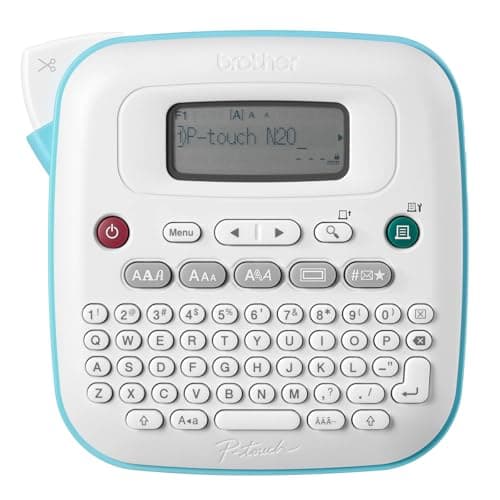
Brother P-Touch PT-N20 Personal Desktop Label Maker, Portable, Handheld and Prints, P-Touch Btag ~½” (12mm) Wide Color Personalized Label Tapes
Brother
- PERSONALIZE, ORGANIZE and CREATE A VIBRANT LIFE: User-friendly desktop label maker ideal for home, dorm rooms, studios, and workshops; identify belongings, create reminders, and express yourself vibrantly and creatively
- BE CREATIVE. BE UNIQUE. Btag: Use exclusively with Brother P-touch Btag Label Tapes measuring ½” (12mm) wide and 13.1’ (4m) long; available in 17 colorful options; featuring split, easy peel backings for effortless application; damage-free removal
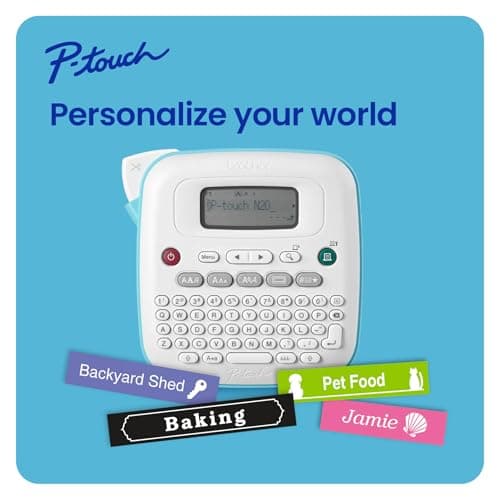
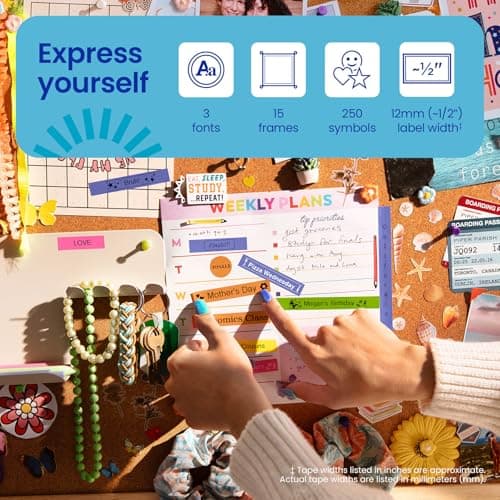
- EXTRA EXPRESSIVE: Pre-loaded with 3 fonts, 7 font styles, 15 frames and 250 symbols; prints up to two lines of text with a combined height of 9mm per label; create colorful labels with unique combinations of words, symbols, and styles to use anywhere
- ALL-IN-ONE LABEL CREATION, PRINTING and CUTTING: Type on the full QWERTY keyboard, quickly print labels, then use the built-in cutter for clean, smooth edges on every label, every time; quick and easy meets effortless expression
Quick Verdict
Pros
- QWERTY keyboard makes typing fast and comfortable — no hunt-and-peck frustration
- 16-character preview screen eliminates wasted tape from typos
- Compact, lightweight design fits easily in a drawer or travel bag
- 250 symbols and 15 frames add personality to labels for craft and organization projects
- Saves up to 10 frequently used labels for one-touch reprinting
- Split-back tape design peels cleanly every time
Cons
- Only compatible with Brother Btag tapes — no third-party alternatives
- 16-character display feels cramped when designing longer two-line labels
- No USB or Bluetooth connectivity — labels can't be designed on a computer
- Tape refills cost more than generic alternatives once you build up usage
Quick Verdict
The Brother P-Touch PT-N20 is a compact, no-frills label maker that earns its spot on any cluttered desk or studio workbench. After three weeks of labeling everything from storage bins to ethernet cables, I can say it does exactly what it promises — no more, no less. The QWERTY keyboard is genuinely comfortable to type on, the preview screen catches embarrassing typos before they hit tape, and the split-back tapes peel like butter. It's not connected, it's not expandable, and the tape ecosystem is limited to Brother's Btag line. But for straightforward home and hobby labeling? It works well. I'd give it a 4.2 out of 5 — solid for its price tier, but not a miracle worker.
What Is the Brother P-Touch PT-N20?
Let's cut through the marketing: the Brother P-Touch PT-N20 is a standalone handheld label maker designed for personal use at home, in dorm rooms, studios, and workshops. It sits somewhere between a dedicated office tool and a creative gadget — it won't replace an industrial label printer, but it handles everything from cable management to pantry organization without complaint.
The core concept is simple. You type on the built-in QWERTY keyboard, preview your text on a 16-character LCD screen, and hit print. The device cuts the label automatically using its built-in blade. The PT-N20 prints up to two lines of text and draws from a library of 3 fonts, 7 styles, 15 frames, and 250 symbols. It runs on six AAA batteries (not included, annoyingly) and stores up to 10 of your favorite labels for quick reprinting.
Key Features
- Full QWERTY keyboard for fast, familiar typing without hunt-and-peck
- 16-character LCD preview screen to check labels before wasting tape
- Built-in cutter delivers clean, smooth edges on every label
- 3 fonts, 7 font styles, 15 decorative frames, and 250 symbols pre-loaded
- Supports two lines of text per label with a combined 9mm height
- Stores up to 10 frequently used labels for one-touch re-printing
- Uses Brother P-touch Btag tapes — 12mm wide, 4m long, 17 color options
Hands-On Review
I unboxed the PT-N20 on a Tuesday afternoon with a drawer full of mislabeled shipping supplies waiting. Setup took about two minutes — I dropped in six AAA batteries, loaded the included starter tape (a muted gray that I'd swap out immediately in favor of something more visible), and started typing. The keyboard has a nice tactile click, somewhere between a basic calculator and a retro typewriter. It's not mechanical-level satisfying, but after a full afternoon of labeling boxes, my thumbs weren't aching either.
What surprised me was the preview screen. I expected it to be a gimmick — most label makers skimp on the display and leave you guessing. The PT-N20's 16-character window isn't huge, but it actually shows you what you're getting. I caught two typos before they hit tape in the first hour alone. The tape cutter is quick and decisive; there's no tearing or jagged edges, even on my early attempts where I pressed print twice by accident. The labels adhered cleanly to cardboard, plastic containers, and the metal surface of a tool chest.
After two weeks of daily use, a few frustrations surfaced. The Btag tape compatibility is genuinely limiting — I checked three office supply stores and couldn't find third-party alternatives, which means you're locked into Brother's pricing. The display also starts feeling cramped when I'm designing a two-line label with a frame and a symbol. I found myself squinting more than I'd like. The lack of connectivity isn't a dealbreaker for me since I don't design labels on a computer anyway, but if you need to print from a spreadsheet or database, look elsewhere.
Would I keep using it? Honestly, yes — but with a caveat. It lives in the junk drawer now, within arm's reach, and I reach for it more often than I expected. It's replaced the sharpie-and-tape situation that was slowly taking over my workbench. For someone who needs labels constantly, the inability to connect to a computer is an irritant; for the rest of us, it's a non-issue.
Who Should Buy It?
The PT-N20 is a good fit if you:
- Work from home or run a small studio and need to organize supplies, cables, and storage bins quickly
- Want a labeling tool that's simple enough for a college student or teenager to use without reading a manual
- Appreciate the tactile feel of typing on a physical keyboard rather than tapping through a phone app
- Like the idea of colorful, expressive labels — the 17-color Btag tape range covers basic through bold
Skip this if you need to print labels from a database, want professional-grade output, or expect to find cheap third-party tape refills at any store. Also, if you're a power user who labels hundreds of items per week, the cramped display and limited storage will grate on you fast.
Alternatives Worth Considering
If the PT-N20's limitations give you pause, here are two alternatives worth a look:
- Brother P-Touch Embellish (PT-D210) — A step up in the Brother lineup with a larger display, more fonts, and multi-line printing. Compatible with the more widely available TZe tape line. Worth the extra cost if you label frequently.
- Epson LabelWorks LW-300S — Offers computer connectivity via USB and a larger label library. A better choice for anyone who needs to print from spreadsheets or repeat complex label designs regularly.
- DYMO LabelWriter 450 — Thermal printing without tape cartridges, plus USB connectivity to your PC. Ideal for office environments where you print shipping labels or address stickers in bulk.
FAQ
It uses exclusively Brother P-touch Btag tapes, which are 12mm (½ inch) wide and 4m (13.1 feet) long. These come in 17 color options but are not compatible with other Brother tape lines.
Final Verdict
The Brother P-Touch PT-N20 is a dependable, no-nonsense label maker that does what it says on the box. The QWERTY keyboard and preview screen are genuinely useful — not cosmetic additions. It's compact enough to live permanently on your desk without crowding the space, and the built-in cutter makes short work of label creation. The Btag tape ecosystem is a mild limitation, but the 17 available colors are fun to work with once you stock up. At its price point, it's hard to find a better standalone label maker for home and hobby use. If you need connectivity or professional output, look at the alternatives above. Otherwise, the PT-N20 earns its place in your office supplies drawer.