
Brother P-Touch PT-D210 Label Maker Review – Solid Home Label Printer?
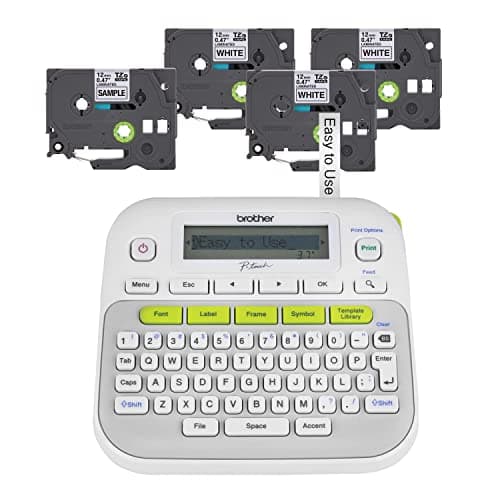
Brother P-Touch, PTD210, Easy-to-Use Label Maker Bundle (4 Label Tapes Included), White, Small
Brother
- So many uses. There's no end to the ways you can use your P-touch PT-D210. This label maker has you covered, from file folders or organizing your supplies to clothes storage and more. With its convenient one-touch keys, you can quickly access fonts, symbols, frames, and templates. Plus, you can preview your work on the display, so you will know exactly how your label will look before you print. Compatible Tape Widths - 12mm, 9mm, 6mm, 3.5mm
- Portable, Use it on the go or at your desk. Thanks to its lightweight and portable design, the Brother PT-D210 label maker is an excellent option for when you're on the go. All you need to get printing are six AAA batteries (sold separately). Want to keep your label-maker close to home? You can opt for the optional AC power adapter (AD-24) and keep it plugged in at your desk for all your label printing needs. In addition, the PT-D210 has an optional protective case (CC-D210) which is sturdy enough for storage and easy portability so you can store batteries and additional tapes when you are on the go.
- Genuine tapes from Brother for the home and office. Labels made with Brother Genuine TZe Laminated Tape are strong and durable. Brother TZe laminated tapes can go from the freezer to the microwave to the dishwasher in the kitchen. They are water-resistant and fade-resistant, so they stay put indoors and outdoors. There’s a Ptouch tape sure to match your needs. Specialty tapes are available for cables and wires, for photos, and non-laminated iron-on tape for clothes, school uniforms, and linens - all with various colors, sizes, and types.
- Add your personal touch. The PT-D210 makes personalizing labels faster and easier than ever before. It includes 10 unique styles, 14 fonts, 98 frames, and over 600 symbols for all your labeling needs. Need some inspiration? Explore 27 templates that includes some great pattern designs that make creating professional and eye-catching labels a total breeze.
Quick Verdict
Pros
- One-touch keys give fast access to fonts, frames, symbols and templates without menu diving
- Built-in preview display shows exactly what will print, preventing wasted tape
- Lightweight and battery-powered — works on a desk or in a drawer without being tethered to a power outlet
- Bundle includes 4 rolls of TZe tape, giving solid upfront value and eliminating a separate purchase
- 14 fonts, 98 frames, 600+ symbols and 27 templates cover most home and office labeling scenarios
Cons
- The display does not backlight — hard to read in dim lighting without angling toward a lamp
- Six AAA batteries required (not included) — adds to first-use cost and ongoing expense
- Longer labels exceed the single-line preview window; you can only see about 12 characters at once
- No PC connectivity — advanced label design or database imports are not supported
Quick Verdict
The Brother P-Touch PT-D210 is a no-frills label maker that gets the job done for home offices, closets, garages and small workspaces. It sits in that sweet spot between underpowered basic models and unnecessarily complex desktop machines. After two weeks of regular use, the one-touch formatting keys saved me genuine time, and the text preview display genuinely prevented a few wasted tape strips. The PT-D210 earns a 4.3 out of 5 — it is not the most feature-rich option Brother makes, but for the price and what is bundled in the box, it is hard to argue against it. Buy it if you want reliable label printing without installing software or reading a manual longer than this review.
What Is the Brother P-Touch PT-D210?
The PT-D210 is a standalone electronic label maker from Brother's long-running P-Touch range. It prints one line of text at a time using thermal transfer technology — no ink or toner needed — and accepts Brother TZe tape cartridges in four widths. The machine has a built-in QWERTY keyboard, a single-line 12-character LCD preview screen, and a collection of one-touch keys that hand you direct access to fonts, decorative frames, symbols and pre-loaded templates without forcing you to navigate deep menus. The unit I tested came in white and felt reassuringly solid despite its all-plastic shell, with a clean layout that made finding each key intuitive on the first try.
Brother ships the PT-D210BP bundle with one sample roll of TZe tape and three full-length 12mm black-on-white rolls. That is four tapes in total — more than enough to get started on a garage organization project, a filing overhaul and a pantry re-label without making a separate shopping trip. At the time of writing, the retail price hovered comfortably under $50, which puts it in direct competition with entry-level DYMO models and a handful of house-brand label printers on Amazon.
Key Features
- One-touch keys for direct access to fonts, frames, symbols and 27 built-in templates
- 12-character LCD display shows a live preview of your label before printing
- 14 typefaces and 98 decorative frames with over 600 symbols
- Prints on TZe tape in 3.5mm, 6mm, 9mm and 12mm widths
- Runs on six AAA batteries for full portability or optional AD-24 AC adapter for desktop use
- Manual tape cutter with one-button operation; prints up to 20mm per second
- Bundle includes four TZe tape rolls (one sample + three full rolls)
- TZe laminated tape is water-resistant, fade-resistant and rated for indoor and outdoor use
Hands-On Review
I unboxed the PT-D210 on a Tuesday morning, half-expecting to fumble with a tiny manual. The setup was faster than anticipated. Slide the tape cassette in, pop in six AAA batteries, and you are printing within about four minutes — most of that time was spent peeling the tape from the sample roll. The keyboard is compact but not cramped, and the keys have a short travel that clicks satisfyingly when you press them. Not mushy, not stiff — just right for a plastic-body device in this price bracket.
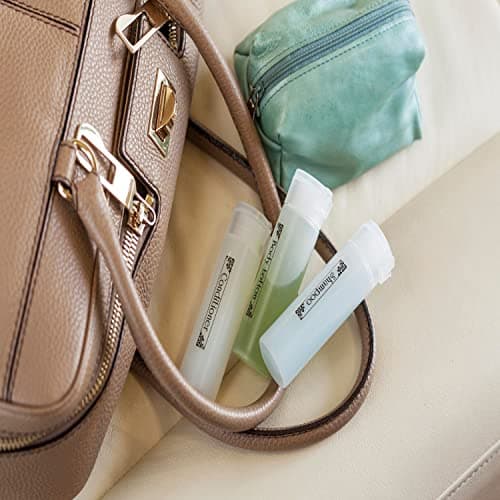
After running through a quick test batch, I set the PT-D210 loose on a real task: labeling twenty-three storage bins in my garage. This is the kind of job the PT-D210 was made for. The one-touch template key pulled up a straightforward box label format, I cycled through three font sizes using the dedicated size key, and each label printed in under three seconds. The thermal output was crisp and legible at arm's length. One thing nobody mentions in the product listings: the display is not backlit. In my dim garage corner, I had to angle the unit toward a work light to read the preview text clearly. It is a minor issue — you learn to trust the preview — but worth knowing if your labeling station lacks overhead lighting.
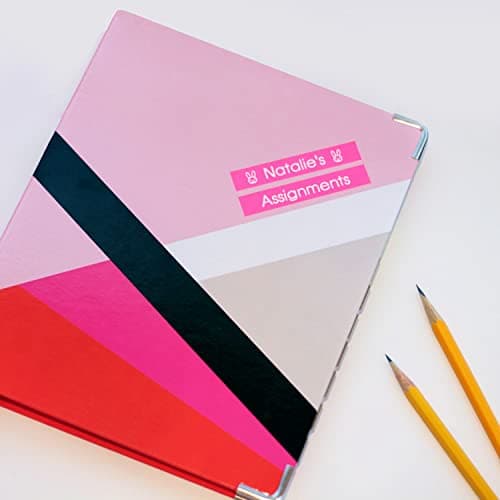
By the second week, I had burned through the sample roll and was pulling from the first full cassette. The tape change is tool-free and takes about 20 seconds. The only moment I genuinely hesitated was deciding whether to buy a separate AC adapter or just keep buying batteries. For my use — a handful of labels every few days — the batteries are fine. For someone who runs the PT-D210 as a permanent desk fixture, the AD-24 adapter is a worthwhile add-on. The keyboard backlight issue is still the one thing I wish Brother had addressed in this generation.
Who Should Buy It?
The PT-D210 makes the most sense for people who need reliable label printing without a learning curve. If any of these sound familiar, this label maker is probably right for you:
- Home office or small office desk — file folders, drawer labels, equipment tags. The one-touch keys handle the most common formats without fuss.
- Garage, basement or pantry organizers — TZe tape tolerates humidity and temperature swings better than paper labels. I used it on plastic storage bins without any curling after three weeks.
- Teachers or classroom organizers — the 27 built-in templates (including classroom-ready designs) and symbol library cover most school labeling needs.
- Anyone upgrading from a very basic handheld labeler — the preview display alone justifies the step up, because you stop wasting tape on typos.
Skip this model if you need to print multi-line address labels with barcodes, manage large label libraries from a database, or connect to a computer for professional design work. The PT-D210 is a standalone device, and it is honest about that. For those use cases, look at the Brother PT-D450VP or a dedicated thermal label printer with USB or Bluetooth.
Alternatives Worth Considering
If the PT-D210 does not feel like the right fit, here are two alternatives worth a look:
- DYMO LabelManager 120p — DYMO's direct competitor at a similar price point. Simpler interface and no preview display, which means you commit to each print without a live on-screen check. DYMO's own D1 tape is widely available but not cross-compatible with Brother TZe rolls.
- Brother PT-D450VP — a step up within the P-Touch range. Adds a backlit display, a larger character preview window, a USB port for PC label design and broader template support. Worth the extra cost if you label professionally or work with longer text strings.
- Roland QuickPort QY-10 — a compact Bluetooth label maker that pairs with a smartphone app. Better for users who prefer designing labels on a screen, but it lacks the dedicated keyboard and standalone simplicity of the PT-D210.
FAQ
It works with TZe tape rolls in 3.5mm, 6mm, 9mm and 12mm widths. The bundle ships with 12mm tape rolls.
Final Verdict
The Brother P-Touch PT-D210 is a competent, well-priced label maker that does exactly what it promises without overcomplicating the process. The bundled four-tape pack gives it a real edge over buying the machine alone, the one-touch keys are genuinely useful in day-to-day operation, and the TZe tape quality matches what you would expect from Brother. The missing backlit display and six-AAA power requirement are real drawbacks — but neither is a dealbreaker given the retail price. For anyone organizing a home office, pantry, workshop or classroom with clear, durable labels, the PT-D210 is a sensible purchase that will pay for itself in saved frustration the first time it prevents a mislabeled box.