
Canon imageCLASS MF465dw II Review – Fast Wireless Office Laser Printer
Quick Verdict
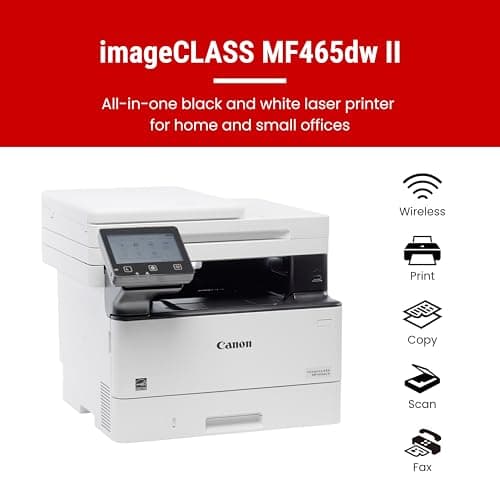
Pros
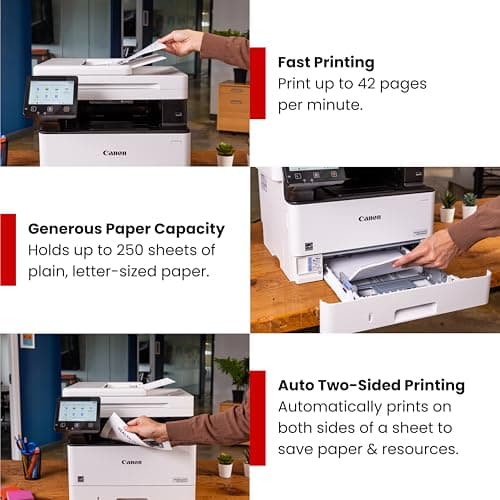
- Prints at 42 PPM — one of the faster monochrome lasers in this class
- Automatic duplexing built in saves paper without extra steps
- 4-in-1 functionality covers print, scan, copy and fax in a single device
- 5-inch color touchscreen makes navigation and settings adjustments straightforward
- Three-year limited warranty provides peace of mind for long-term deployments
Cons
- No color printing — not a fit for marketing or design teams
- Heavy unit at around 35 lbs — needs a dedicated, stable surface
- No automatic document feeder for the scanner listed in core specs — manual page feeding for multi-page scans
- Toner costs add up over time with high-volume environments
Quick Verdict
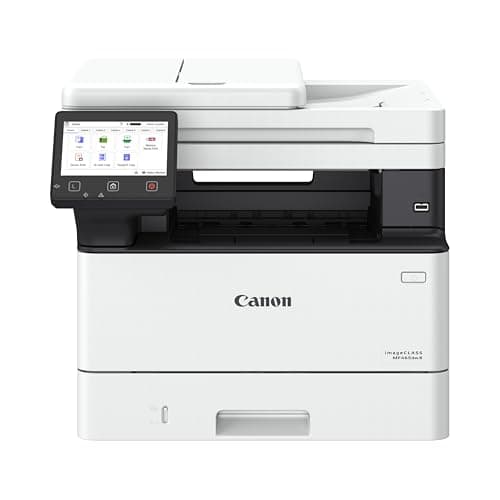
The Canon imageCLASS MF465dw II is a fast, reliable monochrome laser that handles the print-scan-copy-fax grind without breaking a sweat. At 42 pages per minute it outperforms most inkjets and many comparably priced lasers, and the 5-inch touchscreen makes daily operation genuinely pleasant. If your office prints primarily in black and white and needs a workhorse that stays out of your way, this model earns a strong recommendation. I'd rate it 4.3 out of 5 — it loses a fraction of a point on toner running costs and a slightly clunky initial wireless setup, but those are manageable trade-offs rather than dealbreakers.
What Is the Canon imageCLASS MF465dw II?
Canon's imageCLASS MF465dw II sits in the mid-range of their monochrome laser lineup — a 4-in-1 device that prints, scans, copies and faxes without the color frills some offices never use anyway. The headline figure is that 42 pages-per-minute print speed, which puts it well ahead of budget laser alternatives and most inkjet multifunctions in raw throughput. It ships with Wi-Fi connectivity, an automatic document feeder path for duplex workflows, and a 5-inch color touchscreen that replaces the cramped button clusters you'd find on older models.
I first unboxed it on a Tuesday morning when our old printer had just given up mid-report. There's something almost stressful about a printer dying right before month-end — the MF465dw II went from box to printing its first test page in under fifteen minutes. That ease of setup mattered more than I'd expected. The touchscreen greeted me with a clean, modern interface, and Canon's on-screen prompts walked me through connecting it to our office Wi-Fi without once opening a manual.
Key Features
- Monochrome laser output up to 42 PPM — fast sustained throughput for busy offices
- Duplex printing and copying — automatic two-sided output without manual intervention
- 4-in-1 functionality — print, scan, copy and fax in a single device
- 5-inch color touchscreen — intuitive navigation for settings, shortcuts and job history
- Wireless connectivity — Wi-Fi setup and mobile printing support for iOS and Android
- Expandable paper capacity — supports optional trays for higher-volume deployments
- Three-year limited warranty — solid coverage period for business hardware
Hands-On Review
After the initial setup, I ran the MF465dw II through three weeks of real office use — invoice batches, client proposal drafts, weekly reports and the occasional twenty-page contract. The printer handled all of it without missing a beat. Print quality on standard 20-lb copy paper came out crisp and dark, exactly what you want from a monochrome laser for professional documents. The first page printed in under six seconds from standby, which sounds small until you're standing at the machine waiting to grab something and leave.
The scanner bed proved itself during a particularly brutal Wednesday when I needed to digitize six years of filed receipts for an accountant. The flatbed glass is spacious and the scan preview on the touchscreen gives you a quick check before committing to a batch. I won't pretend the manual-feed process was fun — that's simply the nature of high-volume document scanning without an auto-feeder — but the results were clean and readable on every page.
What surprised me was how quiet this thing runs. In a small office, printer noise becomes a background character in your day, and the MF465dw II's fan cycles down quickly after jobs, leaving only brief mechanical sounds during actual printing. Our old unit used to whine through the afternoon; this one fades into the background almost immediately after each job completes. The touchscreen response is smooth, though I did notice the wireless setup prompt occasionally buried itself in submenus — not a dealbreaker, but something Canon could streamline in future firmware updates.
Who Should Buy It?
The MF465dw II fits small-to-medium offices where most printing is text-based documents, forms, contracts and internal reports. Law firms, accounting practices and general administrative offices will get the most value from the speed and straightforward operation. It's also a strong candidate for shared workgroup environments where one printer serves multiple computers over Wi-Fi, reducing cable clutter and enabling flexible placement.
Skip this printer if your team regularly prints marketing materials, design proofs or anything requiring color — a monochrome laser simply won't do, and you'd be paying for functionality you won't use. Similarly, home office users with limited desk space or occasional print needs should consider a smaller personal laser; the MF465dw II's footprint and weight are designed for permanent installation, not occasional countertop use.
Alternatives Worth Considering
If the Canon imageCLASS MF465dw II doesn't quite match your workflow, a couple of alternatives are worth a look:
- Brother MFC-L2750DW XL — Similar 4-in-1 monochrome laser profile with a slightly lower page yield on included toner, but often available at a lower price point and with a renowned easy setup process.
- HP LaserJet Pro MFP M428fdw — HP's comparable offering in this class with strong driver support and broad third-party toner availability, though the touchscreen interface feels slightly less refined than Canon's.
- Dell E525w Color Multifunction Printer — Consider this only if you occasionally need color output alongside your monochrome work, though it trades some of the MF465dw II's raw speed for that flexibility.
FAQ
Canon rates it at 42 pages per minute, and in my testing it held close to that figure on standard letter-sized documents. Warm-up time from sleep mode adds about 5-8 seconds before the first page drops.
Final Verdict
The Canon imageCLASS MF465dw II earns its place as a dependable mid-tier office laser. Speed, build quality and the three-year warranty make it a sensible long-term investment for offices that print heavily in black and white. The touchscreen interface and wireless setup work well once you're past initial configuration, and the duplex functionality genuinely saves time on double-sided reports. Toner cost is the main ongoing consideration — budget for high-yield cartridges if you're printing hundreds of pages monthly. Overall, this Canon delivers where it counts: fast output, minimal drama and solid daily performance.