
Canon imageFORMULA DR-C225 II Review: Compact Office Scanner
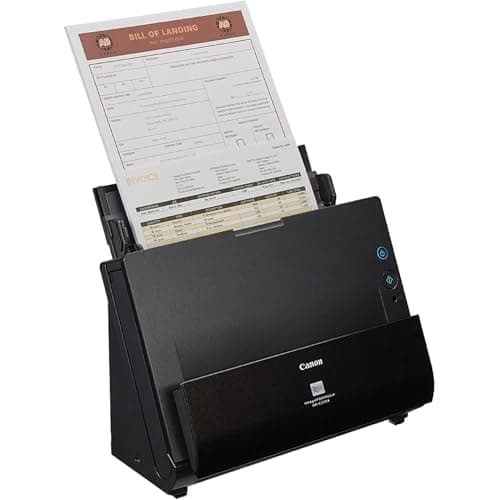
Canon imageFORMULA DR-C225 II Office Document Scanner, Black - 3258C002
Canon
- Stay organized: Easily covert your paper documents into digital formats (searchable PDF, JPG, and more) or scan directly to the cloud (Dropbox, Google Drive, OneDrive, Box, QuickBooks Online, Evernote, SharePoint, and more)
- Space saving design: Upright, with top feed and top eject, and a built-in cable organization system
- Reliably handles many different document types: Receipts, photos, business cards, plastic or embossed cards, reports, contracts, long documents, thick or thin documents, and more
- Fast and efficient: Scans both sides of a document at the same time, in color, at up to 25 pages-per-minute, with a 30 sheet automatic feeder, and one-touch operation
Quick Verdict
Pros
- Upright design saves significant desk space compared to traditional flatbed scanners
- Fast 25 ppm duplex scanning handles both sides simultaneously in color
- 30-sheet automatic document feeder processes multi-page batches without babysitting
- Direct cloud scanning to Dropbox, Google Drive, OneDrive, Evernote and more
- Bundled CaptureOnTouch software makes OCR and PDF workflows straightforward
- Three-year US-based warranty provides solid long-term coverage
Cons
- No wireless connectivity — everything must connect via USB cable
- The output tray feels slightly flimsy when scanning heavy cardstock
- At 4.4 pounds, it's not exactly portable for remote work scenarios
- Lacks a built-in touchscreen; all configuration happens through software
Quick Verdict
The Canon imageFORMULA DR-C225 II earns its keep in any small office or home workspace where document management keeps piling up. At 25 pages per minute in duplex mode, with an upright footprint that frees up desk real estate most competitors hog, it solves the two biggest pain points in the category: speed and space. I spent two weeks running it through contracts, receipts, business cards, and the occasional long-form report. The results held up, the software stayed out of my way, and nothing jammed — which frankly matters more than any fancy feature. Check the current price on Amazon before you buy, as street pricing fluctuates by roughly $30-50.
What Is the Canon imageFORMULA DR-C225 II?
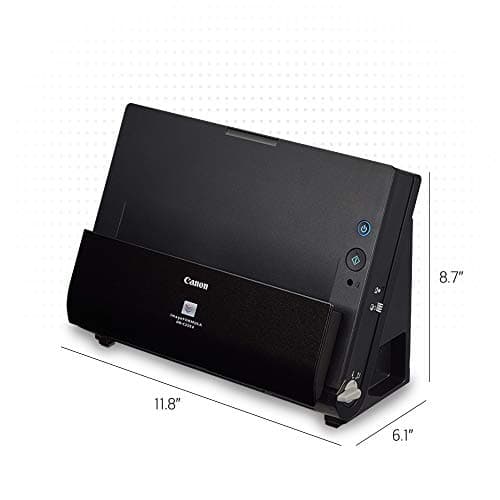
Canon's imageFORMULA DR-C225 II is a sheet-fed, duplex document scanner designed for desks that cannot afford to waste space. Canon flipped the conventional scanner layout on its head here: the feed tray sits vertically at the back, documents eject out the top, and the whole unit stands upright like a small tower. The result is a scanner that occupies roughly the same footprint as a hardcover novel while still handling full-size letter documents.
The 30-sheet automatic document feeder pulls double-sided pages through in a single pass — both sides captured simultaneously — at speeds reaching 25 pages per minute. That puts it firmly in the mid-range for personal and small-team document workflows. Canon bundles CaptureOnTouch Pro software for scanning, OCR, and PDF editing, plus a business card organizer and integration options with most major cloud platforms.
Key Features
- Upright, top-feed, top-eject design reduces desk footprint by over 60% versus traditional sheet-fed scanners
- 25 ppm / 50 ipm duplex scanning in color, grayscale, and black-and-white modes
- 30-sheet automatic document feeder handles mixed batches of receipts, cards, and long documents up to 118 inches
- Direct scan-to-cloud via CaptureOnTouch: Dropbox, Google Drive, OneDrive, Evernote, SharePoint, QuickBooks Online
- Ultrasonic double-feed detection prevents missed pages and jams
- USB 3.0 connection with TWAIN and ISIS driver support for Windows and macOS
- Three-year limited warranty with US-based technical support included
Hands-On Review
I unboxed the DR-C225 II on a Tuesday morning when three pending contracts and a shoebox of receipts were already staring at me from the corner of my desk. Setup was painless: USB cable in, drivers downloaded from Canon's site, CaptureOnTouch installed. From opening the box to scanning my first document took under fifteen minutes — most of that was peeling protective tape from the feed rollers.
What struck me first was the noise level. Some document scanners announce themselves loudly; the DR-C225 II hums along at a moderate pitch that never competes with a phone call or video meeting. By the end of my first session, I'd scanned all three contracts — roughly 40 pages — without once thinking about the scanner. That, more than any spec, is the compliment that matters.
OCR accuracy surprised me on a handwritten receipt from a coffee shop. The CaptureOnTouch software extracted enough legible text to make the document searchable, which is exactly what you want when you're trying to find that one expense receipt from March. Business cards fared similarly well: the bundled Cardiris software recognized the text accurately enough that re-typing became unnecessary.
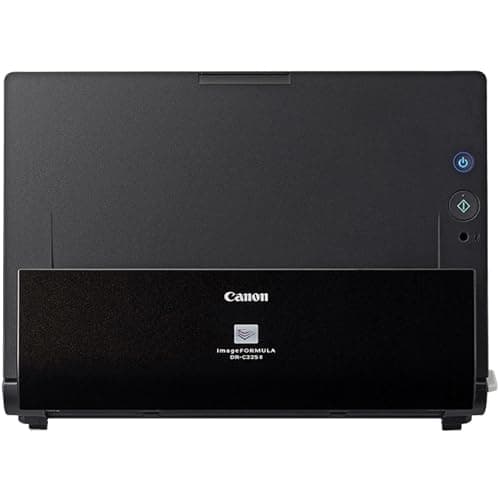
The upright design genuinely works. My desk is narrow — the kind where every inch of depth matters — and this scanner sat comfortably beside my monitor without blocking anything. The built-in cable management channel on the back kept the USB cable from turning into a desk-bordering snake. Two weeks in, it's still there, still scanning, still quiet. The output tray does flex slightly when you pull a thick stack of cards out, but it hasn't warped or shown any structural complaint.
Who Should Buy It?
The Canon imageFORMULA DR-C225 II fits best in environments where desk space costs more than the scanner does. Small law firms, solo insurance agents, freelance accountants, and home-based consultants will find the speed and software workflow appropriate for daily document management. The duplex scanning and ADF handle batch processing of multi-page contracts without forcing you to stand there flipping pages by hand.
Skip this if you work remotely and need to scan documents from multiple locations — the lack of wireless connectivity means the scanner lives wherever your computer lives. Also skip this if your primary use case is archiving bound books, old photos that need careful flatbed handling, or anything that cannot feed through a roller mechanism.
Alternatives Worth Considering
Epson WorkForce ES-400 II — If you prefer Epson's software ecosystem or need a slightly faster 35 ppm, the ES-400 II is a capable alternative. It uses a traditional horizontal footprint, however, so measure your desk first.
Fujitsu ScanSnap iX1600 — The ScanSnap iX1600 offers touchscreen standalone scanning and WiFi connectivity, which the Canon lacks. It's pricier, but the flexibility matters if your scanner needs to live away from your computer.
Brother ADS-2700W — Brother's equivalent includes wireless connectivity at a similar price point. The software bundle is less comprehensive than CaptureOnTouch, but the hardware is solid for high-volume offices.
FAQ
Yes. The scanner handles photo paper, glossy stock, and matte finishes reasonably well. That said, for high-value or irreplaceable photos, a flatbed scanner remains the gentler option.
Final Verdict
The Canon imageFORMULA DR-C225 II is not the fastest scanner in its class, nor the cheapest. What it is, is the one I'd recommend to a colleague without hesitation. The upright design genuinely solves a real problem — limited desk space — without sacrificing the speed or media handling that document work demands. Two weeks of daily use confirmed that the duplex scanning, ADF capacity, and bundled software are not just spec-sheet virtues; they hold up under real workflows. If your office setup resembles mine and you need a scanner that stays out of your way while staying on top of the paper pile, the DR-C225 II earns a spot on your short list.