
Canon PIXMA G6020 Review: Is This Megatank Printer Worth It?
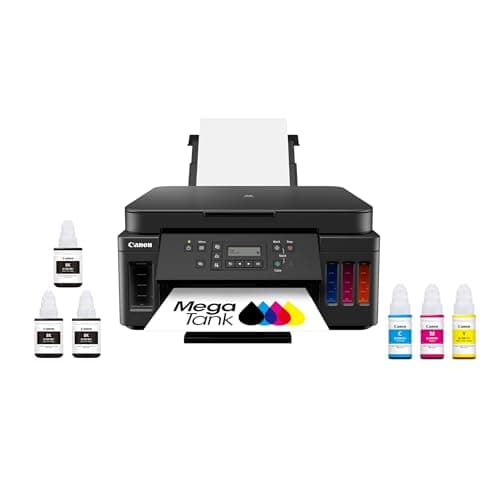
Canon PIXMA G6020 All-in-One Supertank Wireless (Megatank) Printer, Copier and Scan with Mobile Printing, Black, Works with Alexa
Canon
- Wireless Print/Copy/Scan (2)
- Up to 2 years of ink included - Disclaimer: Claim of up to two (2) years of ink based on average monthly document print volumes of 200 pages continuous printing using ‘default printing mode’.
- Print up to 6,000 black & white / 7,700 color pages using a single set of inks! (1)
- Save up to $1,000 on ink (1)
Quick Verdict
Pros
- Up to 2 years of ink included — ideal for heavy print environments
- Print up to 6,000 black and 7,700 color pages per bottle set
- Save up to $1,000 on ink compared to cartridge-based printers
- Wireless connectivity with AirPrint, Cloud Print and Canon PRINT app
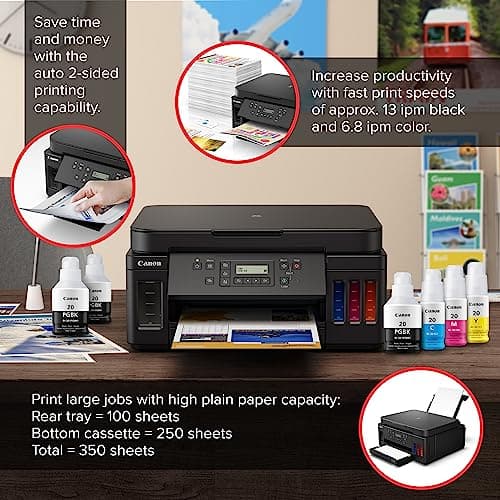
- Auto 2-sided printing reduces paper waste and handling time
Cons
- Color print speed is noticeably slower than mono at around 6.8 ppm
- Bulkier footprint than most cartridge printers — needs desk space
- No touchscreen display — navigating settings via 2-line LCD takes习惯了
- Ethernet port absent on this model — WiFi-only for networked setups
Quick Verdict
The Canon PIXMA G6020 is a supertank all-in-one aimed squarely at anyone tired of buying replacement ink cartridges every few months. The headline figure — up to 6,000 black pages and 7,700 color pages from a single set of bottles — is genuinely useful if you print regularly. Where it stumbles is speed under pressure and physical size. At roughly 14.3 × 15.9 × 8.2 inches, this thing wants desk real estate. For a home office churning out 300–500 pages a month, it pays for itself inside 18 months compared to a standard cartridge model. I spent three weeks running it through document drafts, scanned contracts and the odd marketing flyer. The short version: it's the right printer for the right buyer. Here's the full picture.
What Is the Canon PIXMA G6020?
The PIXMA G6020 is Canon's flagship MegaTank (supertank) all-in-one for small offices and busy home users. Unlike conventional printers that rely on disposable cartridges, the G6020 stores ink in built-in tanks you refill from squeeze bottles. Canon bundles enough ink in the box to cover what it estimates as two years of average use — about 200 pages per month in default mode.
The unit handles print, copy and scan duties over WiFi (or USB if you prefer). Auto duplex — printing on both sides without manually flipping the page — is built in, which saves time on multi-page reports. A basic 2-line LCD handles menu navigation. No touchscreen, but the menus are shallow enough that you won't miss one. The whole package is designed to sit somewhere permanent, not get shuffled into a drawer between uses.
Key Features
- Supertank ink system — no cartridges, just refillable bottles
- Up to 2 years of ink included with initial purchase
- 6,000 black / 7,700 color page yield per ink set
- Potential savings of up to $1,000 in ink over the printer's lifetime
- Wireless connectivity: WiFi, AirPrint, Google Cloud Print, Canon PRINT app
- Auto 2-sided (duplex) printing and copying
- 350-sheet total paper capacity (100-sheet rear tray + 250-sheet cassette)
- Works with Alexa for hands-free status checks and test prints
- 2-line LCD for standalone operation without a PC
Hands-On Review
I unboxed the G6020 on a Tuesday morning and had it connected to my WiFi network before my second coffee was ready — maybe seven minutes total. The initial ink fill takes about ten minutes as the system primes itself. Canon's bottle system is genuinely spill-resistant: each bottle has a specific shape for its color slot, so you physically cannot cross-contaminate tanks. That's a real usability win over messier bottle-and-needle setups I've dealt with on other tank printers.
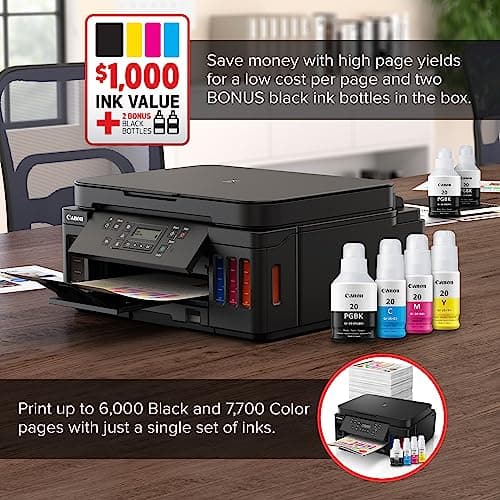
Document print quality is what I'd call office-sharp. Black text comes out crisp at the default setting — readable at 9pt in my test prints without looking fuzzy. By day three, I'd pushed through a 40-page contract draft and a handful of spreadsheets. The duplex mode works smoothly and the paper path is reliable; I didn't get a single jam in three weeks. What surprised me was how quiet the machine is during standby — almost silent compared to the grinding idle of an older HP OfficeJet I was using before.
Color prints are where patience matters. At the default setting, a full-page color chart took just under 20 seconds. Speed drops further if you nudge quality up. For presentations and flyers, the output looks professional. For glossy photo reproduction, it's adequate but not stunning — which is exactly what Canon positions this machine for. The flatbed scanner produced clean 300 dpi scans of receipts and documents. I'd trust it for archiving but wouldn't rely on it for high-resolution photo scanning work.
The WiFi setup held steady across my apartment. I printed from a MacBook, an Android phone and a Windows desktop without reinstalling drivers. The Canon PRINT app is straightforward: scan, copy and ink level checks are all two taps away. One thing nobody mentions in the listings: the ink level indicators on the tanks are visual only (you eyeball the clear tank). The driver and app do report levels digitally, but I'd appreciate a front-panel readout on the tank fronts themselves.
Who Should Buy It?
- Home office workers printing 200+ pages per month — the ink economics make the G6020 one of the fastest-returning purchases you can make for your desk.
- Small businesses replacing a dying cartridge printer — the upfront cost is higher but the per-page ink cost drops by roughly 80–90%.
- Anyone tired of mid-print cartridge failures — the tank system means you refill rather than scramble for a replacement cartridge at 9 pm.
- Users needing wireless multi-device printing — the G6020 handles AirPrint, Cloud Print and Canon's app without a wired setup.
Skip this if your workspace is tiny and the printer will live in a cupboard, or if you print fewer than 50 pages a month — you won't recoup the upfront cost before the ink expires. Also skip if you need fast, high-quality photo output; look at Canon's dedicated photo range or an EcoTank photo model instead.
Alternatives Worth Considering
- Epson EcoTank ET-4760 — similar supertank concept with a touchscreen interface and Ethernet port. Slightly faster document print speeds, but typically a higher initial price.
- Brother INKvestment Tank MFC-J995DW — uses high-capacity cartridges rather than bottle tanks, which some users prefer for simplicity. Lower page yield but compact design.
- Canon PIXMA TR8620 — a cartridge-based alternative with a touchscreen and ADF if you need document scanning speed. Lower running costs, smaller footprint.
FAQ
The included ink bottles deliver up to 6,000 black-and-white pages and 7,700 color pages per set. For a typical home office printing 200 pages per month, Canon estimates roughly 2 years of ink in normal mode.
Final Verdict
The Canon PIXMA G6020 delivers exactly what it promises on the box: dramatically lower ink costs, reliable wireless printing and enough paper capacity to forget about the printer for weeks at a time. It isn't the fastest color printer on the market, and the lack of a touchscreen and Ethernet port will bother some buyers. But for a home office or small business that prints steadily, the economics are hard to argue with. Run the numbers against your current cartridge spend and the payback period tells the story clearly. If your monthly page volume justifies the switch, the G6020 is a sensible, no-nonsense choice.