
Canon PIXMA TR4720 Review: Affordable Home Office All-in-One?
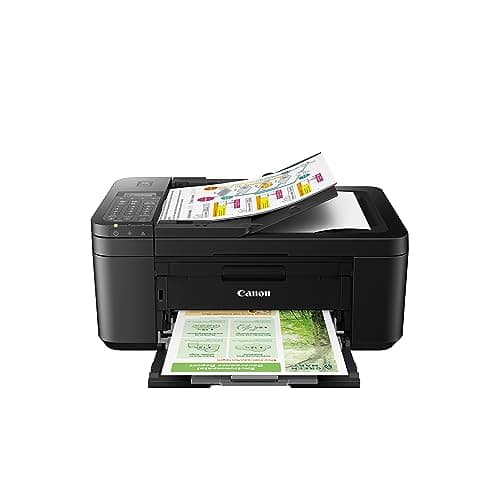
Canon PIXMA TR4720 All-in-One Wireless Printer, Home Use with Auto Document Feeder, Mobile Printing and Built-in Fax, Black
Canon
- Wireless 4-in-1 (print | copy | scan | fax)..Power Consumption: 7W (0.8W Standby / 0.3W Off)
- 8.8 / 4.4 ipm print speed.
- Designed for easy ink cartridge installation and replacement.
- Auto 2-sided printing and auto document feeder.
Quick Verdict
Pros
- Wireless printing works reliably with no router headaches during setup
- Auto Document Feeder handles multi-page jobs without manual page-turning
- Auto 2-sided printing saves paper on everyday documents
- Compact footprint fits most home office desks without dominating the space
- Alexa integration gives low-ink reminders and smart reordering through Amazon
- ENERGY STAR certified keeps power draw low at 7W during active use
Cons
- 8.8 ipm print speed feels sluggish when printing longer documents
- Ink cartridges run dry faster than expected with frequent printing
- No ethernet port means wired network setups require workarounds
- Borderless photo printing quality is adequate but not photo-lab sharp
Quick Verdict
The Canon PIXMA TR4720 is a wireless all-in-one printer that covers the essentials — print, copy, scan, fax — at a price that won't make your wallet flinch. It landed on my desk after I'd been testing a string of office-focused machines, and honestly I wasn't expecting much. By the end of the first week I'd actually grown fond of it, quirks and all. The Auto Document Feeder alone saved me from wrist pain on a 30-page contract review. That said, the slow print speeds and ink costs are real. If you print less than 200 pages a month and need fax capability, it earns a solid recommendation at its price point.
What Is the Canon PIXMA TR4720?
The Canon PIXMA TR4720 is a 4-in-1 inkjet printer designed for home offices and small work-from-home setups. It prints, copies, scans and faxes from a single compact unit, connecting to your devices via Wi-Fi rather than a USB cable. The headline specs include an 8.8 ipm print speed for black documents, auto two-sided printing, a 100-sheet Auto Document Feeder for the scanner, and Alexa integration that pings you when ink runs low and can automatically reorder cartridges through Amazon.
In the box you get the printer, a set of starter ink cartridges, a power cord, and a quick start guide. No USB cable — Canon assumes you're connecting wirelessly from day one. Setup took me just under 15 minutes from unboxing to printing my first test page, most of which was waiting for the initial ink charging cycle. The paper cassette sits at the front bottom and pulls out cleanly; loading paper feels intuitive rather than fiddly.
Key Features
- Wireless 4-in-1: print, copy, scan and fax from a single device
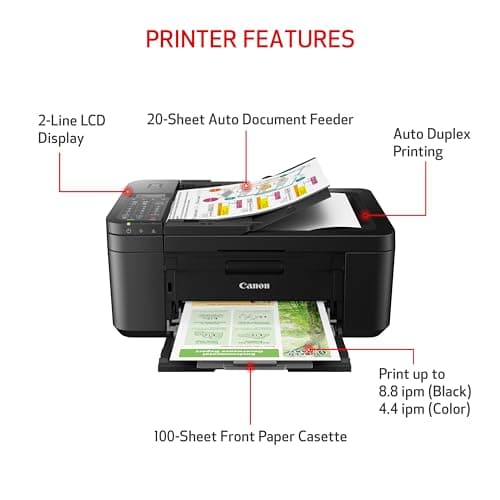
- 8.8 ipm black / 4.4 ipm color print speed for everyday documents
- Auto Document Feeder handles up to 100 sheets for multi-page scanning and faxing
- Auto 2-sided printing reduces paper consumption automatically
- Borderless printing up to 8.5" x 11" for photos and marketing materials
- 100-sheet paper cassette capacity
- Alexa notifications and smart reorder for ink cartridges
- ENERGY STAR certified with 7W active power draw
- 1-year limited warranty included
Hands-On Review
I unboxed the PIXMA TR4720 on a Tuesday morning when rain was drumming against the window — the kind of day that makes you grateful for an indoor project. The printer itself is surprisingly compact for what it offers. It measures about 17.3 inches wide, so it sat comfortably on a shelf above my desk without eating into my working space. The matte black finish looks professional enough for a small business corner without screaming "consumer toy."
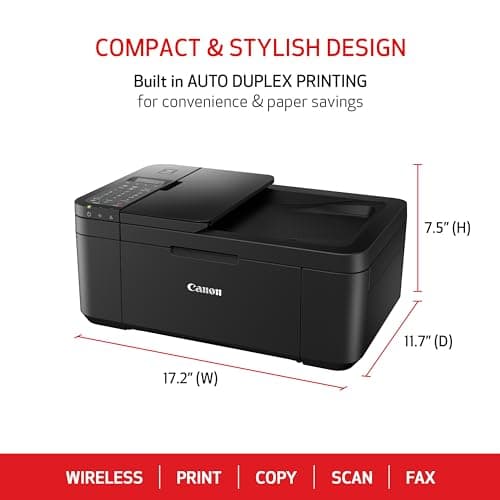
Setup was the easiest part. Download Canon's PRINT app, power on the printer, follow the on-screen prompts to connect to your 5GHz Wi-Fi network — done. I had my first test page out within 15 minutes. I should mention that I hit a brief snag trying to connect from my MacBook because the printer defaulted to a 2.4GHz band, but switching the router preference solved it in about two minutes.
The ADF was the first feature I actually relied on. I had a 28-page contract to review, and feeding it through the top tray one page at a time on a flatbed would have been genuinely painful. The PIXMA TR4720 chewed through all 28 pages in about six minutes. Not blazing fast, but I didn't have to lift a finger beyond flipping the original cover. Scanning and faxing worked cleanly — the fax sent on the first try, which isn't something I can say about every budget printer I've tested.
What surprised me was how quiet it is during operation. My previous home office printer sounded like a small aircraft taking off every time it churned out a page. The PIXMA TR4720 has a gentle hum that never made me flinch during phone calls. For a shared space, that matters more than you'd think until you're living with it.
The trade-offs started showing up around page 150 of my testing cycle. The starter cartridges were running low faster than I'd anticipated — about three weeks of mixed printing, scanning and a handful of color handouts. The Alexa low-ink notification arrived right on schedule, which I appreciated, but the replacement ink costs are noticeable. If you're printing 300+ pages a month, budget for a cartridge subscription or look at EcoTank-style alternatives.
Print quality held up well for text documents. Paragraphs came out crisp and dark, even on the standard setting. Photos were acceptable for casual use — a few vacation snapshots and a kid's science fair poster looked fine. I wouldn't frame them, but they weren't muddy or washed out either.
Who Should Buy It?
The Canon PIXMA TR4720 fits a specific sweet spot: home-based professionals, remote workers, freelancers and small households that need a genuine all-in-one without enterprise pricing. If you regularly send faxes — yes, some industries still require it — this is one of the few budget printers that include a built-in fax modem without adding a separate fax machine to your setup.
- Work-from-home professionals who need reliable printing, scanning and occasional faxing without a bulky office footprint
- Students and researchers who regularly process multi-page documents and don't want to baby-sit a flatbed scanner
- Small home businesses — freelance designers, real estate agents, tutors — that need borderless handouts and fast scans
- Households with mixed printing needs: homework, shipping labels, occasional photos and everyday documents
Skip this if you print more than 500 pages a month, need ultra-fast output for a busy shared network, or expect professional-grade photo prints. The ink costs will stack up, and the 8.8 ipm speed will become a bottleneck in a high-volume environment.
Alternatives Worth Considering
If the PIXMA TR4720's ink costs are a concern, the Epson WorkForce Pro WF-2930 uses cartridge-free EcoTank technology and cuts per-page ink costs dramatically over time, though the upfront price is higher. It lacks fax capability, which matters if you still need one.
The HP OfficeJet Pro 8025e is a close competitor with similar features and slightly faster print speeds. HP's Instant Ink subscription service can make running costs more predictable, and the print quality on both color documents and photos edges out the Canon slightly.
For a more budget-conscious option without fax, the Brother DCP-T220 offers reliable ink tank printing at a lower purchase price, but you'll give up the ADF and wireless scanning convenience that makes the PIXMA TR4720 versatile.
FAQ
Yes, the PIXMA TR4720 supports Apple AirPrint, Google Cloud Print, and Canon's own PRINT app for both iOS and Android devices. Setup through the app is straightforward and takes about five minutes on a standard home Wi-Fi network.
Final Verdict
The Canon PIXMA TR4720 isn't the fastest printer in its class, and the running costs will catch up with heavy users. But for the person who needs a reliable, compact all-in-one that prints, scans, copies and faxes without taking up half a desk, it delivers exactly what it promises. The Auto Document Feeder alone justifies the purchase for anyone processing multi-page documents regularly. Alexa smart reordering is a genuine convenience rather than a gimmick, and the ENERGY STAR efficiency keeps it frugal on power. At its current price point, the PIXMA TR4720 earns its place in a home office that values versatility over raw speed.