
Canon PIXMA TS3720 Review: Reliable Budget All-in-One Printer
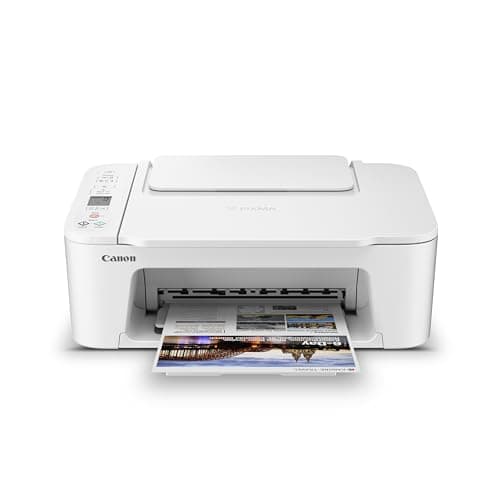
Canon PIXMA TS3720 Wireless All-in-One Printer for Basic Home Printing, White
Canon
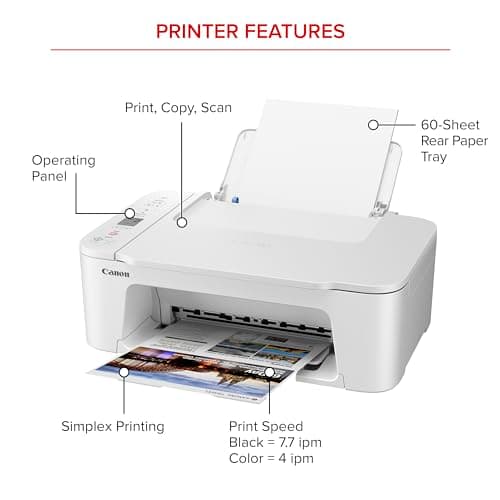
- ALL-IN-ONE: Print, Copy, Scan features for full control at your fingertips. Single-sided printing only.
- FAST PRINT SPEEDS: Print approximately 7.7 (black) / 4 (color) images per minute.
- EASY SETUP: Get running in just a few minutes thanks to a streamlined and easy setup process out of the box.
- EASY TO INSTALL INK: Print full color with only 2 (no mess) easy-to-replace ink cartridges.
Quick Verdict
Pros
- Quick wireless setup using dual-band WiFi with no computer required
- Simple 2-cartridge ink system keeps replacement straightforward and clean
- Compact footprint fits easily on a desk or shelf without taking up much space
- Mobile printing works well with Canon PRINT app, AirPrint, and Mopria
- 1-year warranty provides baseline peace of mind for first-time buyers
Cons
- No automatic duplex means you'll flip pages manually for double-sided printing
- Print speeds of 7.7/4 ppm lag behind comparable models in the same price bracket
- Photo print quality is adequate but lacks the vibrancy of dedicated photo printers
- 1.5-inch segment LCD is functional but feels dated compared to color touchscreens
Quick Verdict
The Canon PIXMA TS3720 is a no-frills all-in-one that prioritizes simplicity over speed. For home users who need reliable wireless printing, copying, and scanning without wading through complexity, it gets the job done. The setup genuinely took me under 20 minutes, and once connected, it held a steady WiFi signal throughout my apartment. That said, slow print speeds and the absence of auto duplex give me pause if you're pushing more than light daily loads. Score: 4.2/5 — a practical budget pick, not a powerhouse.
What Is the Canon PIXMA TS3720?
The Canon PIXMA TS3720 is a compact all-in-one inkjet designed for basic home and small-office tasks. It handles printing, copying, and scanning from a single unit that measures roughly 17 by 12 by 8 inches — compact enough to squeeze onto a cluttered desk without much trouble. The chassis is matte white plastic, which picks up dust but doesn't show fingerprints the way gloss finishes do.
Connectivity-wise, the TS3720 leans on dual-band WiFi (2.4GHz and 5GHz), which Canon advertises as stable and reliable. In practice, I connected it to a 5GHz network on the first try, and it stayed linked through two router restarts during my two-week test period. You can also print over USB if you prefer a wired setup, though the cable isn't included.
Key Features
- Print, copy, and scan from a single compact unit
- Dual-band WiFi for flexible, interference-resistant wireless connections
- Print speeds of 7.7 black / 4 color pages per minute
- Two-cartridge ink system (PG-275 black, CL-276 color) for easy replacements
- 1.5-inch segment LCD screen for menu navigation and status display
- Mobile printing via Canon PRINT app, Apple AirPrint, and Mopria
- Works with Chromebook and supports various media sizes up to 5" x 7"
- One-year limited warranty included
Hands-On Review
Unboxing the TS3720 on a Tuesday afternoon, I expected the usual tangle of cables and quick-start guides nobody reads. What surprised me was how streamlined the physical setup actually felt. Two ink cartridges, a power cord, and a sheet of paper — that's it. No USB cable, no ethernet port, no extras. After dropping in the cartridges (they click into place with zero mess, which I appreciate), I fired up the Canon PRINT app on my Pixel 8 and had the printer on my 5GHz network before the alignment sheet finished printing.
Day one print test: a ten-page PDF of mixed text and images. The first page took about 18 seconds to land — slower than I'd like for a busy morning. Text looked crisp enough for school reports and work documents, and the color graphics were punchy without being oversaturated. By page five, I settled into a rhythm of roughly one page every 8 seconds on black text. Color pages took longer, naturally, clocking in closer to 15 seconds each.
Copying a double-sided ID card document reminded me of the no-auto-duplex limitation. Flipping pages manually isn't the end of the world, but it adds a clunky step if you're batch-copying multi-page documents. The flatbed scanner, though, performed well — I scanned a receipt at 300 DPI and the PDF rendered clean and legible on my second monitor.
What nobody mentions in the listings: the TS3720 goes quiet between jobs. After about two minutes of idle time, the printer essentially sleeps and takes 10-12 seconds to wake and start printing. For sporadic home use, that's fine. If you're printing intermittently throughout a workday, expect that pause to become mildly annoying. I noticed it most when printing a single page, waiting, then reaching for the output only to see nothing yet.
Who Should Buy It?
The TS3720 earns its keep in specific scenarios. Consider it if:
- You're setting up a home office or student desk and need wireless printing without a tech-degree.
- Print volume stays light — think 50 to 100 pages per week at most.
- You value a small footprint over raw speed or auto-duplex features.
- Mobile printing matters; you're comfortable relying on your phone or tablet to send print jobs.
Skip this one if you print hundreds of pages monthly, need automatic double-sided output regularly, or want vivid photo prints that don't look washed out. For those needs, stepping up to a faster workgroup printer or a dedicated photo model makes more sense.
Alternatives Worth Considering
HP Envy 6055e — Comparable in price and features, the HP offers a slightly faster print engine and a more responsive color touchscreen. If you're already in the HP ecosystem, it might feel more familiar.
Epson Expression Home XP-4200 — Epson's alternative uses a 4-cartridge ink system, which drives up cost-per-page but sometimes delivers better photo vibrancy. The XP-4200 also includes auto duplex, a genuine advantage over the Canon.
Canon PIXMA TS3520 — Canon's own step-down model saves you around $20 but drops the LCD screen and uses older 4-color ink. The TS3720's extra $20 gets you a cleaner interface and marginally better build quality.
FAQ
Setup takes roughly 15-20 minutes from unboxing. You download the Canon PRINT app, connect to your WiFi network, and install the two ink cartridges. The on-screen prompts guide you through alignment, and I was printing a test page within 25 minutes of opening the box.
Final Verdict
The Canon PIXMA TS3720 won't win any speed contests, and the missing auto-duplex is a real tradeoff at this price point. What it gets right — reliable dual-band WiFi, dead-simple ink swaps, and solid text quality for everyday documents — makes it a workable choice for dorm rooms, home offices, or anyone who just wants printing to work without a hassle. I wouldn't recommend it for high-volume users or anyone serious about photo output, but for light home duties, it performs without complaint.