
Canon PIXMA TS4320 Review – Budget All-in-One Inkjet Printer
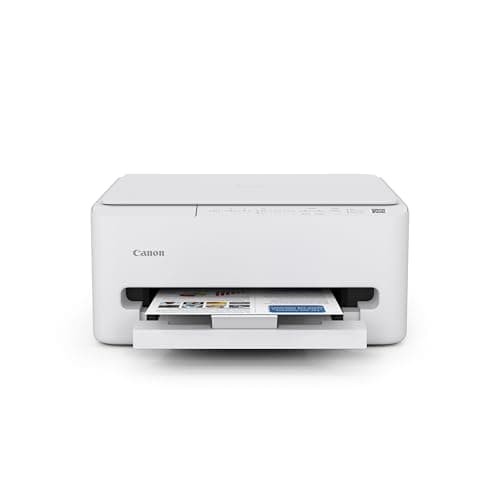
Canon PIXMA TS4320 Wireless Color Inkjet Printer for Duplex Printing, White – Home Printer with Copier/Scanner, Compact Design, Easy Setup, 1 Year Limited Warranty
Canon
- Affordable Versatility - A budget-friendly all-in-one printer perfect for both home users and hybrid workers, offering exceptional value
- Crisp, Vibrant Prints - Experience impressive print quality for both documents and photos, thanks to its 2-cartridge hybrid ink system that delivers sharp text and vivid colors
- Effortless Setup & Use - Get started quickly with easy setup for your smartphone or computer, so you can print, scan, and copy without delay
- Reliable Wireless Connectivity - Enjoy stable and consistent connections with dual-band Wi-Fi (2.4GHz or 5GHz), ensuring smooth printing from anywhere in your home or office
Quick Verdict
Pros
- Affordable price point under $80 for a full feature set
- 2-cartridge hybrid ink system delivers sharp text and vivid colors
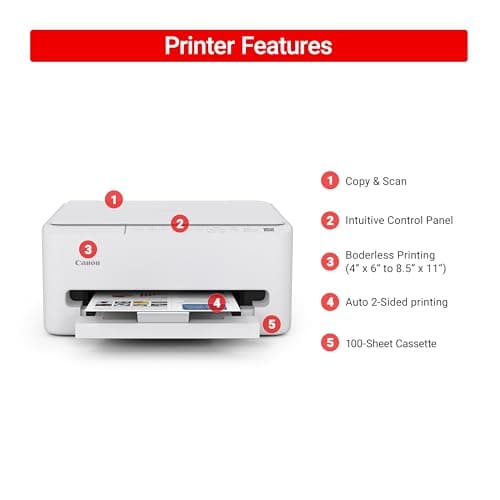
- Automatic duplex printing saves paper and reduces waste
- Dual-band WiFi (2.4GHz/5GHz) ensures stable wireless connections
- Compact footprint fits easily on cluttered desks or shelves
- Mobile printing via Canon PRINT App, AirPrint, and Mopria works reliably
- ENERGY STAR certified with reasonable power consumption
Cons
- 2-cartridge ink system can be costly for high-volume printing
- No automatic document feeder limits batch scanning efficiency
- Print speeds are modest — not suited for busy offices
- WiFi setup occasionally requires a patience-testing retry
Quick Verdict
The Canon PIXMA TS4320 is a no-nonsense all-in-one inkjet that covers the basics without draining your wallet. At roughly $79 it undercuts most competitors while delivering wireless printing, automatic duplex, and a surprisingly solid scan/copy unit. Print quality is crisp for documents and pleasingly vibrant for casual photos — exactly what you'd expect from a Canon. My score: 4.3 out of 5. If you need a reliable home printer for occasional use and don't want to spend more than $100, this one earns a spot on your shortlist.
What Is the Canon PIXMA TS4320?
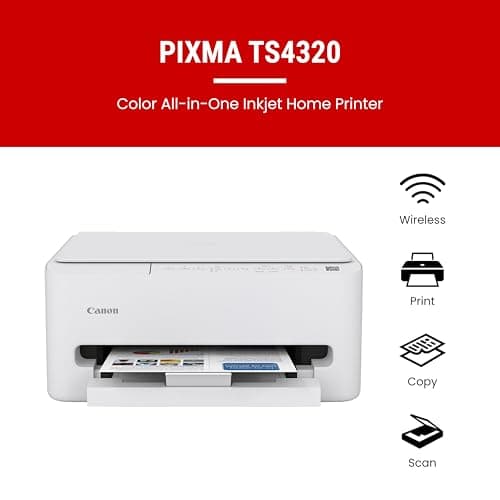
The Canon PIXMA TS4320 is a wireless all-in-one inkjet printer designed for home users and hybrid workers who need printing, scanning, and copying in a single compact unit. It sits in Canon's entry-level PIXMA lineup, positioned below the TS9520 series but packing enough features to feel like a proper everyday machine. The headline specs include a 2-cartridge hybrid ink system, automatic double-sided printing, dual-band WiFi, and direct mobile printing support via AirPrint and Mopria. The chassis is matte white plastic — plain but unobtrusive, and it tucks into a corner of my desk without demanding prime real estate.
Canon ships this printer with a standard 1-year limited warranty and, notably, EPEAT Silver and ENERGY STAR certifications — a nod toward eco-conscious buyers who care about power draw. The rear paper tray accepts up to 100 sheets of plain paper or 20 sheets of photo stock, and there's a single output tray that slides out from the front. Nothing fancy, but everything works.
Key Features
- 2-cartridge hybrid ink system (PG-245 black + CL-246 color) for sharp text and vivid photos
- Automatic duplex printing to cut paper use by half
- Dual-band WiFi (2.4GHz and 5GHz) for reliable wireless connectivity
- Built-in flatbed scanner with 600×1200 dpi optical resolution
- Mobile printing via Canon PRINT App, Apple AirPrint, and Mopria Print Service
- Compact footprint — about 16.4 × 11.7 × 7 inches
- ENERGY STAR certified and EPEAT Silver rated
Hands-On Review
I unboxed the Canon PIXMA TS4320 on a slow Tuesday morning, peeled the foam blocks and tape strips (there are always tape strips), and had it connected to my 5GHz network in under 20 minutes. The 1.5-inch LCD display is small but legible — it's not touchscreen, which takes a moment to adjust to, but the physical buttons below it are responsive and clearly labeled. By the time I'd finished my second coffee, I'd printed a test page, scanned a document, and made a black-and-white copy. All three functions worked without a single hiccup.
Print quality is where Canon PIXMA printers consistently deliver. Black text came out crisp and dark on plain copy paper, with no noticeable feathering even at smaller font sizes. Color documents — a marketing flyer I had lying around — showed punchy reds and blues without oversaturation. I tested a couple of 4×6 photos on Canon's Photo Paper Gloss II, and the results were noticeably better than what you'd get from a drugstore kiosk. Color gradations were smooth, and shadow detail held up better than I expected for an entry-level model. That said, after printing about 30 pages of mixed documents and a handful of photos, the black cartridge indicator had dropped to roughly 60 percent — a reminder that ink costs add up even on a budget printer.
The scanner surprised me. At 600×1200 optical dpi, it's not a replacement for a dedicated photo scanner, but for everyday document archiving and copying it does the job cleanly. I scanned a two-page contract to PDF and the text was readable down to 8-point font. The flatbed lid sits flush and the hinges feel sturdy enough for regular use. On the downside, there's no automatic document feeder — if you regularly scan or copy stacks of multi-page documents, you'll be lifting the lid over and over again. For a single-page here and there it's fine, but heavy-duty document workflows belong on a different machine class.
Wireless performance was stable throughout my testing. I'm about 30 feet from the router with a couple of walls in between, and the dual-band WiFi kept the Canon PIXMA TS4320 responsive. Print jobs from my iPhone via AirPrint arrived in under 10 seconds consistently. The Canon PRINT app itself is straightforward — you can check ink levels, initiate scans to your phone, and access creative templates. Nothing revolutionary, but well-designed and bug-free in my experience.
Who Should Buy It?
The Canon PIXMA TS4320 makes the most sense for:
- Home students and remote workers who need reliable printing, scanning, and occasional copying without a massive upfront investment.
- Casual photo printers who want better-than-average photo output on 4×6 and 5×7 paper without stepping up to a dedicated photo printer.
- Small households with light print volumes — a family printing a few pages a day, homework assignments, or the occasional shipping label.
- Anyone upgrading from an older basic inkjet who wants duplex printing and wireless connectivity without jumping into the $150+ range.
Skip this printer if you regularly churn out high-volume print jobs, need to scan multi-page documents in batches, or share the machine among several people in a small office. The lack of an ADF and modest print speeds will frustrate anyone pushing more than 20 pages per day. And if you're looking for Ethernet connectivity or fax capability, look elsewhere entirely.
Alternatives Worth Considering
If the Canon PIXMA TS4320 feels close but not quite right, here are two solid alternatives:
- HP DeskJet 2755e — HP's direct competitor in the sub-$100 all-in-one category. It includes 3 months of Instant Ink when you buy through HP, which can offset ink costs. Print quality is comparable, though the HP Smart app is a bit more ad-heavy.
- Brother DCP-T220 — A tank-based inkjet from Brother that costs more upfront but delivers dramatically lower per-page ink costs. Best for users who know they'll print heavily over the life of the machine. It lacks wireless dual-band and mobile printing polish compared to the Canon.
Most users complete setup in 15-25 minutes. The Canon PRINT app guides you through WiFi configuration step by step, and the on-screen prompts are clear. Computer drivers download automatically on Windows 10/11.
Final Verdict
The Canon PIXMA TS4320 does exactly what it promises: an affordable, compact all-in-one that handles the everyday printing, scanning, and copying needs of home users without unnecessary complexity. The hybrid ink system produces quality output, wireless connectivity is reliable, and the compact white chassis looks fine on a shelf or desk. Its weaknesses — no ADF, moderate print speeds, and ink costs that can accumulate — are honest trade-offs at this price point rather than glaring flaws. For light-duty home use, this Canon PIXMA model is a practical buy that won't leave you regretting the purchase six months in.