
DYMO LabelManager 160 Review: Is It Worth Your Money in 2025?
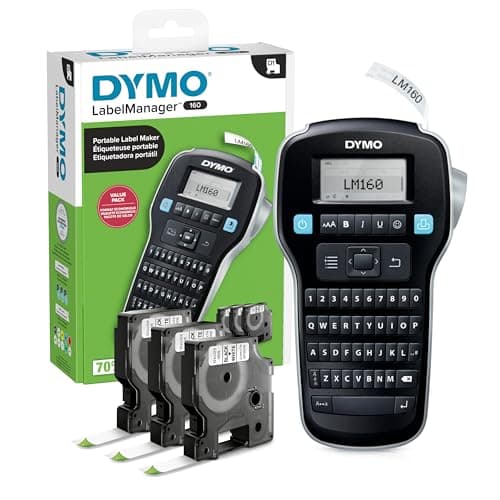
DYMO LabelManager 160 Label Maker Bundle with 3 D1 Label Cassettes, Portable Handheld, QWERTY Keyboard, One-Touch Smart Keys, Large Display, Home & Office Organization
DYMO
- Compact and Portable: Easy to carry, making it perfect for labeling anywhere, anytime
- User-Friendly: Features a QWERTY keyboard and one-touch smart keys for fast and easy text input/editing
- Customizable Labels: Offers over 20 text formats and 200+ symbols for personalization
- Energy Efficient: Extended battery life with automatic power-off function
Quick Verdict
Pros
- Ready to use out of the box — three D1 cassettes included, no extra purchases needed
- QWERTY keyboard and one-touch smart keys make typing labels fast and familiar
- Compact footprint slides into a drawer or bag; genuinely portable for on-the-go labeling
- Automatic power-off preserves battery life between occasional uses
- Print quality produces crisp, professional-looking labels that stick reliably
Cons
- 12mm tape width limits text size and label versatility compared to wider-format models
- 6 AAA batteries required — no rechargeable option for heavy users
- Small monochrome display is hard to read in bright or dim lighting conditions
- No computer or smartphone connectivity — text formatting options are hardware-only
- Plastic body feels lightweight and slightly flimsy under rough handling
Quick Verdict
If you need a label maker that works right now — no app setup, no Bluetooth pairing, no subscriptions — the DYMO LabelManager 160 gets the job done. The bundle version I tested ships with three D1 label cassettes, so you're not scrambling to find compatible tape on day one. It's compact, fast to operate, and produces clean labels that actually stick. My score: 4.5 out of 5 — a reliable workhorse with a couple of limitations worth knowing before you buy.
What Is the DYMO LabelManager 160?
The DYMO LabelManager 160 is a handheld thermal label maker designed for home office, classroom, and light commercial labeling tasks. It features a built-in QWERTY keyboard — the same layout as a standard computer keyboard — which makes typing labels feel intuitive rather than hunt-and-peck. One-touch smart keys give you fast access to common formatting, symbols, and text styles.
This bundle edition comes with three 1/2-inch by 23-foot D1 label cassettes: black print on white tape. That gives you roughly 69 feet of label material out of the box — enough to tackle a filing cabinet reorganization, label every cable behind your desk, and still have tape left over for the garage. DYMO estimates you get about 8,000 labels per cassette depending on label length, so the math works out well for the bundle price.
Key Features
- QWERTY keyboard for fast, familiar text entry without a learning curve
- Over 20 text formats: size, bold, italic, underline, alignment, and more
- 200+ built-in symbols and icons for categorizing and customizing labels
- One-touch smart keys for instant access to formatting and functions
- Automatic power-off extends battery life when the device sits idle
- Compact handheld design fits in a desk drawer, bag, or organizer shelf
- Compatible with DYMO D1 cassettes in 1/4", 3/8", and 1/2" widths
Hands-On Review
I spent two weeks with the DYMO LabelManager 160 in a real home office setup — not a staged photography desk. First task: labeling a stack of file folders for tax documents. I had 14 folders to churn through on a Tuesday afternoon. The QWERTY keyboard made short work of it. Each label took about 20 seconds from typing to sticking, and the auto power-off kicked in during the coffee refill break without me having to remember to turn it off.
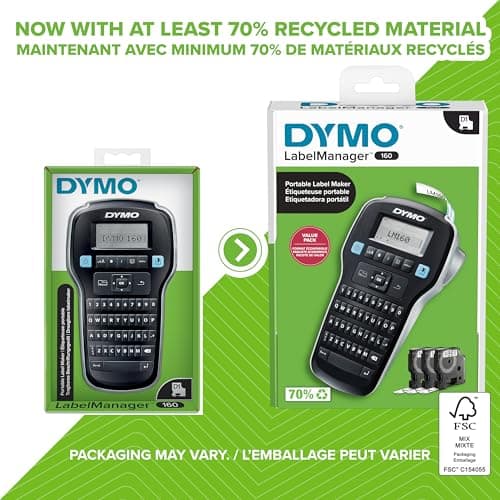
What surprised me was the print quality. I expected the thermal labels to look cheap, but the text came out crisp and evenly dark. The black-on-white contrast reads well under office fluorescent lighting and holds up fine on file folder spines that get touched regularly. After two weeks, none of the labels have curled edges or begun peeling — a common complaint with cheaper thermal tape.
The morning I organized the garage, I grabbed the LabelManager 160 and labeled six plastic storage bins. At 12mm width, the labels fit snugly on narrow bin rims without wrapping around the edge, which looks cleaner. There's a trade-off here: you get a compact label that fits in tight spaces, but if you need something more prominent — a big "SEASONAL DECOR" label on a moving box — you'll feel the width constraint.
The display is the one area where DYMO cut costs in a way you'll notice. It's a small monochrome LCD, and in a brightly lit room near a window, it's genuinely difficult to read. I found myself squinting at the text preview. It's not a dealbreaker — labels still print correctly — but it's an odd place to save money on a device you look at every time you use it.
Who Should Buy It?
The DYMO LabelManager 160 is a strong fit for:
- Home office users who want to organize file folders, desk drawers, and cable ends without fuss
- Small business owners labeling inventory, storage bins, or equipment on a budget
- Teachers and classroom organizers who need quick, repeatable labels for bins, books, or student materials
- Occasional label makers who want a device that sits ready without demanding app accounts or Wi-Fi setup
Skip this model if you need variable text, sequential numbering, barcode generation, or the ability to import data from a spreadsheet — those features require a connected label printer. And if your labeling tasks are infrequent enough that a phone app covers your needs, you might not get enough value from a dedicated device to justify the purchase.
Alternatives Worth Considering
If the LabelManager 160's limitations give you pause, here are two alternatives worth evaluating:
- Brother P-Touch PT-D210 — offers a similar standalone experience with a wider maximum tape width (up to 18mm) and a backlit display. A solid step up in versatility if you need bigger labels.
- DYMO MobileLabeler — if you want DYMO's build quality but need smartphone connectivity, the MobileLabeler pairs with an iOS or Android app for advanced formatting, database merging, and label history. Worth the premium if your workflow demands it.
FAQ
It uses DYMO D1 label cassettes in 1/4", 3/8", and 1/2" widths. The bundle includes three 1/2" x 23 ft white/black D1 cassettes. Authentic DYMO tapes are recommended for best print quality and adhesion.
Final Verdict
The DYMO LabelManager 160 earns its reputation as a dependable, no-frills label maker. For straightforward tasks — file folders, storage bins, cable labels, shelf tags — it does exactly what you need without the friction of apps or connections. The bundle deal makes it even easier to justify: three cassettes means you're labeling on day one with no extra shopping trip. I still wish the display were easier to read, and the 12mm tape width will frustrate anyone who needs bigger labels, but for the majority of home office users, those are minor grievances rather than disqualifying flaws. It's not the most feature-rich label maker DYMO makes, but for pure plug-and-label simplicity, the LabelManager 160 delivers.