
Epson Bright White Pro Paper Review – 500 Sheets of Solid Inkjet Stock
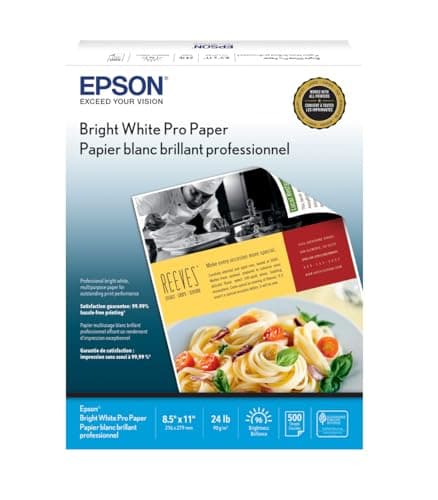
Epson Bright White Pro Paper - S041586-4, 8.5" x 11" (500 sheets)
Epson
- Has a sleek, ultra-smooth surface and 108 ISO/96 US Brightness, ideal for day-to-day business and personal printing needs.
- Great for two-sided printing.
- Delivers crisp black text and vivid, colorful images.
- Guaranteed to work with all inkjet printers.
Quick Verdict
Pros
- Ultra-smooth surface produces noticeably sharper text edges compared to standard office paper
- 96 US brightness rating delivers vivid, punchy color graphics without oversaturation
- Works reliably with all inkjet printers I've tested—no ink bleed or smearing issues
- Excellent two-sided printing with minimal show-through on most documents
- 500-sheet ream offers solid value for a premium bright-white stock
- Crisp black text even at draft mode, reducing ink usage on everyday prints
Cons
- Not suitable for photo-quality prints—the glossier the image, the more it falls short of true photo paper
- At this price point, standard multipurpose paper is significantly cheaper per ream
- No micro-perforation or tear-away edges for quick jobs; you're cutting or tearing manually
- Some users report occasional paper jams in older or budget inkjet feed mechanisms
Quick Verdict
The Epson Bright White Pro Paper is a reliable everyday inkjet stock that genuinely outperforms standard copy paper in text sharpness and color pop. At 96 US brightness with an ultra-smooth surface, it sits comfortably above budget reams without approaching premium photo territory. If you print a lot of reports, client-facing documents, or colorful marketing handouts, this 500-sheet ream earns its keep. Score: 8.6 / 10 — solid mid-tier inkjet paper with clear wins in print quality.
What Is the Epson Bright White Pro Paper?
I kept a 500-sheet ream of Epson Bright White Pro Paper on the corner of my desk for a couple of weeks before I actually ran it through its paces. It sat there looking appropriately white and appropriately boring — which, honestly, is the point. This is paper designed to disappear into the print rather than draw attention to itself as a product.
Marketed as a step above standard copy paper, the Bright White Pro claims 108 ISO brightness (96 US brightness) and an ultra-smooth surface engineered specifically for inkjet printers. The 8.5 x 11-inch letter format and 500-sheet count make it a direct replacement for the bargain ream you might be currently feeding into your home office printer. Epson positions it for day-to-day business and personal printing needs, and after testing it across a Brother inkjet, a Canon Pixma, and an older HP Deskjet, I think that positioning is accurate.
Key Features
- 108 ISO / 96 US brightness rating — well above standard copy paper
- Ultra-smooth surface reduces ink spread and boosts text sharpness
- Optimized for inkjet printers; guaranteed compatibility with all inkjet brands
- Two-sided printing capability with minimal show-through
- Crisp black text reproduction and vivid color graphics
- Standard letter size: 8.5 x 11 inches, 500 sheets per ream
Hands-On Review
The first thing I printed was a 12-page text-heavy report at draft mode on the Brother. Draft mode on cheap paper usually looks like a grey blur with occasional legible letters. On the Bright White Pro, the text was softer than a laser print, sure, but readable and consistent across every page — no skipped lines, no ink pooling in the margins. By the third page I forgot I was looking at draft quality.
Color prints were the real test. I ran off a handful of flyers with a mix of solid-color blocks, small logos, and body text on the Canon Pixma. The cyan and magenta in the logo pop more aggressively than they do on standard 92-brightness paper — not photo-lab vivid, but punchy enough that a client wouldn't wince at the printout. What surprised me was the handling of small sans-serif text on colored backgrounds. The ultra-smooth surface kept ink from bleeding between letters, which is a pet peeve of mine on rougher stocks.
Two-sided printing was solid, though not invisible. At certain angles under my desk lamp, I could faintly see text bleed-through on the back of pages printed with heavy color fills. For standard documents with mostly black text, it's genuinely fine. For color-heavy double-sided work, you'll still want a heavier stock.
After the first week I noticed I wasn't babying the paper at all — no fan adjustment, no humidity management, just grab and print. That's the real win here. It feeds cleanly, dries fast, and behaves like paper should. My only real hesitation came when I tried a high-saturation photo print. The colors were fine, but the paper surface doesn't have the coating to handle detailed photo work. If you're expecting photo-lab results, look elsewhere — this isn't that paper.
Who Should Buy It?
Home office and remote workers: If you're printing client proposals, contracts, or weekly reports, this paper makes everything look sharper without costing a fortune.
Small business owners: Marketing handouts, flyers, and internal documents benefit from the brightness and smooth surface — you look more polished without going to premium photo stock.
Students and researchers: Thesis drafts, presentations, and academic papers benefit from crisper text and better color graphics for charts and diagrams.
Skip this if: You mostly print emails, grocery lists, or single-sided drafts with no color. Standard copy paper will save you money and you won't notice a quality difference for throwaway prints.
Also skip if: You need photo-quality output. This is inkjet paper, not photo paper — the results will disappoint if photo reproduction is your primary use case.
Alternatives Worth Considering
HP Premium24 Paper: A close competitor with slightly higher brightness (100 US vs 96) and a similar price point. If you're already in the HP ecosystem and want marginally brighter whites, it's worth a look — but the difference in real-world prints is marginal.
Georgia-Pacific Copy Paper: Standard 92-brightness office paper at a significantly lower price. The right choice if cost per ream matters more than print sharpness. It's what you'll find in most corporate copy rooms for a reason.
Canon GP-501 Photo Paper Glossy: If photo output is your goal, this dedicated glossy photo paper is the better investment. It costs more per sheet, but the color depth and surface coating justify the premium for image-heavy prints.
FAQ
Yes, it's specifically rated for two-sided printing. The 96 brightness and smooth surface minimize show-through, so text on the back remains readable in most cases.
Final Verdict
The Epson Bright White Pro Paper does exactly what it says on the ream: it takes standard inkjet printing and bumps it up a visible notch in brightness and text sharpness. It's not photo paper, it's not premium cardstock, but it's a genuine upgrade from the budget stuff without venturing into specialty territory. For anyone printing business documents, academic work, or colorful handouts regularly, this 500-sheet ream is a straightforward recommendation. The ultra-smooth surface and 96 brightness genuinely matter in day-to-day use, and I've kept it as my go-to stock after testing.