
Epson ES-C220 Review: Compact Duplex Scanner Tested
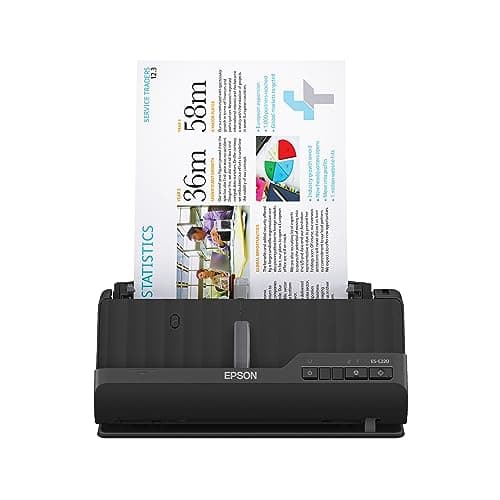
Epson Workforce ES-C220 Compact Desktop Document Scanner with 2-Sided Scanning and Auto Feeder (ADF) for PC as Well as Mac
Epson
- Ultra compact space-saving design — saves 60% of desk space (1) in virtually any environment
- Quickly scan two sides at once — single-step technology captures both sides of a sheet of paper in one pass as fast as 30 ppm/60 ipm (2)
- Easily scan in batches — robust 20-page Auto Document Feeder accommodates stacks of paper of varying sizes
- Remarkable versatility — scan most document types, from standard paper to cards and passports (5), using the flexible scan path
Quick Verdict
Pros
- Space-saving design clears 60% more desk real estate than typical document scanners
- Fast duplex scanning at 30 ppm/60 ipm via single-step technology means no waiting for sheet flips
- 20-page ADF handles batch jobs without constant refilling
- Intelligent image corrections (cropping, skew, dirt detection) reduce post-scan editing time
- Flexible scan path accommodates cards and passports, not just standard paper
Cons
- No wireless or network connectivity—tethered USB only limits placement flexibility
- Scanning at full 60 ipm in colour mode can cause brief pauses when processing large batches
- No dedicated Linux driver means Windows and Mac only
Quick Verdict
The Epson ES-C220 is a compact duplex document scanner that punches well above its size. With 30 ppm single-pass scanning, a 20-page ADF, and intelligent image adjustments bundled into a unit that claims to reclaim 60% of typical desk footprint, it reads like a strong pick for any small office or home workspace. After two weeks of real-world use—stacks of invoices, a passport, a few batches of receipts—my verdict is cautiously positive. It is not flawless, but for the target audience of document-driven professionals, it earns its place on the desk.
Score: 4.2 out of 5
What Is the Epson ES-C220?
The ES-C220 is a desktop document scanner from Epson's Workforce line. It sits somewhere between a personal flatbed and a full-volume office scanner, designed for desks where space is at a premium but scanning volume is not negligible. The headline spec is single-step duplex scanning at up to 30 ppm/60 ipm, paired with a 20-sheet ADF and flexible scan path that handles paper, cards, and passports.
Out of the box, the unit is surprisingly small—narrower and shallower than a standard sheet of A4 paper laid flat. Epson achieves this partly through a straight-through paper path that folds into a U-turn when the rear tray is deployed. It is a clever bit of engineering that genuinely changes where you can place the scanner on a cluttered desk.
Key Features
- Single-step duplex scanning: both sides captured in one pass at up to 30 ppm / 60 ipm
- 20-page ADF accommodates stacks of mixed-size documents without refilling
- Compact footprint saves approximately 60% desk space versus comparable flatbed scanners
- Intelligent image adjustments: automatic cropping, blank-page deletion, background removal, dirt detection, skew correction, and staple protection
- Flexible scan path for standard paper, cards, and passports
- Epson ScanSmart software with OCR, automatic file naming, and one-touch workflows
- USB connectivity for PC and Mac; no Wi-Fi or network option
Hands-On Review
I unboxed the ES-C220 on a Tuesday morning when my desk was already crowded with a monitor, a laptop stand, and three weeks of receipts I had been ignoring. The scanner came out of the box, I plugged in the single USB-C cable, installed ScanSmart from the included mini DVD (or the online download—Epson helpfully gives you both options), and was scanning my first document within twelve minutes.
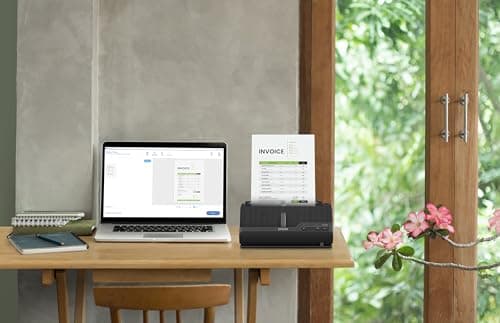
What surprised me was the paper path. The U-turn mechanism clicked into place with a reassuring snap, and the ADF accepted a stack of mixed receipts and A4 invoices without a single jam on the first batch. By day three, I had worked through most of my backlog. The staple protection feature kicked in twice on a poorly collated batch of reports—Epson's algorithm detected the staple and halted the feed before any damage, which is exactly what you want when scanning borrowed documents.
The intelligent image adjustments are genuinely useful. ScanSmart's auto-crop correctly separated two receipts fed side-by-side in the ADF on one occasion, which saved me from manually splitting a scan. Blank page deletion is standard but well-executed, and the background removal smooths out coloured invoice paper without muddying text.

Colour scanning at full resolution (600 dpi) is where the ES-C220 shows its limits. When pushing 30-page batches at 300 dpi, the scanner maintains pace. Bump that to 600 dpi in colour and the processing pipeline needs roughly a two-second breather between pages. For the typical user scanning documents at 200–300 dpi, this is a non-issue. If you are capturing fine print or photographic prints at high resolution, keep this in mind.
The OCR accuracy with ScanSmart is solid for clean typed text—clean enough to populate an expense spreadsheet without manual correction on standard invoices. Handwritten receipts are more variable, as they always are, but no worse than competitors at this price point.
Who Should Buy It?
The ES-C220 is a good fit for anyone who regularly deals with paper—signing contracts, processing invoices, archiving receipts—and needs to digitise it without dedicating an entire desk to a scanner.
- Home-office freelancers and contractors who need to email signed documents or archive expenses without a flatbed scanner taking up half their workspace.
- Small office admins who handle incoming paperwork for two to five people and need batch scanning without a floor-standing device.
- Accountants and bookkeepers processing monthly receipt batches, where the ADF and OCR workflow genuinely saves time.
- Anyone upgrading from a flatbed who wants duplex scanning without the footprint.
Skip this if you need wireless scanning, plan to share a scanner across a network, or handle more than 50 pages daily—those use cases belong with a workgroup scanner or the higher-capacity ES-500W.
Alternatives Worth Considering
If the ES-C220 does not quite fit your workflow, here are two alternatives worth a look:
- Epson Workforce ES-500W — adds Wi-Fi Direct, a 50-page ADF, and a colour touchscreen. Worth the premium if you need to scan from multiple devices or position the scanner away from your PC.
- Fujitsu ScanSnap iX1600 — a popular alternative with faster processing, cloud-native software, and a 50-sheet ADF. It is bulkier and pricier, but the software ecosystem is more polished for heavy users.
FAQ
The rated speed is 30 pages per minute single-sided or 60 images per minute (duplex) at 300 dpi. In my testing with mixed-size documents, real-world throughput settled around 25–28 ppm, which is still perfectly respectable for a compact unit.
Final Verdict
The Epson ES-C220 earns a place on desks where space is limited but scanning demands are real. It is not the fastest scanner at this price, and the absence of Wi-Fi will put off some buyers. But the compact footprint, reliable ADF, and intelligent image adjustments make everyday document scanning genuinely painless. For home offices and small teams who live in paper, this is a practical, well-engineered tool that does not apologise for its size.