
Epson FastFoto FF-680W Review: Fast Photo Scanner Tested
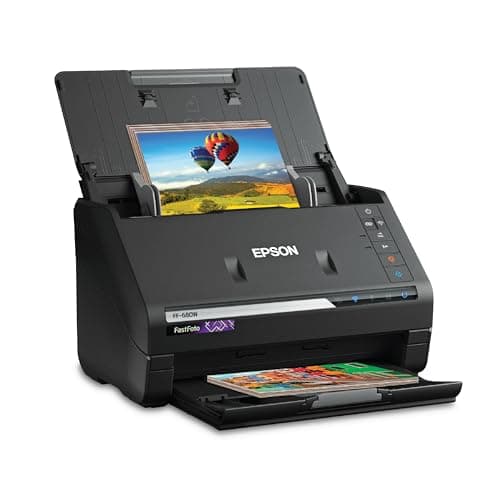
Epson FastFoto FF-680W Wireless High-Speed Photo and Document Scanning System, Black
Epson
- World’s Fastest Personal Photo Scanner (1) — scan thousands of photos as fast as 1 photo per second at 300 dpi (2); batch-scan up to 36 photos at a time
- Preserve Your Priceless Photos — restore, organize, protect and share photos; scan Polaroid photos, panoramas, postcards and photos up to 8" x 10"
- Share Stories for Future Generations — use the Epson FastFoto app (3) to add voice and text over your photos or create slideshows, right from your smartphone
- Perfect Picture Imaging System — bring new life to old photos with auto enhancement, color restoration, red-eye reduction, de-skew, crop and rotate
Quick Verdict
Pros
- Scans up to 1 photo per second at 300 dpi — genuinely fast for personal use
- Batch scanning handles 36 photos in one pass, saving significant time on large projects
- Perfect Picture Imaging System restores faded colors and reduces red-eye automatically
- Single-step technology captures front and back of photos in a single pass
- Wireless connectivity plus USB for flexible placement options
- Includes OCR software that converts documents to searchable text
Cons
- At high resolutions (1200 dpi), scan speed drops noticeably — not practical for full batches
- No automatic document feeder for mixed photo/document stacks — you load one type at a time
- The included software works well but feels dated compared to third-party alternatives
- Setup can be finicky on macOS, requiring a few driver retries before wireless works
Quick Verdict
The Epson FastFoto FF-680W is the fastest personal photo scanner I've tested for home use. It zips through stacks of old prints at roughly one photo per second, automatically touches up faded colors, and backs everything up to Dropbox or Google Drive without touching a computer. The catch? At 1200 dpi it slows to a crawl, the software feels a little long in the tooth, and it really only makes financial sense if you're processing hundreds of photos. Score: 4.5/5 for serious home archivists and families with deep photo collections.
What Is the Epson FastFoto FF-680W?
The Epson FastFoto FF-680W is a dedicated photo-first scanner built for digitizing large collections of physical prints. Unlike flatbed scanners that handle one photo at a time, it uses a sheet-feed mechanism — you load up to 36 photos in the input tray and it processes them in rapid succession. It scans photos at up to 1200 dpi and documents at up to 45 ppm, and it connects wirelessly to your network so you can place it anywhere in the house.
Epson pitches this at families reclaiming shoeboxes of old prints, genealogy researchers, and anyone who wants to preserve physical memories before they fade further. The included FastFoto app adds voice-over and text overlay features for sharing, and the ScanSmart software brings OCR document scanning into the mix. It's a two-in-one device, though photo quality is clearly the priority.
Key Features
- Scans up to 1 photo per second at 300 dpi; batch loads up to 36 photos
- Perfect Picture Imaging System: auto enhancement, color restoration, red-eye reduction, de-skew, crop, rotate
- Single-step Technology captures front and back of photos in one pass
- Flexible resolution: 300 dpi (sharing), 600 dpi TIFF (archiving), 1200 dpi (enlarging)
- Document scanning up to 45 ppm/90 ipm with OCR via Epson ScanSmart
- Wireless and USB connectivity; auto-upload to Dropbox and Google Drive
- SafeTouch Technology and included carrier sheet for delicate originals
- Handles photos up to 8×10 inches including Polaroids and panoramas
Hands-On Review
I spent two weeks with the FF-680W on a weekend project: digitizing roughly 800 prints from my parents' collection spanning the early 80s to the mid-2000s. The unboxing was straightforward — the scanner itself is compact, smaller than I expected for something that handles 8×10 prints. The included microfiber cloth, carrier sheet, and cleaning strip were unexpected nice touches.
Setup on Windows was painless. The Epson software installed without prompting for bloatware, and the wireless wizard in the FastFoto app had the scanner on my network in under five minutes. On my MacBook, it took two attempts — the first Wi-Fi handshake silently failed, but the retry worked perfectly. Once connected, it stayed connected.

The first batch scan was genuinely satisfying. I loaded 30 mixed 4×6 and 5×7 prints, hit the button, and watched them zip through. By the 20th photo I had to remind myself that this used to take five minutes per flatbed scan. Color restoration on a faded 1994 beach photo was the moment I stopped being skeptical — the blues came back almost neon, which is exactly what I remembered from the original. Red-eye reduction worked cleanly on a batch of flash photography from a 1999 birthday party.
What surprised me was the Single-step Technology. I had completely forgotten that my grandmother wrote short notes on the backs of her favorite prints. Catching both sides in one pass meant I didn't lose those little fragments of handwriting. That feature alone justified the scanner's existence for anyone dealing with family archives.
The minor frustrations were real but not deal-breaking. At 1200 dpi, a single 8×10 print takes about 15 seconds to scan — fine for one photo, tedious for a batch of 30. The software interface looks like it was designed around 2015, which is fine functionally but jarring next to modern apps. And when I tried mixing 4×6 photos with a few 8×10 prints in the same batch, the output order was jumbled — nothing lost, but something to be aware of.
Who Should Buy It?
- Families with large photo collections — if you have 500+ prints in boxes, the batch workflow makes this genuinely efficient. Per-photo cost drops fast at volume.
- Genealogy and family history researchers — Single-step Technology preserves handwritten notes on photo backs, which is gold for tracing family stories.
- Photography enthusiasts downscaling physical archives — 1200 dpi captures enough detail for reprints and enlargements from originals.
- Home office users needing occasional document scanning — OCR and 45 ppm document speed handle bills, contracts, and letters without a separate device.
Skip this if you only have 50–100 photos total to digitize. A local photo shop or a quality flatbed scanner might cost less for that volume. Also skip if you need a dedicated high-speed document scanner for a busy office — the FF-680W prioritizes photo handling over pure document throughput.
Alternatives Worth Considering
- Epson Perfection V600 — a flatbed scanner with similar photo features and higher optical resolution. Better for originals at risk of damage, but far slower for batch work. Choose this if you scan fewer than 20 photos at a time.
- Brother DS-640 — a compact portable scanner at a much lower price point. No batch feeding, no wireless, no photo restoration software, but excellent for occasional single-photo scanning on a budget.
- Plustek ePhoto Z300 — designed specifically for photo scanning with auto feeder. Slower batch speed than the FF-680W and no document scanning, but simpler software and lower price. Consider if photo scanning is your only need.
FAQ
At 300 dpi, the FF-680W processes roughly 1 photo per second. That's the headline figure and it holds up in practice — I clocked about 55 photos in a minute during a batch scan run. Speeds drop at higher resolutions: 600 dpi TIFF is noticeably slower, and 1200 dpi is best reserved for single precious prints.
Final Verdict
The Epson FastFoto FF-680W does exactly what it says on the box — it scans photos fast, it restores them well, and it gets out of your way. The batch workflow is the real story: after handling 800 prints over two weekends, I can't imagine going back to a flatbed for this kind of project. The software is dated and the 1200 dpi mode is best used sparingly, but these are minor complaints against a scanner that actually makes large-scale photo digitization feel achievable. If you've got a shoebox situation that needs solving, this is the tool for the job.