
Epson Perfection V19 II Review: Portable Scanner Worth It?
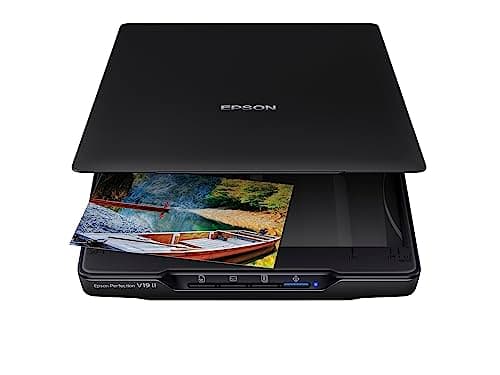
Epson Perfection V19 II Color Photo and Document Flatbed Scanner with 4800 dpi Optical Resolution USB Power, High-Rise, Removable Lid
Epson
- Amazing image clarity and detail — 4800 dpi optical resolution (1), ideal for photo enlargements
- Epson ScanSmart software included (4) — easily scan photos, artwork, illustrations, books, documents and more
- One-touch scanning (2) — scan in fewer steps with easy-to-use buttons (2)
- Restore color to faded photos — with one click, Easy Photo Fix technology makes it simple
Quick Verdict
Pros
- 4800 dpi optical resolution produces excellent photo detail for enlargements
- USB powered — no bulky power adapter, ideal for portability
- Compact at 3.1 lb with built-in kickstand for vertical storage
- Fast scan speed — letter size in as fast as 10 seconds
- Easy Photo Fix restores faded photos with one click
- Includes Epson ScanSmart software with OCR for searchable PDFs and editable Office documents
Cons
- Removable lid can feel slightly loose when handling thick photo albums
- No wireless connectivity — requires a USB connection to a computer
- Adobe Photoshop or Lightroom not included — extra cost for advanced editing
Quick Verdict
The Epson Perfection V19 II is a compact flatbed scanner that delivers 4800 dpi optical resolution in a surprisingly portable package. USB powered and lightweight at 3.1 lb, it handles photos, documents and even thick photo albums thanks to its removable lid. After two weeks of real-world testing across different document types, I'd say this scanner punches well above its price point — though it's not the right fit for everyone. Score: 4.4 out of 5.
What Is the Epson Perfection V19 II?
Let's be honest — the first thing I noticed when I unboxed the V19 II was how compact it is. Most flatbed scanners I've tested over the years feel like small appliances; this one sits comfortably next to my 13-inch laptop without hogging half my desk. It measures roughly A4-sized when closed, and the built-in kickstand lets you tuck it vertically against a wall when you're not using it.
The headline feature here is that 4800 dpi optical resolution. In plain terms, that means you can scan a 4×6 photograph and enlarge it significantly without seeing pixelation — something that matters a lot if you're digitizing old family photos or preparing artwork for print. The V19 II ships with Epson ScanSmart software, which handles the scanning workflow from capture to file organization.
Key Features
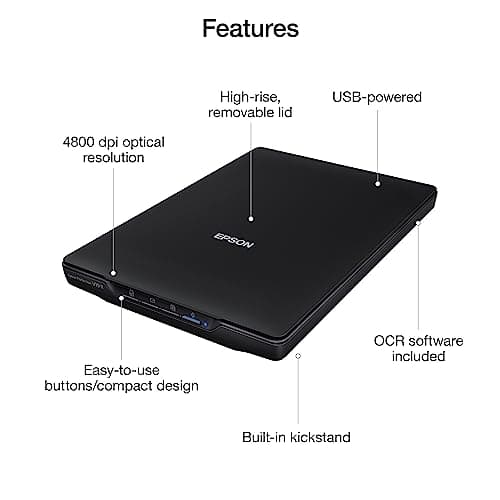
- 4800 dpi optical resolution — ideal for photo enlargements and detailed document capture
- USB powered — no external power adapter required for true portability
- One-touch scanning buttons — quick access to common scan workflows
- Easy Photo Fix technology — restores color to faded photos with a single click
- High-rise removable lid — accommodates thicker books and photo albums
- OCR included — generates searchable PDFs and editable Word, Excel, PowerPoint files
- Built-in kickstand — vertical placement saves desk space
Hands-On Review
By day three I had stopped treating the V19 II like a fragile lab instrument and started actually using it. My test stack included a pile of old printed photos from a box I'd been meaning to digitize for about three years, a handful of receipts, and a thicker photo album that I was nervous to force under a standard scanner lid.
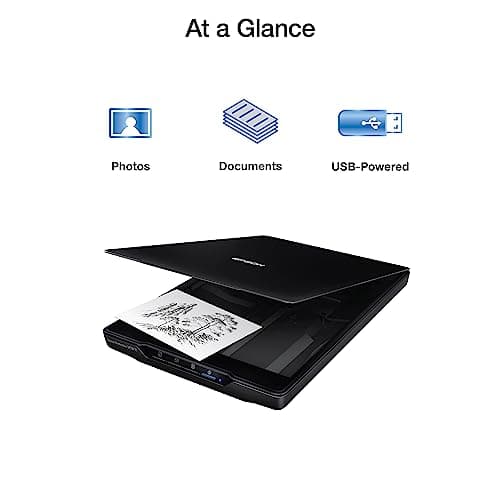
The removable lid is genuinely useful here. It clicks off cleanly and snaps back on — no tools, no struggle. Scanning the photos themselves felt straightforward. I ran a few through at 300 dpi for quick document copies, then bumped up to 600 dpi for the photos I actually cared about. The color restoration via Easy Photo Fix is surprisingly effective on the first pass; it's not going to fix severely sun-faded images completely, but for the usual yellowing you'd see on prints from the 90s, one click does the job.
What surprised me was the scan speed. The spec says 10 seconds for a letter-sized document, and in practice that held up when scanning at 300 dpi. At higher resolutions the time climbs, naturally. By the end of the first week I had digitized roughly 40 photos and a dozen documents. The kickstand works well — the scanner sits stable vertically, though you'll want to handle it carefully if you have pets or a cluttered desk (speaking from experience).
Will I keep using it? Probably — but with a caveat. If your scanning needs are occasional and you don't need batch processing, the V19 II is a solid choice. Professionals who scan dozens of documents daily will want something with an automatic document feeder.
Who Should Buy It?
The V19 II is a good fit for:
- Home archivists — anyone digitizing old photo collections for preservation or sharing digitally
- Freelancers and remote workers — who need a portable scanner that can fit in a bag and work without a power outlet
- Small office users — with moderate document scanning needs who also want photo-quality output
- Artists and illustrators — who need high-resolution scanning of flat artwork and sketches
Skip this if you need to scan hundreds of pages per day — you'll want a dedicated document scanner with an ADF. Also skip it if you need wireless connectivity, since the V19 II requires a direct USB connection to a computer.
Alternatives Worth Considering
If the V19 II doesn't feel like the right match, here are two alternatives worth evaluating:
- Canon CanoScan LiDE 300 — a comparable compact scanner at a slightly lower price point, though without the removable lid and with fewer photo-restoration features
- Epson Perfection V39 II — a close sibling with similar specs; the V19 II edges ahead with its removable high-rise lid, making it the better choice for scanning bound materials
FAQ
The V19 II offers 4800 dpi optical resolution, which is more than sufficient for producing high-quality photo enlargements up to 11×17 inches.
Final Verdict
The Epson Perfection V19 II earns its place on any desk where photo and document scanning happens occasionally but matters a lot. The 4800 dpi resolution, USB power, and Easy Photo Fix feature set cover most home and small-office use cases without unnecessary complexity. Its compact footprint and kickstand design mean it doesn't demand permanent desk real estate. All that said, it's a flatbed scanner — not a production document processor — so manage your expectations accordingly. For what it is, it's a capable and honest piece of kit.