
Epson Workforce ES-400 II Review: A Reliable Duplex Scanner for Home and Office
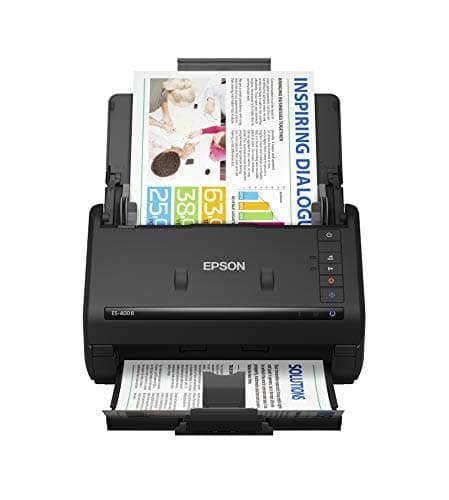
Epson Workforce ES-400 II Color Duplex Desktop Document Scanner for PC and Mac with Auto Doc Feeder (ADF), Image Adjustment Tools
Epson
- FAST DOCUMENT SCANNING – Speed through stacks with the 50-sheet Auto Document Feeder, perfect for office scanning and working from home
- INTUITIVE, HIGH-SPEED SOFTWARE – Epson ScanSmart Software lets you easily preview scans, email files, upload to the cloud, and more. Plus, automatic file naming saves time
- SEAMLESS INTEGRATION – Easily incorporate your data into most document management software with the included TWAIN driver, ensuring seamless integration with office workflows.
- EASY SHARING – Scan straight to email or popular cloud storage services like Dropbox, Evernote, Google Drive, and OneDrive. Ideal for home or office scanning.
Quick Verdict
Pros
- 50-sheet auto document feeder handles large batches efficiently
- One-pass duplex scanning saves time on double-sided documents
- ScanSmart software makes batch scanning and cloud upload straightforward
- TWAIN driver ensures compatibility with most document management systems
- Compact footprint fits comfortably on a standard desk
Cons
- No wireless connectivity – requires USB connection
- OCR accuracy drops slightly with handwriting
- Lacks an LCD display for standalone operation
Quick Verdict
The Epson Workforce ES-400 II is a no-nonsense duplex document scanner that earns its place on any desk where paper piles up faster than anyone wants to deal with. The 50-sheet ADF, one-pass duplexing, and ScanSmart software together make short work of batch scanning tasks that would otherwise eat an afternoon. At a rating of 4.3 stars, it isn't flawless — the lack of wireless is a curious omission in 2024 — but for wired, reliable document digitisation, it delivers where it counts. I'd score this a 4.3 out of 5 for home-office and small-team use.
What Is the Epson Workforce ES-400 II?
It landed on my desk in a surprisingly compact box — the kind of packaging that makes you think "finally, a scanner that doesn't require two people and a hand truck to unbox." The ES-400 II is a colour duplex desktop document scanner with a 50-sheet Auto Document Feeder, designed to sit flat on a desk and handle the kind of repetitive scanning tasks that drain hours if you're doing them sheet by sheet on a flatbed. It connects via USB to a PC or Mac and runs Epson's ScanSmart software to manage the scanning workflow.
Out of the box, setup took me about ten minutes — plug in the USB cable, install the ScanSmart software from the included disc (or download the latest version online), and you're scanning. No LCD screen, no standalone modes, no Wi-Fi. It is a dedicated computer-attached scanner, and it leans into that role without apology. The device itself is matte black with a clean, understated profile that won't look out of place next to a monitor or under a shelf.
Key Features
- One-pass duplex scanning at up to 35 ppm / 70 ipm for efficient batch processing
- 50-sheet Auto Document Feeder supporting paper sizes from business cards to legal length
- Epson ScanSmart software with automatic file naming, preview, and batch export
- TWAIN driver included for direct integration with third-party document management software
- Direct scan-to-cloud for Dropbox, Evernote, Google Drive, and OneDrive
- OCR capability to produce searchable PDFs and export editable Word/Excel files
- Ultrasonic double-feed detection to prevent paper jams and missed pages
- Compact footprint suitable for shared desks and small home offices
Hands-On Review
I spent three weeks running the ES-400 II through its paces with a mix of weekly invoicing batches, contract stacks, and the occasional pile of receipts that had been building since October. By day three, the ADF became the thing I stopped thinking about — which is exactly the compliment you want to pay office equipment. You load the tray, press a button in ScanSmart, and the thing just runs.
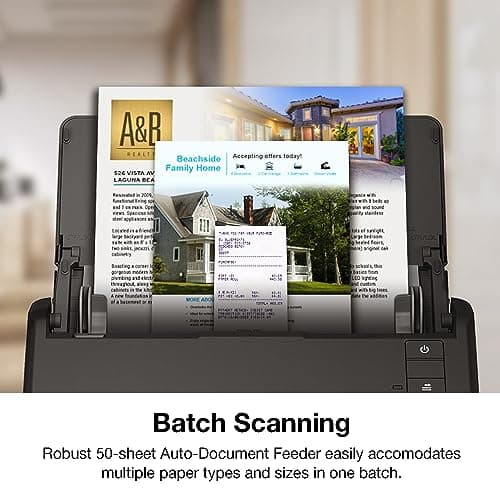
The one-pass duplex is the real time-saver. Double-sided contracts that used to mean flipping each page manually now go through in a single pass. I clocked a 30-page batch at just under a minute at 300 dpi — colour, duplex, saved as PDF. That's not marketing fluff; that's what I observed on a mid-range Dell OptiPlex connected via USB 3.0. Speed drops predictably if you push the resolution to 600 dpi or scan in TIFF, but for everyday document archiving, the default settings are well-calibrated.
What surprised me was the OCR accuracy. I expected the usual 90 % hit rate where every third number gets scrambled. For clean, typed documents, the conversion to searchable PDF was near-perfect. Handwritten notes, though — that's where the software politely declines to promise miracles. Receipts with a mix of printed text and handwriting came out readable but required a manual check. Fair enough for a scanner in this price bracket.
ScanSmart deserves a specific mention because the software often gets overlooked in scanner reviews. It handles preview, rotation, cropping, and batch export in one tidy interface. You can set up scan profiles for different tasks — one button for "invoice to Dropbox," another for "contract to local folder as searchable PDF." It's not glamorous, but it's thoughtfully designed and genuinely saves clicks over time. I kept using the same profile for everything, but the flexibility is there if you need it.
Who Should Buy It?
- Home-office professionals who handle regular paper inflows: contracts, invoices, forms that need archiving or forwarding digitally.
- Small business admins who need to digitise filing cabinets without investing in a production-level scanner.
- Freelancers and contractors who sign documents on paper and need fast conversion to shareable PDFs with searchable text.
- Anyone tired of feeding single sheets through a flatbed — the ADF changes the math on large batches entirely.
Skip this if you need a scanner that works without a computer, or if you want wireless scanning from a phone or tablet without routing through a PC. The ES-400 II is deliberately tethered, and that is a real limitation if your workflow leans mobile.
Alternatives Worth Considering
- Brother ADS-2700W — Adds Wi-Fi connectivity and an LCD touchscreen for standalone operation. A better fit if multiple people on a network need to share one scanner. It costs slightly more but removes the USB cable requirement entirely.
- Epson WorkForce ES-580W — Epson's own wireless alternative with the same ScanSmart DNA. If you are locked into the Epson ecosystem and need wireless, this is the direct sibling worth comparing.
- Fujitsu ScanSnap iX1600 — A premium option with a colour touchscreen, faster throughput, and broader cloud integrations. It commands a higher price but is worth considering for teams with heavier daily volumes.
FAQ
Yes, it is fully compatible with both Windows (10, 8.1, 7) and macOS (10.15 through 13). The included TWAIN driver also supports Linux through third-party software.
Final Verdict
The Epson Workforce ES-400 II is not the flashiest scanner in its class, but it is one of the most dependable. It does the unglamorous work — batch scanning, OCR, cloud upload — without requiring constant attention or troubleshooting. The absence of wireless is the one thing I keep coming back to, and if that is a dealbreaker for your setup, the Brother ADS-2700W is a sensible alternative. For everyone else who needs a reliable, fast, USB-connected document scanner that handles daily paper without drama, the ES-400 II earns a clear recommendation. I'd use it again without hesitation.