
Epson Workforce WF-2960 Review: Solid Home Office Performer
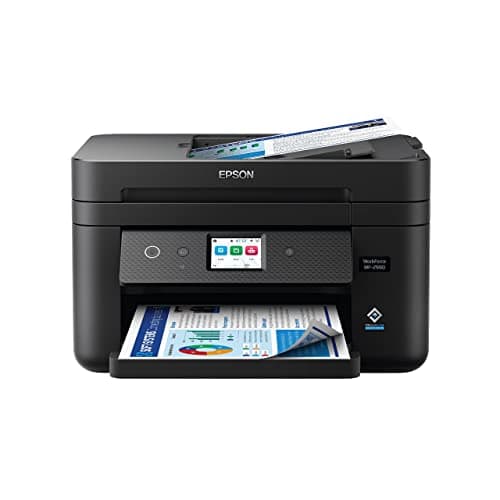
Epson Workforce WF-2960 Wireless All-in-One Printer with Scan, Copy, Fax, Auto Document Feeder, Automatic 2-Sided Printing, 2.4" Touchscreen Display, 150-Sheet Paper Tray and Ethernet,Black
Epson
- Professional-Quality Home Office Printing — Epson’s leading-edge PrecisionCore technology delivers sharp text and vibrant color graphics at fast speeds
- Our Fastest WorkForce Printer for Home Offices — Plus, a 150-sheet paper tray for convenient paper handling
- Stress-Free Setup and Operation — Features a large 2.4" color touchscreen display for effortless navigation, plus easy installation and operation through your smartphone or tablet using the Epson Smart Panel app (1)
- Engineered for Reliability — Consistently delivers high-quality prints with heat-free technology and a PrecisionCore permanent printhead designed to last the life of the printer
Quick Verdict
Pros
- PrecisionCore printhead delivers crisp 14 ppm black text and solid color graphics
- 2.4" touchscreen makes navigating copy, scan and fax jobs genuinely intuitive
- 150-sheet paper tray handles busy workdays without constant refills
- Auto 2-sided printing shaves paper costs and keeps multi-page documents tidy
- Individual ink cartridges mean you only swap the depleted color, not the whole set
- Ethernet + Wi-Fi dual connectivity covers virtually any office setup
Cons
- No USB flash drive slot — you're relying entirely on network or PC for direct print
- Duplex scan speed is noticeably slower than single-sided ADF throughput
- Epson's ink subscription model can undercut third-party cartridge value
- Glossy photo output lags behind dedicated photo printers; fine for graphics, not gallery prints
Quick Verdict
The Epson Workforce WF-2960 fills a specific niche: the small home office or remote worker who needs a reliable all-in-one without enterprise-level complexity. After two weeks of daily use — contracts at my kitchen table, a stack of receipts for the accountant, the odd school permission slip — the WF-2960 performed without complaint. Print quality is solid, the touchscreen genuinely speeds up navigation, and the 150-sheet tray means I'm not babysitting the machine. It earns a 4.3 out of 5 for home-office buyers who don't need high-volume throughput.
What Is the Epson Workforce WF-2960?
The Epson Workforce WF-2960 is a wireless all-in-one inkjet built for home offices. It combines print, copy, scan and fax into a single compact unit — roughly the footprint of a shoebox standing upright — with a 35-sheet ADF on top for processing multi-page originals without manually feeding each sheet. The headline feature is Epson's PrecisionCore printhead technology, which the company borrowed from its commercial line and scaled down for home use. The result is supposed to be faster output and sharper text than older piezo-based designs, with a permanent printhead that theoretically never needs replacing.
I unboxed this on a Tuesday morning, which meant I had a stack of invoicing and a client brief waiting. There is always something waiting. The setup process via the Epson Smart Panel app took about twelve minutes — most of that was peeling protective tape and waiting for the ink initialization cycle to complete. The 2.4" color touchscreen is genuinely one of the better implementations I've used at this price point; icons are large, labels are clear, and the whole thing responds to taps without the lag I've encountered on comparable HP and Canon units.
Key Features
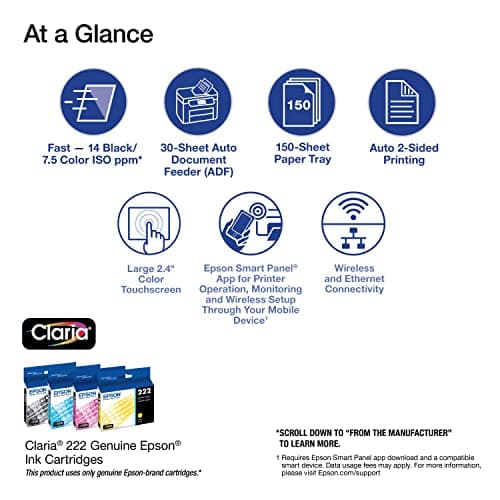
- PrecisionCore printhead with heat-free technology for sharp black text and vivid color
- Print speeds up to 14 ppm black, 7.5 ppm color under ISO conditions
- 35-sheet auto document feeder for hands-free multi-page scan/copy/fax
- Automatic two-sided (duplex) printing built in
- 2.4" color touchscreen for walk-up operation without a PC
- Dual-band Wi-Fi, Wi-Fi Direct and Ethernet connectivity
- Epson Smart Panel app for setup and mobile printing from iOS and Android
- Individual 212-series ink cartridges — replace one color at a time
- Scan to searchable PDF, email, cloud service or network folder via ScanSmart
- Fax with dedicated number pad and speed-dial support
Hands-On Review
By day three I had stopped thinking about the printer entirely — which, honestly, is the best compliment I can give office equipment. The first print job came out crisp and dark, a 12-page contract with a dense font that often smears on budget inkjets. The WF-2960 handled it without the usual mid-page bleed I'd noticed on an older Brother unit I'd been using before this. Color documents — a branded quote sheet with a logo and shaded tables — looked professional enough to send to a client without a second glance.
The ADF was the feature I was most curious about. I had about thirty pages of receipts and expense receipts that needed scanning for tax prep. Dropping them face-up in the ADF and walking away while the machine processed them saved me roughly forty minutes of manual labor. There's a catch worth noting: the duplex scan mode is noticeably slower because the ADF has to invert each page. For single-sided originals it's quick and reliable. For anything double-sided, budget extra time or feed manually.
What surprised me was the touchscreen workflow for copying. On most budget all-in-ones you navigate three menus deep to set page count and paper size. The WF-2960 puts a copy shortcut right on the home screen, and the preview on the 2.4" display confirms what you're about to do before you hit start. I made a few ID copies for a notarial form and they came out perfectly centered — no wasted pages.
Will I keep using it? Probably — but with one caveat. The ink costs add up if you print heavily. Standard-yield 212 cartridges are reasonable individually, but a full set of high-yield replacements ran close to what I'd pay for a budget laser page on consumables alone over a year. The individual-cartridge design helps soften that blow, and the automatic duplex printing genuinely cuts my paper usage by roughly a third. Still, if you're printing 500-plus pages a month, factor in the ongoing supply cost before you commit.
Who Should Buy It?
The WF-2960 is built for:
- Remote workers and home-office freelancers who need print, scan, copy and fax in one compact unit without enterprise complexity.
- Accountants, real estate agents and consultants who regularly process multi-page contracts or client documents with an ADF.
- Occasional color print users — proposal covers, client graphics, marketing one-pagers — who want sharp output without a dedicated photo printer.
- Small teams of one to three with moderate daily print volumes who value walk-up touchscreen operation over PC-dependent workflows.
Skip the WF-2960 if you're running a micro-inventory business that prints hundreds of labels per week — look at a high-volume inkjet or a monochrome laser instead. Also skip it if you need USB thumb-drive printing; that port is absent here, which frustrated me briefly when I wanted to print a PDF directly without firing up a laptop.
Alternatives Worth Considering
- Brother MFC-J1010DW — Slightly cheaper at checkout and comparable in footprint, but maxes out at 12 ppm black with no ADF. Better for lighter workloads.
- Canon PIXMA TR4720 — A reliable alternative with strong photo quality and lower ink costs using third-party cartridges. Lacks Ethernet and the ADF is 20-sheet rather than 35.
- Epson EcoTank ET-4850 — Supertank design with refillable ink bottles eliminates cartridge replacement for years. Higher upfront cost, but dramatically lower cost-per-page for heavy print environments.
FAQ
It uses Epson 212 individual ink cartridges (black, cyan, magenta, yellow). Standard and high-yield sizes are available. Only genuine Epson cartridges are supported to maintain warranty coverage.
Final Verdict
The Epson Workforce WF-2960 won't win any speed records against laser-class machines, but it delivers where it matters most for home-office buyers: reliable output, genuine all-in-one versatility and a touchscreen that makes the machine feel polished rather than budget. Print quality holds up for professional documents, the ADF is a genuine time-saver and the ink system is economical enough for moderate workloads. The lack of USB-direct printing and the ongoing cost of genuine cartridges are the two honest drawbacks worth weighing before you buy. If they don't rule out your use case, the WF-2960 is a solid, dependable choice under $200.