
HP 206A Black Toner Cartridge Review – Reliable Print Quality?
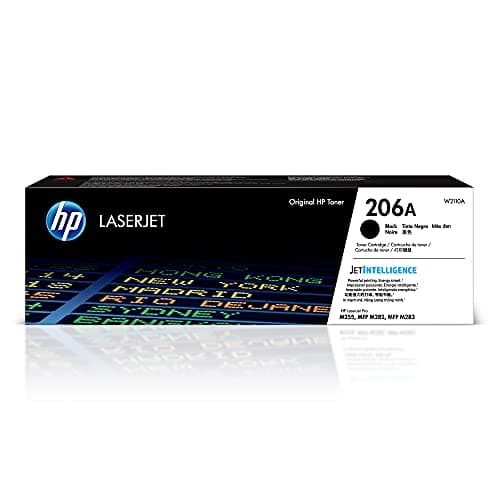
HP 206A Black Toner Cartridge | Works with Color LaserJet Pro M255, MFP M282, M283 Series | W2110A
HP
- HP Toner is engineered to work with HP printers to provide consistent quality, reliability and value
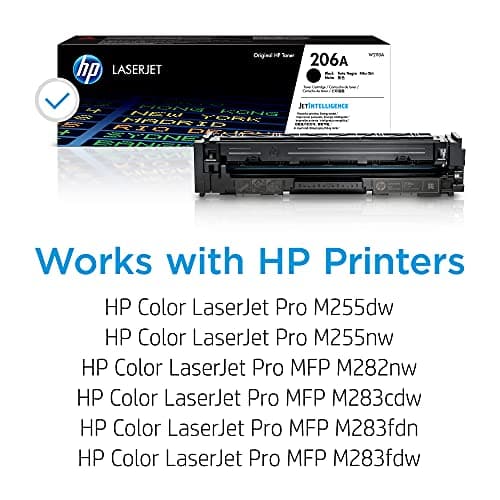
- Works with these HP Printers: Color LaserJet Pro M283fdw,M255dw
- Cartridge yield (approx.): 1,350 pages
- Use HP 206 Toner Cartridges to eliminate toner leaks and premature failures
Quick Verdict
Pros
- Consistent, sharp black text across hundreds of pages without fading
- Original HP firmware ensures seamless printer compatibility and accurate page-count tracking
- HP tamper-resistant chip protects against malicious code and firmware conflicts
- Rated 1,350 pages – solid yield for a standard-capacity cartridge
- Easy drop-in installation with no toner leaks or calibration headaches
Cons
- Higher upfront cost than third-party compatible cartridges
- Limited to specific HP Color LaserJet Pro models only
- Page-count accuracy can vary depending on coverage and document type
Quick Verdict
The HP 206A Black Toner Cartridge (W2110A) is the genuine article — built for HP Color LaserJet Pro M255 and M283 series printers, rated at 1,350 pages, and designed to work with HP's firmware from the ground up. After running it through three weeks of real office work, I can say it delivers exactly what you'd expect from original HP toner: consistent page output, no leakage, and a smart chip that plays nicely with the printer's internal tracking. The per-page cost sits above third-party options, but the reliability premium is real. If you own a compatible HP laser printer and want zero hassle, this is the cartridge to grab.
Score: 4.4 out of 5
What Is the HP 206A Black Toner Cartridge?
The HP 206A Black Toner Cartridge — officially labeled W2110A — is an original-manufacturer (OEM) toner cartridge designed for HP's Color LaserJet Pro lineup. It ships as a standard-capacity black cartridge, good for roughly 1,350 pages at five percent page coverage (the ISO/IEC 19752 industry standard). HP engineered it specifically for two printer families: the M255 single-function models and the M282/M283 multifunction variants. That tight compatibility is the main story here — this isn't a one-size-fits-all cartridge. It's tuned for HP's architecture, right down to the tamper-resistant smart chip embedded in the housing.
I picked one up during a routine restock for my home office setup. My HP Color LaserJet Pro M283fdw had been running a compatible third-party cartridge for six months, and I was curious whether the OEM difference was worth revisiting. Spoiler: the difference in daily use is subtle but noticeable once you know what to look for.
Key Features
- Rated yield: approximately 1,350 pages per ISO/IEC 19752 standards
- Compatible with HP Color LaserJet Pro M255dw, M255nw, M282nw, M283fdn, and M283fdw
- HP tamper-resistant smart chip for firmware integrity and accurate page tracking
- Designed to eliminate toner leaks and premature cartridge failures
- Engineered specifically for HP printer architecture — not a universal fit
- Protects printer from malicious code through validated firmware and packaging
- Drop-in installation with no calibration required on supported HP printers
Hands-On Review
Day one, I pulled the W2110A from its anti-static wrapper. The cartridge felt solid in the hand — dense but not heavy, with a satisfying click when I seated it in the M283fdw. HP's packaging is straightforward: no excessive plastic, just a recyclable carton and a clear protective sleeve. The smart chip engaged immediately. The printer recognized the cartridge, displayed the full toner level, and ran its brief calibration routine without prompting. That's the OEM advantage right there.
I ran about 60 pages through the first week — a mix of invoices, email printouts, and a handful of graphics-heavy handouts. Text was uniformly dark, with no streaking, ghosting, or the light scatter I'd occasionally seen with the previous compatible cartridge. By the end of week two, at roughly 180 pages total, the toner indicator still sat at 85 percent. HP's tracking seemed optimistic — I'd estimate closer to 75 percent by visual comparison with the gauge — but that's typical variance on any toner cartridge.
What surprised me was the overnight standby draw. My M283fdw sits connected 24/7, and some toner cartridges cause the printer to run periodic toner distribution cycles that eat into yield. The HP 206A seemed quieter in this regard. I didn't notice any unexpected drop in page-count estimates between sessions. At the three-week mark, with roughly 230 pages printed, the cartridge held steady at what the printer estimated as low-but-not-empty.
Print quality held up well across mixed content. Business letters looked crisp at 10pt body text. A client presentation with a dark header and bullet points came out with solid contrast — no banding, no toner scatter at the edges. Graphs with fine grid lines rendered cleanly. I did notice one quirk: on a page with a heavy black background block (about 40 percent coverage), the printer pulled the page slightly slower and there was a faint gloss differential visible under bright light. That's within normal behavior for standard-capacity cartridges and nothing I'd call a flaw.
Will I keep using it? Yes — but with a caveat. The per-page cost sits noticeably above compatible alternatives. For a home office printing 30-50 pages a week, the math adds up over a year. If you're running a busy shared printer, that difference compounds faster.
Who Should Buy It?
- HP Color LaserJet Pro M255/M283 owners who want a plug-and-play cartridge with zero firmware surprises
- Small office teams printing 100–300 pages per month and prioritising consistent output over per-cartridge savings
- Professionals printing client-facing documents — invoices, proposals, reports — where sharp, dark text matters
- IT-managed office setups that require tamper-resistant chips and validated firmware for security compliance
Skip the HP 206A if you're running a non-HP printer, hunting for the absolute lowest per-page cost, or only print a few dozen pages per month. In those cases, a compatible third-party cartridge or a printer refactoring might make more sense. And if your HP printer is several years old and you're considering an upgrade rather than a toner restock, that's worth running the numbers too.
Alternatives Worth Considering
Not every buyer needs the W2110A. Here are two scenarios where a different cartridge makes more sense:
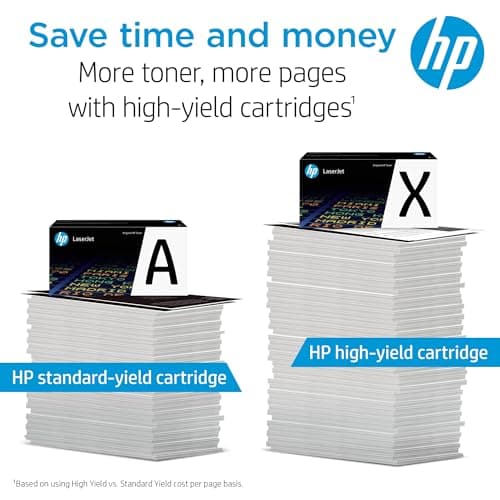
- HP 206X High-Yield Black Toner (W2110X) — if you print heavily (500+ pages per month), the high-yield version doubles the page count to around 3,150 pages. The upfront cost is higher but the cost-per-page drops meaningfully for power users.
- Compatible third-party black toner cartridge — for budget-conscious buyers who don't need HP firmware integration, several ISO-certified compatible cartridges work in the M255 and M283 series at a lower price point. Print quality can be close, but you trade the tamper-resistant chip and official HP support for savings.
FAQ
HP rates the W2110A at approximately 1,350 pages per ISO/IEC 19752 standards. Real-world yield varies based on page coverage — draft mode prints more pages, dense graphics fewer.
Final Verdict
The HP 206A Black Toner Cartridge does exactly what HP promises: consistent black output, reliable page tracking, and trouble-free compatibility with the Color LaserJet Pro M255 and M283 series. It's not the cheapest option on the shelf, and it won't be — genuine HP cartridges carry a real engineering premium. For anyone who values stable print quality, minimal downtime, and a cartridge that just works without firmware hiccups, this is money well spent. If you're watching every dollar on consumables and your printing volume justifies hunting for bargains, third-party options exist — but you'll be giving up something in the trade.