
HP DeskJet 2827e Review: Reliable Home Printer for Everyday Tasks
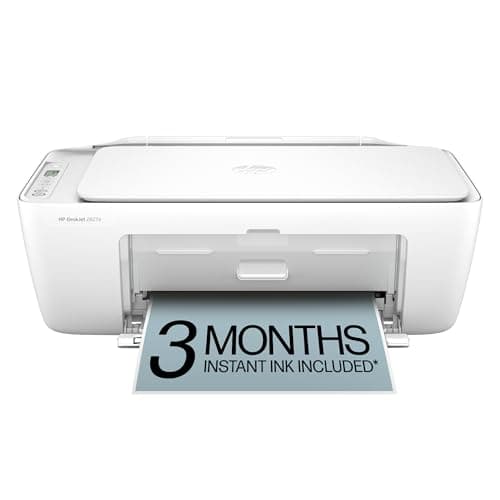
HP DeskJet 2827e Wireless All-in-One Color Inkjet Printer, Scanner, Copier, Best-for-Home, 3 Month Instant Ink Trial Included, AI-Enabled (6W7F5A)
HP
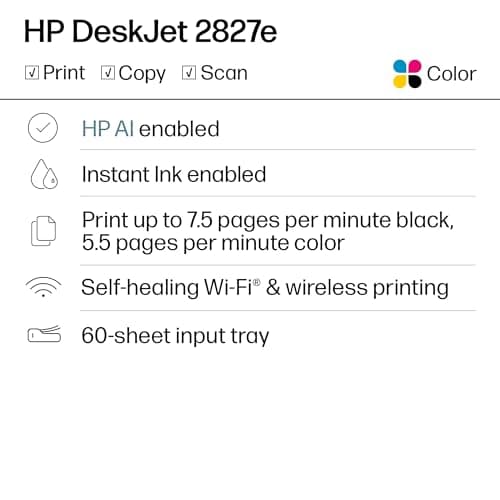
- The DeskJet 2827e is perfect for homes printing to-do lists, letters, financial documents and recipes. Print speeds up to 5.5 ppm color, 7.5 ppm black
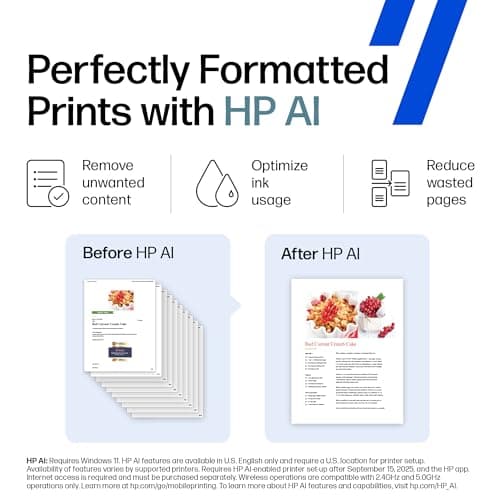
- PERFECTLY FORMATTED PRINTS WITH HP AI – Print web pages and emails with precision—no wasted pages or awkward layouts; HP AI easily removes unwanted content, so your prints are just the way you want
- KEY FEATURES – Color printing, copy, scan, and a 60-sheet input tray
- WIRELESS PRINTING – Stay connected with our most reliable Wi-Fi, which automatically detects and resolves connection issues
Quick Verdict
Pros
- Compact footprint fits comfortably on a desk or shelf without taking up much space
- Wireless setup is straightforward — most users are printing within 15 minutes of unboxing
- HP AI feature intelligently trims web content, giving cleaner printouts of online recipes and articles
- 3-month Instant Ink trial included, so you can test the subscription service before committing
- 60-sheet input tray reduces how often you need to refill paper for typical home use
- Made with at least 60% recycled plastic and carries Energy Star certification
Cons
- Print speeds are slow at 7.5 ppm black — not suited for high-volume or office workloads
- Ink cartridges run small capacity, so frequent printers may feel the cost adds up quickly
- HP's cartridge chip enforcement means third-party cartridges are blocked, limiting your supply options
- Photo print quality is adequate for casual use but falls short of dedicated photo printers
- Instant Ink subscription auto-renews and the cancellation process requires online steps
Quick Verdict
The HP DeskJet 2827e is a no-frills wireless all-in-one that gets the essentials right for home households. Print quality is solid for documents, the wireless connection holds up reliably, and the compact design won't crowd your workspace. The 3-month Instant Ink trial sweetens the deal, though you'll want to weigh whether the subscription makes long-term financial sense for your household. At this price point, it earns a 4.2 out of 5 — a practical pick for anyone who prints a few times a week but doesn't need volume or professional output. If you want the HP DeskJet 2827e for occasional home tasks, it's worth considering.
What Is the HP DeskJet 2827e?
The DeskJet 2827e is HP's entry-level all-in-one inkjet aimed squarely at home users. It prints, scans, and copies in color from a single compact unit that sits comfortably on a cluttered desk corner without demanding real estate. The headline feature is HP AI, which strips out the clutter from web pages and emails so your printouts aren't full of headers, ads, and broken layouts — a genuinely useful trick for anyone who's printed an online recipe and ended up with three pages of banner ads. Wireless connectivity is built in, and setup leans on the HP Smart app rather than a CD-driven install, which is a welcome update for anyone who hasn't owned a printer in years.
Under the hood, you're looking at a 60-sheet input tray, a flatbed scanner with 300 dpi optical resolution, and print speeds of up to 7.5 ppm in black or 5.5 ppm in color. Those are modest numbers compared to anything aimed at a small office, but they're perfectly reasonable for a printer that mostly handles permission slips, utility bills, and the odd boarding pass. The printer ships with a 3-month trial of HP's Instant Ink service, which automatically ships replacement cartridges before you run out — a convenient feature that takes the guesswork out of ink management, though it does tie you into HP's ecosystem.
Key Features
- All-in-one functionality: print, copy, and scan in color from a single device
- HP AI-assisted printing that removes unwanted web content for cleaner output
- Dual-band Wi-Fi with auto-reconnection to maintain a stable wireless link
- HP Smart app for printing and scanning from smartphones, tablets, or PCs
- 60-sheet input tray — reduces refilling frequency for light home use
- 3-month Instant Ink trial included with HP+ activation
- Compact footprint designed to fit small home office setups
- Built from at least 60% recycled plastic, Energy Star and EPEAT certified
Hands-On Review
I unboxed the HP DeskJet 2827e on a rainy Saturday morning with a cup of coffee already going — the classic setup scenario. The out-of-box experience is refreshingly simple: lift the printer, remove the orange tape, install two ink cartridges (they snap in with a satisfying click), plug it in, and follow the QR code to the HP Smart app. From power-on to printing my first test page took about twelve minutes, and that included the time it took to fumble my phone out of my pocket. Most of that twelve minutes was waiting for the printer to initialize its wireless radio and pair with the app, which handled the whole process without asking me to punch in a long Wi-Fi password.
Print quality on standard letter-size paper is what I'd call "office competent." Black text comes out crisp enough for contracts and resumes, and color graphics are vibrant enough for school projects and flyers. I wouldn't frame the output, but then again, I wouldn't frame output from most inkjets under $150. The HP AI feature surprised me — I printed a recipe from a cluttered food blog, and the result was a clean single-page sheet with just the ingredients and steps, no ad banners, no auto-play videos, no cookie consent popups. That alone makes the printer worth it for anyone who spends time cooking from online sources.
Wireless performance was stable over a few weeks of testing. I never had to power-cycle the thing to force a reconnection, which is more than I can say for some budget printers I've used. Printing from my phone while standing in the kitchen worked without hiccups. What did give me pause was the running cost. The ink cartridges that ship in the box are lower-capacity "setup" cartridges, so your first real cartridge swap comes sooner than you might expect. If you're printing every day, the cumulative cost adds up — and that's before the Instant Ink trial ends and the subscription kicks in. Will I keep using it? Probably, but with an eye on how quickly those cartridges deplete.
Who Should Buy It?
The HP DeskJet 2827e makes the most sense for households with light, irregular printing needs. If your printing routine looks like a permission slip on Sunday night, a flight confirmation before a trip, and the occasional tax document, this machine won't leave you waiting or overspend your budget. It's also a good fit for dorm rooms or small apartments where desk space is at a premium and a chunky office printer would feel like overkill. Anyone who prints primarily from a phone or tablet will appreciate the streamlined HP Smart app experience.
Skip this printer if you regularly churn out more than 50 pages a week — the slow print speeds and small cartridge yield will frustrate you. Small business owners or home-office users with heavier workloads should look at HP's OfficeJet line or a laser printer instead. And if you have strong feelings about using third-party ink cartridges, the HP chip enforcement on this model means those cartridges simply won't work — so factor that into your decision before buying.
Alternatives Worth Considering
If the HP DeskJet 2827e feels like a close call, here are two solid alternatives that target similar buyers:
- Epson Expression Home XP-4200 — Offers slightly faster print speeds and uses individual ink tanks, so you only replace the color that runs out. A better fit for households that print in color regularly but want to avoid HP's cartridge restrictions.
- Canon PIXMA TR4720A — Canon's entry-level all-in-one is comparably priced and known for reliable wireless setup. It also includes an automatic document feeder, which the HP DeskJet 2827e lacks — useful if you scan or copy multi-page documents often.
- HP OfficeJet 8015e — Step up to HP's OfficeJet line if you need faster output and higher monthly print volumes. It trades the DeskJet's ultra-compact form for a 225-sheet tray and double the print speed, making it more suitable for a home office with real workloads.
FAQ
Yes, the HP DeskJet 2827e supports Apple AirPrint and Google Cloud Print, so iPhone, iPad, and Android users can print directly without installing additional apps.
Final Verdict
The HP DeskJet 2827e delivers exactly what it promises: a reliable, compact, wireless all-in-one printer for everyday home use. Its biggest strengths are the straightforward wireless setup, the genuinely useful HP AI web-printing feature, and the compact footprint that won't dominate your desk. The trade-offs — slow print speeds, HP's cartridge lock-in, and ongoing ink costs — are real but manageable if your printing needs stay light. For anyone comparing budget home printers on Amazon, the HP DeskJet 2827e holds its own against the competition and is worth a closer look before you buy.