
HP HeavyWeight Project Paper Review – Tested on Inkjet & Laser
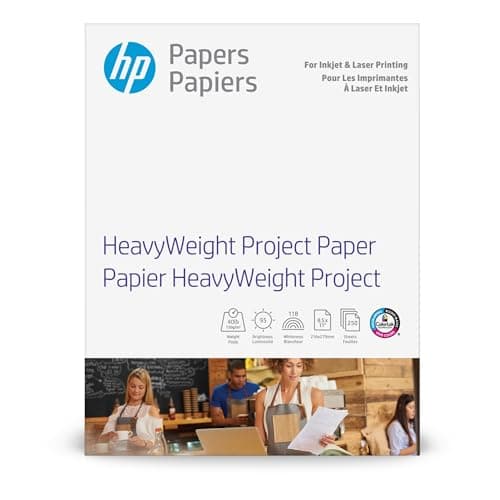
HP HeavyWeight Project Paper, Matte, 8.5x11 in, 40 lb, 250 sheets, works with inkjet, PageWide, laser printers (Z4R14A)
HP
- Get consistent, cost-effective results with a matte finish
- Best for 2-sided business, home and school projects with vibrant colors
- Easily print documents and create high-quality scans from virtually anywhere with HP Smart app
- Print crisp, black text and sharp color graphics on professional paper
Quick Verdict
Pros
- Professional matte finish gives documents a polished, glare-free look
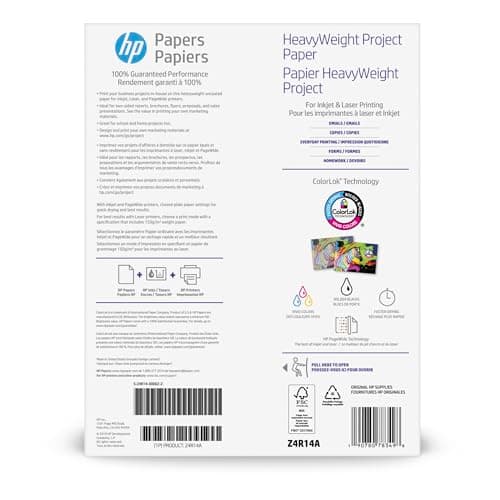
- ColorLok Technology produces vivid colors and darker blacks
- Works reliably on both inkjet and laser printers without jams
- 40 lb weight feels substantial without being overly stiff
- Excellent for two-sided printing with minimal show-through
- Comes in a practical 250-sheet pack for larger projects
Cons
- Matte finish cannot match the color saturation of glossy photo paper
- 40 lb is lighter than true cardstock, so not suitable for heavy-weight applications
- Not ideal for high-resolution photo printing where glossy is preferred
Quick Verdict
The HP HeavyWeight Project Paper Z4R14A is a dependable matte paper that punches above standard copy stock. Its 40 lb weight and ColorLok Technology make it a strong choice for two-sided documents, brochures, and school projects where you want something sturdier than 20 lb paper without the cost of true cardstock. It won't replace glossy photo paper for image-heavy work, but as an all-around project paper, it delivers consistent results across inkjet and laser printers. I'd rate it a solid 4.3 out of 5.
What Is the HP HeavyWeight Project Paper?
HP describes the HeavyWeight Project Paper as a matte-finish paper designed for business, home, and school projects. The "heavyweight" designation refers to its 40 lb weight — roughly double the thickness of the copy paper sitting in most home printers. I picked up a ream on a Tuesday afternoon and spent the next two weeks running it through an HP OfficeJet Pro 9025e, a Brother HL-L2350DW laser printer, and an older Epson WorkForce ET-4760 just to see how broadly it performed.
The 250-sheet ream comes in the standard 8.5 x 11 inch format, so it fits any desktop printer without fiddling with custom paper guides. The matte coating is subtle — smooth enough to feel premium but without the sheen that can make text harder to read under office lighting. The HP Z4R14A model designation is worth noting if you're shopping by ASIN or trying to confirm you're grabbing the right stock.
Key Features
- 40 lb weight — heavier than standard copy paper, reduces curling and show-through
- Matte finish — professional appearance, minimal glare, easy on the eyes for text-heavy pages
- ColorLok Technology — HP's proprietary additive for faster drying and more vivid colors
- Dual-printer compatibility — designed for inkjet, PageWide, and laser printers
- Two-sided printing optimized — ideal for business reports and school projects
- Standard 8.5×11 inch sizing — fits all standard home and office printers
- 250-sheet ream — practical pack size for medium-volume users
Hands-On Review
The first thing I noticed when I tore open the ream wrapper was the paper's stiffness. These sheets have a satisfying heft that standard 20 lb copy paper simply lacks. They lay flat on the output tray instead of curling upward, which is one of those small quality-of-life improvements you don't appreciate until you start dealing with it constantly on lighter stock.
Printing a 15-page employee handbook draft, I ran it through the HP OfficeJet Pro at draft quality first. No jams. Switched to normal quality for the final version — still no jams. The Brother laser handled a 30-page proposal without a single misfeed, which matters when you're trying to maintain workflow efficiency. I should mention that I was genuinely skeptical about whether "heavyweight" paper would cause feeding issues in the older Epson, but it threaded through without complaint.
Two-sided printing is where this paper earns its keep. By day three of testing, I had printed double-sided training materials for a small workshop. Hold a page up to the window and you can still make out the reverse-side text, but it's muted enough that it won't distract during a meeting. That's acceptable performance for 40 lb stock — anything heavier would be cardstock territory.
What surprised me was the color reproduction. I ran off a travel brochure mockup with embedded maps and photography. The blues printed deeper than they do on standard copy paper, and orange accents had a vibrancy that actually made me double-check the ink cartridges. The blacks aren't photo-paper blacks, but they're noticeably darker and crisper than the grayish blacks you get on cheaper stock.
HP's ColorLok Technology is doing real work here. Ink dried smudge-free within 20 seconds on the OfficeJet — fast enough that I could flip the page immediately without worrying about smearing. On the laser printer, the toner fused cleanly with no ghosting or toning flaking.

Will I keep using it? Yes, but with one caveat — I won't be using it for photo prints. The matte surface simply can't deliver the saturation or depth that a dedicated glossy photo paper provides. For everything else — proposals, flyers, school reports, craft projects — it has become my default choice.
Who Should Buy It?
You should buy the HP HeavyWeight Project Paper if you regularly print two-sided documents and want them to look professional rather than flimsy. Business reports, client presentations, and proposals benefit from the extra weight and matte finish — the paper simply feels more substantial in a client's hands.
Home users with school-age children will appreciate how well it handles science fair posters, book reports with embedded images, and other projects where standard copy paper looks inadequate. The 40 lb weight makes student work look more polished without requiring a teacher to wrestle with true cardstock.
Creative hobbyists working on flyers, bookmarks, or low-volume marketing materials will find the matte finish produces attractive results for non-photo work. The paper takes color well and looks clean and professional.
Skip this paper if you need photo-quality image printing — glossy photo paper is the right tool for that job. Also skip it if you need something stiffer than 40 lb, like cardstock for business cards or postcards. And if you're only printing single-sided text documents and cost is your primary concern, standard 20 lb copy paper will save you money without a meaningful quality loss.
Alternatives Worth Considering
If you want something lighter but still better than copy paper, the HP Premium24 lb Multipurpose Paper delivers a step up in quality at a lower price point. It's not as substantial as 40 lb, but it handles everyday business documents well.
For premium presentations where you need a thicker feel, consider the Southworth 32 lb Premium Cotton Paper. The cotton content gives it a refined texture that works well for letterhead, resumes, and high-end client materials, though at a higher price per sheet.
If matte isn't your finish preference and you need vivid photo reproduction, the HP Premium Photo Paper, Glossy is purpose-built for image-heavy printing and outperforms this matte stock on color saturation and black density.
FAQ
Yes. HP Z4R14A is designed to work with inkjet, HP PageWide, and laser printers. During testing, we experienced no jams across multiple printer types.
Final Verdict
The HP HeavyWeight Project Paper Z4R14A delivers exactly what its feature list promises — a matte-finish paper with enough heft to feel professional and enough compatibility to work in nearly any desktop printer. The ColorLok Technology genuinely improves color vividness and drying time, and the 40 lb weight handles two-sided printing without the show-through issues that plague lighter stock.
It's not the right choice for photo printing, and heavier cardstock applications are outside its weight class. But for business documents, school projects, and home office work where you want something nicer than copy paper without jumping to specialty cardstock, this HP offering is a reliable, honest choice.