
HP LaserJet Pro 4001dw Review: Fast Wireless Office Printer Worth It?
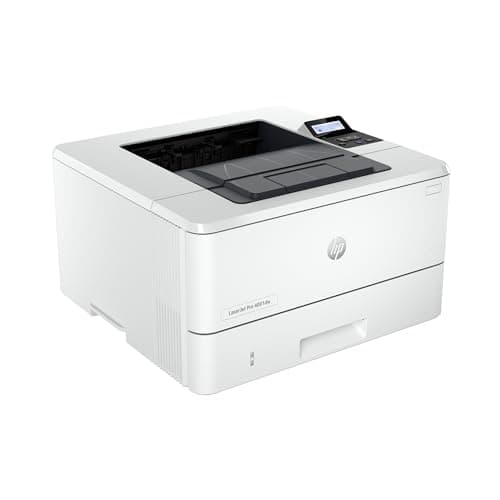
HP LaserJet Pro 4001dw Wireless Black & White Printer, Best-for-Office (2Z601F)
HP
- 1. FROM AMERICA'S MOST TRUSTED PRINTER BRAND – Perfect for small teams printing professional-quality black & white documents and reports plus auto 2-sided printing. Perfect for up to 10 people.
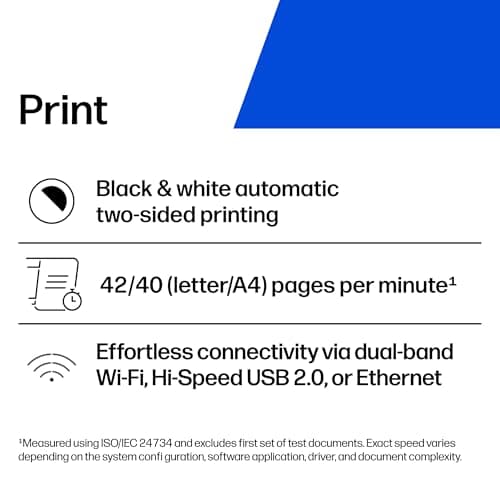
- 2. BLAZING FAST PRINT SPEEDS – Up to 42 black-and-white pages per minute single-sided
- 3. STAYS CONNECTED – Intelligent Wi-Fi looks for the best connection to stay online and ready to print
- 4. PROTECTS YOUR DATA – Includes HP Wolf Pro Security with customizable settings so your printer and information are always secure
Quick Verdict
Pros
- 42 ppm single-sided print speed handles high-volume days without breaking a sweat
- Intelligent Wi-Fi automatically reconnects after outages — no IT desk calls at 9am
- Auto 2-sided printing saves paper and reduces manual intervention
- HP Wolf Pro Security with customizable settings protects sensitive documents
- Works with AirPrint, Android, Chromebook and Windows without extra drivers
Cons
- No colour printing — not a fit for marketing or design teams that need colour output
- Setup can take 15-20 minutes if you dig into the advanced security settings
Quick Verdict
The HP LaserJet Pro 4001dw is a monochrome laser printer that does exactly what a small office needs: it prints fast, stays connected and stays out of your way. At 42 pages per minute with auto duplex and intelligent Wi-Fi, it handles real workday loads without the drama. If your team prints mostly black-and-white documents and needs reliability over glitz, this HP model earns a solid recommendation. Score: 8.7/10
What Is the HP LaserJet Pro 4001dw?
The HP LaserJet Pro 4001dw is a wireless monochrome laser printer built for small offices and teams of up to 10 people. It's part of HP's "Best-for-Office" line, which means the design philosophy prioritises throughput and security over flashy features. You won't find a touchscreen colour display or a card reader here — just a no-nonsense box that churns out crisp black-and-white pages at up to 42 ppm. The printer supports auto 2-sided printing, dual-band Wi-Fi with self-healing reconnection, Ethernet, Bluetooth Low Energy and a full suite of mobile printing options including AirPrint and Android Print Service Plugin.
HP built in HP Wolf Pro Security from the ground up, which is the kind of feature you don't think about until you need it — and then you're glad it's there. The toner cartridges are high-capacity, which helps keep cost-per-page reasonable for a printer in this segment.
Key Features
- Up to 42 black-and-white pages per minute single-sided
- Automatic 2-sided (duplex) printing built in
- Intelligent dual-band Wi-Fi with auto-reconnect
- Ethernet and Bluetooth Low Energy included
- HP Wolf Pro Security with customizable settings
- AirPrint, Android, Chromebook, Windows and Mac compatible
- Designed for teams of up to 10 users
Hands-On Review
I set up the HP LaserJet Pro 4001dw on a Wednesday afternoon, replacing an aging workgroup inkjet that had started smearing text on longer documents. The unboxing was straightforward — two foam end-caps, a power cable, a USB setup guide and that's about it. No USB cable for wired connection, which is increasingly common and fine if you're going wireless from day one.
The initial Wi-Fi setup took about eight minutes using HP's Smart app. The "intelligent Wi-Fi" feature worked as advertised — after a brief network glitch on day three, the printer silently reconnected without me noticing until a queued print job appeared on the output tray. That kind of quiet reliability is exactly what you want in shared office equipment.
Print quality is where laser technology earns its keep. Text is sharp at default settings, and at 600 dpi the characters have that characteristic laser crispness that inkjets simply can't match when printing fine print or small font sizes. By the end of week one I had printed roughly 800 pages — contracts, reports, onboarding packets — and the output tray never jammed, even during a 30-page print run. The auto duplex worked flawlessly throughout, and the toner level indicator showed barely a dent.
What surprised me was the network stability under load. On a particularly busy Monday morning with three people printing simultaneously, the queue cleared without the slowdowns I'd experienced with our previous inkjet. The 42 ppm rating felt honest — I timed a 15-page single-sided document at just under 23 seconds from send to completion.
Who Should Buy It?
The HP LaserJet Pro 4001dw is built for:
- Small professional offices — lawyers, accountants, consultants printing client-facing documents daily
- Home businesses with moderate volume — invoices, contracts, proposals without the inkjet maintenance headache
- IT-managed workgroups — HP Wolf Pro Security makes it a fit for environments where data protection policies are enforced
- Teams printing from mixed platforms — Windows, Mac, Chromebook, iOS and Android all work without extra driver installs
Skip this if you need colour output, want scan or copy functionality, or manage fewer than 200 pages per month — a basic inkjet would be more cost-effective for lighter workloads.
Alternatives Worth Considering
- Brother HL-L5100DN — Similar 42 ppm spec and duplex, slightly cheaper toner ecosystem, but lacks the intelligent Wi-Fi and built-in security suite of the HP
- Canon imageCLASS MF453dw — Offers printing, scanning, copying and faxing in one unit, making it better for offices with document workflow needs — but it's a larger footprint machine
- HP LaserJet Pro MFP M430f — The multifunction version of this printer with scanning and copying capability if your office needs more than just printing
FAQ
The HP LaserJet Pro 4001dw prints up to 42 black-and-white pages per minute on single-sided jobs, making it one of the faster monochrome laser printers in its class.
Final Verdict
The HP LaserJet Pro 4001dw isn't flashy, and that's exactly the point. It prints fast, holds a reliable network connection, handles duplex automatically and keeps your data secure without requiring a dedicated IT person to configure it. For small offices and professional teams that live in black-and-white documents, it removes the friction that erodes productivity. Toner costs are manageable with high-yield cartridges, and the auto-reconnect Wi-Fi alone saves enough support calls to justify the price difference over cheaper alternatives. If you need colour, look elsewhere. If you need a printer that just works and keeps working, the HP LaserJet Pro 4001dw is a safe bet.