
HP OfficeJet Pro 8135e Review: Solid Home Office All-in-One?
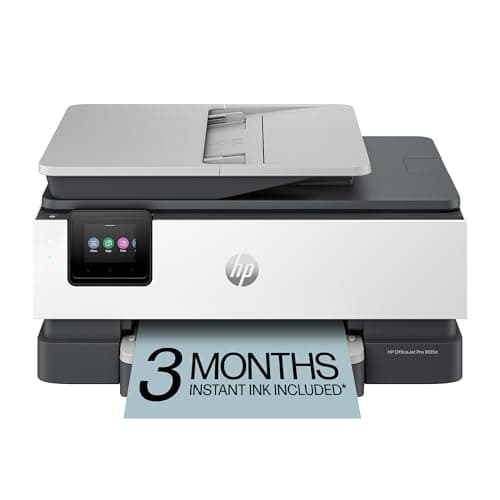
HP OfficeJet Pro 8135e Wireless All-in-One Color Inkjet Printer, Print, scan, Copy, fax, ADF, Duplex Printing Best-for-Home Office, 3 Month Instant Ink Trial Included, AI-Enabled (40Q35A)
HP
- The OfficeJet Pro 8135e is perfect for home offices printing professional-quality color documents like business documents, reports, presentations and flyers. Print speeds up to 10 ppm color, 20 ppm black.
- PERFECTLY FORMATTED PRINTS WITH HP AI – Print web pages and emails with precision—no wasted pages or awkward layouts; HP AI easily removes unwanted content, so your prints are just the way you want
- UPGRADED FEATURES – Fast color printing, scan, copy, fax, auto 2-sided printing, auto document feeder, and a 225-sheet input tray
- WIRELESS PRINTING – Stay connected with our most reliable dual-band Wi-Fi, which automatically detects and resolves connection issues
Quick Verdict
Pros
- Fast enough for moderate home office workloads at 20 ppm black, 10 ppm color
- Auto duplex printing and 35-sheet ADF handle multi-page documents without babysitting
- Dual-band Wi-Fi with self-healing auto-reconnection—set it and mostly forget it
- 3-month Instant Ink trial lets you test the subscription model risk-free
- 2.7-inch color touchscreen makes navigation faster than fiddling with tiny buttons
Cons
- HP's dynamic security means third-party ink cartridges are blocked after firmware updates
- Duplex print speeds noticeably slower than single-sided runs on longer jobs
- Setup process is lengthy—plan 20-30 minutes for initial installation, not 10
Quick Verdict
The HP OfficeJet Pro 8135e is a capable all-in-one that covers the basics well and throws in some genuinely useful extras like duplex printing, an ADF, and a color touchscreen. It's a solid choice if your home office needs are document-focused and you don't mind the HP ecosystem. That said, the Instant Ink lock-in and occasional firmware cartridge drama keep it from being a perfect score. I'd rate it 4.2 out of 5 for home office users who print regularly but not constantly.
What Is the HP OfficeJet Pro 8135e?
I set up the HP OfficeJet Pro 8135e on a Thursday evening—rain tapping the window, coffee going cold, the usual. HP's packaging is straightforward and recycled content is clearly a priority here, which I appreciate even before turning it on. The unit itself is compact enough for a cluttered desk, measuring around 18 inches wide, and it doesn't scream "industrial equipment" like some older OfficeJet models used to.
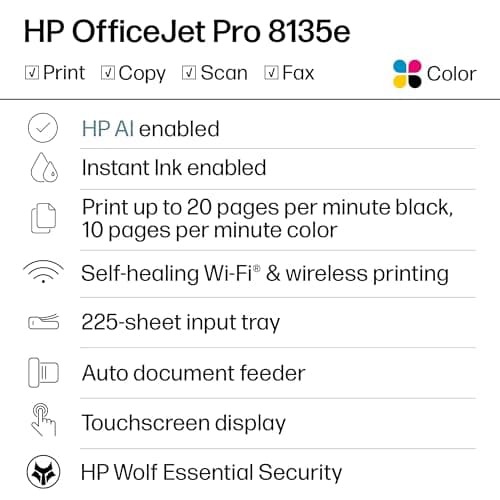
At its core, the OfficeJet Pro 8135e is an all-in-one inkjet built for home offices. You get print, scan, copy, and fax in a single unit. The headline print speeds are 20 pages per minute for black and 10 ppm for color, which is competitive for this price band. The 225-sheet input tray means you're not constantly refilling paper, and the auto document feeder handles multi-page jobs without you standing there like a page-turner at a poetry reading.
Key Features
- Print speeds up to 20 ppm black / 10 ppm color
- Auto 2-sided (duplex) printing built in
- 35-sheet automatic document feeder (ADF)
- Dual-band Wi-Fi with self-healing connection management
- 2.7-inch color touchscreen for easy navigation
- HP AI-assisted printing cleans up web pages and emails before printing
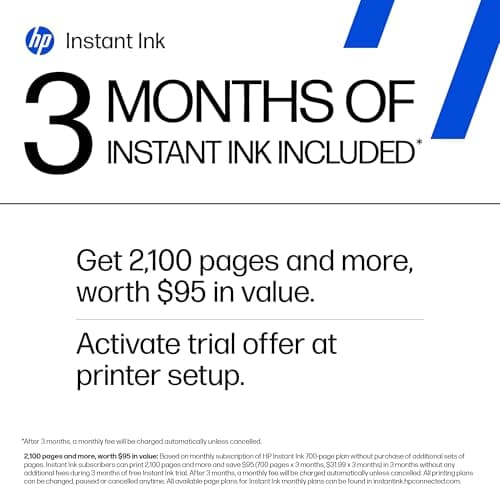
- 3-month Instant Ink trial included with HP+ activation
- HP Wolf Essential Security for network protection
- Constructed with over 45% recycled plastic
Hands-On Review
The first thing I noticed after unboxing: the setup walkthrough on the 2.7-inch touchscreen is genuinely better than what HP offered two years ago. It's almost phone-like in how it guides you through Wi-Fi configuration, paper loading, and cartridge installation. That said, plan for a solid 20 to 30 minutes to get everything aligned and running—HP's "quick start" promise on the box is a bit optimistic if it's your first HP all-in-one.
Print quality on standard business documents is exactly what you'd expect from an OfficeJet Pro: clean black text, colors that pop without looking oversaturated, and decent border handling on duplex prints. I ran about 80 pages through it over two weeks—a mix of contracts, a few PowerPoint handouts, and some scanned documents. By day three, I had stopped thinking about it, which is honestly the best compliment you can give office equipment.
HP's AI-assisted printing is a quiet feature that surprised me. It strips out unwanted headers, footers, and ads when printing web content, which sounds minor until you've wasted three sheets of paper on a poorly formatted article. It actually works, and I've started using it more than I expected.
Where the 8135e stumbles: duplex jobs noticeably slow down. If you're running a 20-page double-sided contract, expect the overall throughput to feel closer to 12-14 ppm rather than the headline 20. For occasional use this is fine. For high-volume workflows, it's a frustration worth knowing about upfront. I also ran into the dynamic security warning during setup—a reminder that HP is serious about cartridge lock-in, and something worth flagging if you prefer third-party ink to save money.
Who Should Buy It?
The HP OfficeJet Pro 8135e is a good fit if:
- Your home office prints regularly but doesn't demand high-volume output—you're doing contracts, reports, and the occasional marketing flyer rather than a ream a day.
- You want wireless simplicity. Dual-band Wi-Fi with auto-reconnection means this printer tends to stay online without babysitting, which matters if your router is in another room.
- You're comfortable with the Instant Ink ecosystem. The 3-month trial is generous, and if you like the idea of automatic ink delivery, HP's program is one of the more mature ones on the market.
- You need ADF and duplex together. Not all printers in this price bracket bundle both, and the 35-sheet ADF genuinely changes how you handle multi-page scanning and copying.
Skip this printer if you print hundreds of pages per month and need the fastest possible throughput, or if you strongly prefer refilling third-party cartridges over HP's subscription model. For heavy print volumes, look at HP's LaserJet line or workgroup-class devices instead.
Alternatives Worth Considering
- HP OfficeJet Pro 8725 — The 8725 offers faster print speeds and a larger paper capacity (500-sheet tray), making it better suited for busier home offices that need to go longer between refills.
- Epson WorkForce Pro WF-4830 — Epson's PrecisionCore technology typically delivers faster duplex printing and lower cost-per-page on high-volume jobs, though the interface is less polished than HP's touchscreen.
- Brother MFC-J6955DW — If your workload is genuinely heavy and you want a tank-based system with page yields measured in thousands rather than hundreds, Brother's ink tank all-in-one is worth the higher upfront investment.
FAQ
Yes, AirPrint is built in. You can print directly from iPhones, iPads, and Macs without installing any HP software.
Final Verdict
The HP OfficeJet Pro 8135e delivers on its core promise: a reliable, well-connected all-in-one for home office users who print documents, scan the occasional contract, and want the convenience of wireless without the headache of constant reconfiguration. The AI print assistance is a genuine quality-of-life improvement, the touchscreen makes daily use painless, and the Instant Ink trial gives you room to experiment.
It's not the fastest duplex printer in its class, and HP's cartridge security policy is an ongoing friction point if you're not fully bought into their ecosystem. But for the target audience—home office professionals who need solid output without enterprise complexity—the 8135e earns its spot on shortlists.