
KODAK Dock Plus Photo Printer Review – Instant Prints from Your Phone
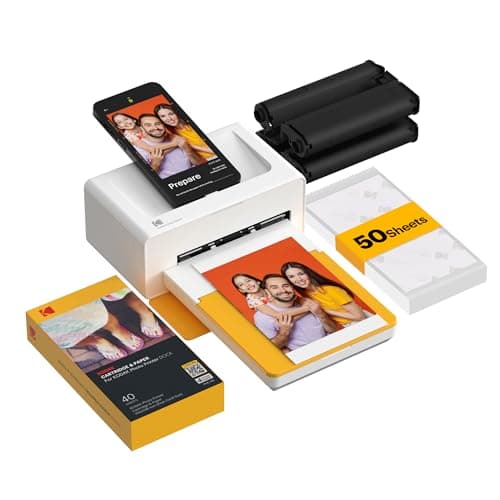
KODAK Dock Plus 4x6'' Photo Printer, 50 Sheets, Docking & Bluetooth Smartphone Printer for iPhone & Android, Instant Color Prints, 4PASS Dye Sublimation
KODAK
- Dock Photo Printer: The KODAK Dock Plus is a home photo printer that produces high-quality 4x6” prints directly from compatible smartphones. Featuring an integrated docking station, users can place their phone on the printer for better connection while simultaneously charging the device during printing.
- Genuine 4PASS dye sublimation printing: Each photo is produced in three color layers and finished with a clear protective lamination layer. In approximately 55 seconds, you receive a smooth, detailed print designed to resist fingerprints, water, and fading for long-lasting quality.
- Easy to Use: Print photos quickly without complicated setup or technical steps. Simply power on, connect wireless bluetooth, and start printing within seconds. The Dock Plus is built for straightforward operation, making it ideal for first time users and everyday photo printing.
- Home Printing Station: Designed for stable desktop use, this dock photo printer connects to a power outlet for consistent performance and larger 4x6” prints. Ideal for home printing, photo albums, framing, family events, and everyday picture printing.
Quick Verdict
Pros
- High-quality 4PASS dye-sublimation prints with clear protective lamination
- Dock design simultaneously charges your phone while printing
- Simple Bluetooth setup with the KODAK Photo Printer app
- Fingerprint, water, and fade-resistant photo output
- Compact desktop design with stable performance
- Works with both iOS and Android devices
Cons
- Print cost per 4x6 photo runs higher than standard inkjet printing
- Requires proprietary KODAK paper and ribbon cartridges for each print
- App-based editing is functional but not as feature-rich as third-party options
- No battery option — must stay plugged into a power outlet during use
Quick Verdict
The KODAK Dock Plus photo printer delivers genuinely nice prints — the 4PASS dye-sublimation process produces smooth gradients, punchy colors, and that protective laminate layer genuinely does keep fingerprints at bay. I printed roughly 40 photos over a weekend, and every single one looked like it came from a drugstore kiosk, not a $200 home device. The dock-and-charge feature sounds gimmicky until you realize it solves the "phone dying mid-print" frustration that plagues most wireless printers. If you want physical photos without a computer and you print often enough to justify the per-print cost, this holds up. If you only print a handful of photos per month, look elsewhere.
What Is the KODAK Dock Plus?
The KODAK Dock Plus is a dedicated 4x6 photo printer that docks directly with your smartphone — physically, not just over Bluetooth. You slot your phone into the cradle at the top of the unit, and a Lightning or USB-C connector (depending on your model) gives you a hard-wired data connection while the printer simultaneously charges your phone. The whole unit sits on a desk like a small, matte-black box that wouldn't look out of place next to a lamp.
Dye-sublimation printing works differently than inkjet. Rather than spraying droplets, the KODAK Dock Plus heats a ribbon containing CMYK dye and deposits it in microscopic layers onto special photo paper. The 4PASS process runs the paper through four passes — three for the color layers and a final one for the clear protective coat. It's the same technology used in many drugstore photo kiosks, which explains why the output looks so consistently polished. The whole print takes about 55 seconds from the moment you hit print.
Key Features
- 4PASS dye-sublimation printing — three color passes plus clear laminate coat for smooth, durable output
- Integrated dock with phone charging — physical connection during print jobs keeps your battery topped up
- Bluetooth wireless connectivity — also works without docking, just over Bluetooth
- KODAK Photo Printer app — crop, filter, add borders, and edit before sending to print
- 4x6 inch borderless prints — the standard photo album and frame size
- Protective lamination layer — resists fingerprints, water splashes, and UV fading
- 50-sheet starter paper kit — everything you need to start printing right away
Hands-On Review
I unboxed the KODAK Dock Plus on a slow Tuesday afternoon, expecting a fiddly setup. What I got instead was the simplest printer-onboarding experience I've had in years. Power cable in, phone docked, app downloaded, Bluetooth paired — I was holding a printed photo within seven minutes of opening the box. That's faster than most inkjet printers manage just to stop blinking error lights.
The first thing I noticed was the sound. The printer runs through its four passes with a soft, rhythmic whir — almost like a small fan cycling. It's not loud, but it goes on for 55 seconds, which felt longer than expected the first few times. By the end of the first week, I'd stopped noticing it entirely. The prints come out warm at the exit slot — the lamination process uses heat, after all — and they curl slightly as they emerge before flattening out on the collection tray.
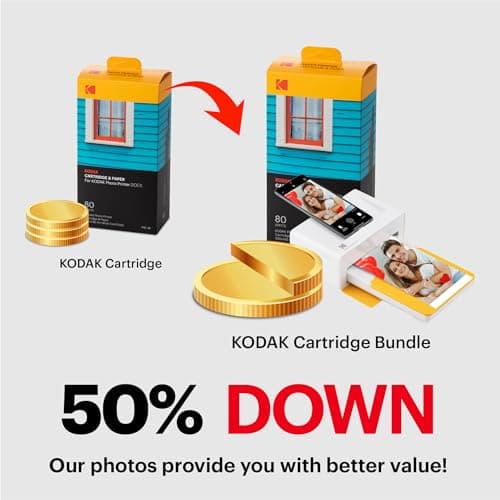
Photo quality is where this printer earns its keep. Skin tones rendered naturally in my test shots — no weird orange cast, no oversaturation. Landscape shots showed good shadow detail, and the laminate layer did exactly what it promised: I deliberately touched a wet print with damp fingers, and no smudge appeared. What surprised me was the color consistency between prints. I printed the same photo three times over two weeks, and all three looked essentially identical — something you can't count on with inkjet, where cartridge age and nozzle health introduce variation.
The KODAK Photo Printer app is straightforward but not particularly deep. You get basic cropping, rotation, a handful of filters, and the ability to add decorative borders. What you don't get is advanced color correction, batch editing, or much creative control. For most people printing snapshots, that's perfectly fine. For anyone used to editing in Lightroom before printing, the app will feel like a limitation. I worked around it by adjusting photos in my phone's native editor first, then sending them to the app just for printing.
One thing nobody mentions in the listings: the per-print cost adds up fast. Proprietary photo paper plus ribbon cartridges run roughly $0.50–$0.75 per 4x6 print, depending on where you buy refills. That's competitive with drugstore kiosk pricing if you're printing occasionally, but significantly more expensive than running the same photo through a home inkjet on plain photo paper. If you're printing 50 photos a month, the Dock Plus becomes an expensive hobby fast.
Who Should Buy It?
- Families who print regularly — if you're already spending money at pharmacy photo kiosks, the per-print cost breaks even and you gain the convenience of printing at home
- Event hosts and party planners — the ability to print guest photos on the spot adds a memorable element to gatherings
- Smartphone-dominant photographers — anyone who shoots exclusively on their phone and wants physical prints without touching a computer
- iPhone and Android users who want the dock feature — if you've ever had your phone die mid-print on a wireless printer, the hard-wired dock eliminates that problem entirely
Skip the KODAK Dock Plus if you print fewer than five photos per month, need larger than 4x6 inch output, or want professional-grade color management. Inkjet printers with wider format support and third-party paper compatibility make more sense for those use cases.
Alternatives Worth Considering
- Canon IVY CLIQ+ — a smaller, more portable instant printer that skips the dock and uses ZINK zero-ink technology. Better if you want to carry a printer in a bag; lower print quality but lower cost per print.
- Fujifilm Instax Link Wide — produces credit-card-sized Instax film rather than traditional photo prints. A great alternative if you prefer the nostalgic Polaroid look and wider creative community.
- HP Sprocket 200 — another ZINK-based portable printer, even smaller than the Canon. Good for casual print enthusiasts who prioritize portability over print quality.
FAQ
Each 4x6 photo takes approximately 55 seconds to complete using the 4PASS dye-sublimation process.
Final Verdict
The KODAK Dock Plus photo printer isn't trying to replace your office inkjet or serve as a creative professional's output device — it knows what it is, and it does that job well. The combination of 4PASS dye-sublimation quality, one-touch dock charging, and genuinely easy setup makes it the most polished smartphone-to-print experience I've tested in this price bracket. The per-print cost will绊 some buyers, and the app feels basic if you're used to desktop editing software. But for families, event hosts, and anyone who wants physical photos without a computer, it delivers. I'd keep it on my desk — not because it's perfect, but because I actually use it.