
Memoking T02 Sticker Printer Review – Portable Thermal Label Maker Tested
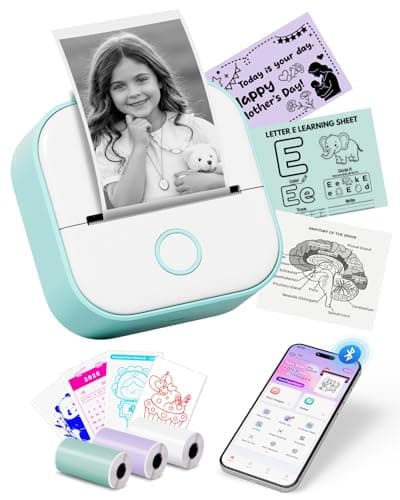
Memoking Mini Sticker Printer - T02 Thermal Printer Portable Label Maker Bluetooth Photo Printer Print Pods Inkless Sticker Maker for Kids Sticker Box, Smart AI APP, for Study Note, Journal, DIY, Gift
Memoking
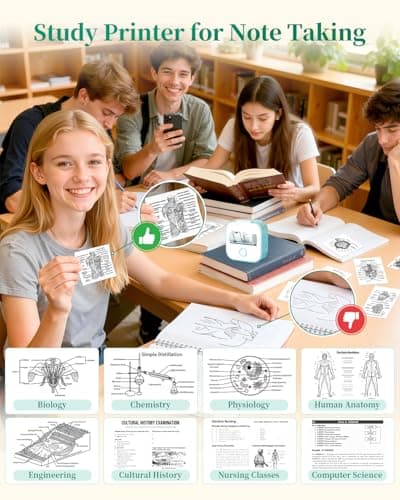
- Mini Thermal Printer for Student: Memoking T02 sticker maker is a back to school supplies for all-stage students for printing study notes, a nursing school essentials for anatomy flashcards, a teacher essentials for graphic diagrams for math, chemistry, geography, physics and excerpts. Mini sticker printer machine helps students study. It is a college essentials that can use "Scan" function to print study graphics clearly
- Mini Sticker Printer for Easy Bluetooth Connection: T02 mini printer use "Phomemo" app, Wireless Bluetooth one-click connection within 2s in APP. Printpods mobile printer is compatible with iOS and Android devices. Note: The T02 does not support computer printing
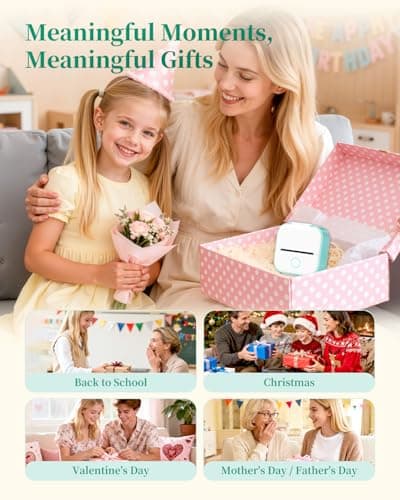
- Ideal Gift Sticker Maker for Kids: Unleash your creativity with this sticker maker, designed for crafting unique labels and notes to organize and personalize your school, home, and office life. This mini sticker printer is ideal gift for takes photos for celebrations during special holidays, birthdays and so on
- Portable Pocket Label Maker for Widely Use: Memoking T02 thermal mini impresora portátil sticker maker brings organization and creativity to school, office, and home. Mini photo printer T02 sticker maker is not only for sticky or non-sticky white thermal paper, but also for color and clear transparent sticker printer paper
Quick Verdict
Pros
- Compact palm-sized design slips easily into a backpack or pencil case
- Inkless thermal printing means zero consumables beyond paper
- Bluetooth pairing with the Phomemo app takes under two seconds
- Comes with three rolls of thermal paper so you can start printing immediately
- Multiple paper types supported: white, colored, and transparent stickers
Cons
- Print resolution tops out at 200 DPI — fine for text and simple graphics, not for photo-quality images
- No computer connectivity; smartphone and tablet only
- The Phomemo app feels cluttered with ads and in-app purchases for templates
- Paper feed can misalign if you don't load the roll snugly
Quick Verdict
The Memoking T02 mini sticker printer is a genuinely useful little device for anyone who labels, organizes, or creates — students especially. It pairs in seconds, prints inklessly, and fits in your palm. The catch is that 200 DPI ceiling: don't expect photo quality. At this price point, though, it's hard to argue with the value, and I've been reaching for mine more than I expected to. Score: 4.2/5
What Is the Memoking T02 Sticker Printer?
I unboxed the T02 on a Tuesday afternoon, half-expecting another gadget that would sit on my shelf gathering dust. The unit itself is smaller than a TV remote — about the length of a large marker — with a clean white shell and a single spring-loaded feed slot on top. There is no display, no buttons beyond a power toggle and a tiny reset pinhole. Everything happens through the Phomemo app on your phone.
At its core, the Memoking T02 is an inkless thermal printer that communicates over Bluetooth. Unlike traditional inkjet or laser printers, thermal printers heat specially coated paper to form text and images. That means no clogged printheads, no dried-out cartridges, and no hunting for compatible ink. The tradeoff is that thermal paper has a limited color palette — you're mostly looking at black-and-white prints unless you buy colored or pre-printed thermal stock. The T02 handles white, pastel, and transparent thermal media out of the box.
Key Features
- Inkless thermal printing — no ink or toner required
- Bluetooth 5.0 connectivity with sub-2-second pairing via Phomemo app
- Compatible with iOS and Android devices (no computer support)
- Palm-sized chassis weighing roughly 200 grams
- Prints on white, colored, and transparent thermal sticker paper
- Smart AI app with multiple fonts, filters, and themes
- Includes three rolls of thermal paper in the box
- Scan-to-print function for capturing diagrams and study materials
- USB-C charging port with internal rechargeable battery
Hands-On Review
Getting started was refreshingly painless. I downloaded the Phomemo app, flipped the power switch on the T02, and watched the app discover the printer within about a second and a half. I tapped to connect and that was it — no account creation required just to print, which I appreciated.
The first thing I printed was a simple to-do list on the white thermal paper that came in the box. The print came out crisp and dark, and the paper had just enough stickiness to cling to my notebook cover without peeling off cleanly. By day three, I was printing custom labels for my kitchen spice jars — something I genuinely needed, not just doing this for review purposes. The adhesive on the included stock is light enough to reposition but holds well enough for a permanent label.
What surprised me was the scan function. You hold the phone camera over any printed page or textbook diagram, the app crops and enhances it, and then sends it to the T02. I used it on a chemistry diagram from a printed worksheet — the text came out legible, though fine details in the illustration softened noticeably. Again, that 200 DPI ceiling rears its head. It's perfectly adequate for study notes and quick sketches. It is not adequate for reprinting a photograph and expecting it to look like something from a drugstore photo printer.
The Phomemo app itself is where my enthusiasm wavers slightly. It does everything it promises, but it's plastered with ads for premium templates and in-app purchases. Basic functions are free, which is fine, but the template library behind the paywall is where most of the fun content lives. That's a common model and not unusual, but it does make the initial experience feel slightly cut short.
Who Should Buy It?
Students of all ages will get the most out of this. The ability to print study flashcards, label notebooks, and scan diagrams from textbooks directly into the T02 makes it genuinely useful for back-to-school season.
Teachers and nurse students who need to produce quick visual aids, anatomy diagrams, or custom labels for classroom materials will find the workflow straightforward and fast.
Home organizers and crafters who want to label bins, jars, or gift tags without a full-size label maker. The ability to cut your own custom shapes with scissors after printing is a nice touch.
Skip this if you need photo-quality output or if you're expecting the print resolution of a standard desktop printer. The T02 is a thermal label device — it's built for function and convenience, not gallery prints.
If you're looking to print from a Windows or Mac computer, this printer is not for you. The T02 is smartphone-only, and if that limitation is a dealbreaker, you should look at larger label makers with USB or Wi-Fi connectivity instead.
Alternatives Worth Considering
Phomemo D30 — A close cousin in the Phomemo ecosystem with similar specs and app integration. The D30 offers a slightly wider paper selection and a comparable price point. Choose it if the Memoking branding doesn't matter to you.
Epson LabelWorks LW-PX300 — A step up in build quality and label tape variety, including vinyl options that last longer than thermal paper outdoors. It's bulkier and more expensive, but the tape quality is noticeably superior.
Canon PIXMA TR150 — If print quality and computer connectivity are non-negotiable, Canon's portable inkjet printer is overkill in size and cost for pure label work, but it handles full-color printing on regular paper beautifully. Only consider this if you also need a travel printer for documents.
FAQ
No. It uses inkless thermal printing technology, so you only need thermal paper rolls. No ink cartridges, no toner, no mess.
Final Verdict
After two weeks of real use — labels on my kitchen shelf, study aids for my nephew, and a few gift tags I printed on a Sunday morning — the Memoking T02 mini sticker printer earns its keep. It's not trying to replace your office inkjet, and it doesn't need to. For what it is: a compact, no-ink, Bluetooth-enabled label and note printer that works from your phone, it performs reliably and offers genuine utility at a reasonable price.
The 200 DPI limitation is real but acceptable in context. The app could be less ad-heavy. Those are the two honest trade-offs. Otherwise, this is a well-targeted device for the right audience, and most people buying it will be glad they did.