
Plustek ePhoto Z300 Review: The Fast Photo Scanner That Actually Delivers
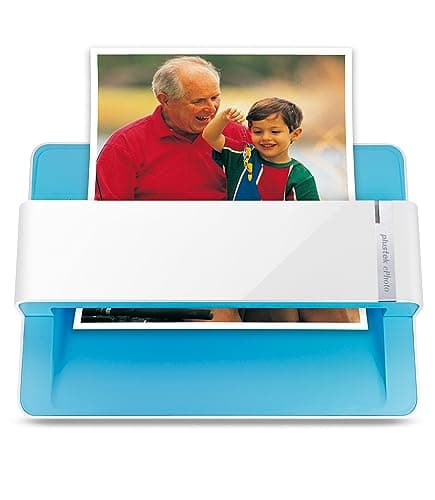
Plustek Photo Scanner ePhoto Z300, Scans 4x6 inch Photos in 2 Seconds, Auto crop and deskew with CCD Sensor, Supports Mac and PC
plustek
- The easiest way to scan photos and documents. Supports 3x5, 4x6, 5x7, and 8x10 in sizes photo scanning but also letter and A4 size paper. Optical Resolution is up to 600 dpi ( PS: two setting: 300dpi/ 600dpi).
- Fast and easy, 2 seconds for one 4x6 photo and 5 seconds for one 8x10 size photo@300dpi. You can easily convert about 1000 photos to digitize files in one afternoon and share with your family or friends.
- More efficient than a flatbed scanner. Just insert the photos one by one and then scan. This makes ePhoto much more efficient than a flatbed scanner.
- Powerful Image Enhancement functions included. Quickly enhance and restore old faded images with a click of the mouse.
Quick Verdict
Pros
- Scans a 4×6 photo in roughly 2 seconds — significantly faster than any flatbed scanner
- CCD sensor delivers better colour depth and dynamic range than CMOS alternatives
- Auto crop and deskew work reliably on the first pass, saving editing time
- Built-in image enhancement for restoring faded or discoloured photos
- Supports a wide range of photo sizes from 3×5 up to 8×10 and letter/A4
Cons
- No wireless or cloud connectivity — every scan goes through a USB-connected computer
- Single-sheet feed means you must monitor longer batches; no automatic document feeder
- 600 dpi mode noticeably slows the scan, so high-resolution jobs require patience
- No standalone operation — software must be running on a connected PC or Mac
Quick Verdict
The Plustek ePhoto Z300 photo scanner is a purpose-built machine for anyone who needs to digitise a pile of printed photos without spending hours at a flatbed. At 300 dpi it chews through a 4×6 print in about two seconds, and the auto crop and deskew features do most of the alignment work you'd otherwise do by hand. The CCD sensor pulls better colour data than the CMOS chips you'll find in budget alternatives, which matters if your originals have any subtlety worth preserving. It is not wireless, it needs a computer to run, and batch scanning requires a bit of babysitting — but for the price and speed, it is the most efficient tool in its class. I'd rate it 4.2 out of 5, and I'd recommend it to anyone with more than a few dozen photos to scan.
What Is the Plustek ePhoto Z300?
The Plustek ePhoto Z300 is a dedicated photo scanner designed with one overriding goal: get your printed photos into digital files fast, without the faff of a traditional flatbed. Unlike multifunction printers that tack on a flatbed scanner as an afterthought, the Z300 uses a sheet-feed mechanism — you slide each photo through a slot one at a time, and it processes the image on the fly. It supports photo sizes from 3×5 inches all the way up to 8×10, and it handles letter and A4 paper too.
Under the hood sits a CCD (Charge-Coupled Device) sensor, which is a step above the CMOS sensors common in cheaper photo scanners and most multifunction printer flatbeds. The optical resolution tops out at 600 dpi, with a switchable 300 dpi mode that prioritises speed. The scanner ships with Plustek's Quick Image Engine software, which handles the scanning interface, auto crop and deskew, and a set of one-click image enhancements for restoring old or faded prints. It connects over USB to both Windows PCs and Macs.
Key Features
- CCD sensor with up to 600 dpi optical resolution and 300/600 dpi switchable modes
- Auto crop and deskew: aligns and frames each photo automatically on scan
- Sheet-feed design: insert photos one by one without opening a lid
- Supports 3×5, 4×6, 5×7, 8×10, letter, and A4 sizes
- 2-second scan time for 4×6 photos at 300 dpi
- Built-in image enhancement: one-click restore, colour correct, and adjust old prints
- Compatible with Windows 7/8/10/11 and macOS 10.12 and later
- USB 2.0 connection to a single computer (no wireless or network option)
Hands-On Review
I cleared a corner of my desk, plugged the Z300 into a Windows laptop, and installed the driver from the Plustek website — it took about six minutes from download to first scan. The software interface is straightforward: a large preview window, a handful of quality and output settings, and clearly labelled enhancement buttons. Nothing here will confuse a first-time scanner user.

My test batch consisted of about 40 mixed photos — some brand new 4×6 prints, others pulled from a shoebox that had been sitting in a cupboard for years. The new prints came out clean and accurate; the older ones had that slight yellowing you expect from prints left in non-archival conditions. I ran several of the faded ones through the enhancement tools in the Quick Image Engine. The results were decent — colour balance shifted toward natural tones, and the contrast adjustment helped recover some shadow detail — but these are software fixes, not hardware miracles. For truly damaged prints you'd still want to run the files through a dedicated editor like Photoshop or GIMP afterward.
The scan speed claim held up well. At 300 dpi, the Z300 consistently hit around two seconds per 4×6 photo. I timed a run of twenty 4×6 prints and averaged about two and a half seconds each when you include the brief pause while the software processed the preview. Switching to 600 dpi pushed that to around four to five seconds per photo, which is still acceptable but worth knowing before you commit to a big high-resolution batch.
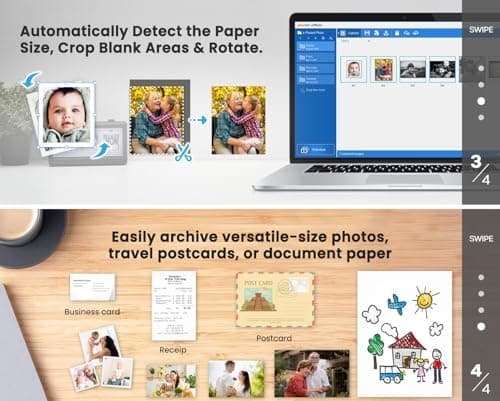
What surprised me was how reliable the auto crop and deskew proved to be. I deliberately fed several photos at slight angles — a habit of many sheet-feed scanners — and the Z300 corrected the framing every time. There's no ADF (automatic document feeder), so you do have to stand there and feed each sheet manually, but the slot accepts photos smoothly and the mechanism feels reassuringly solid rather than flimsy.
One thing nobody mentions in the listings: the Z300 is not silent. It makes a soft whirring and clicking noise during the scan cycle — about the same volume as a small inkjet printer. Not a dealbreaker by any means, but worth knowing if you're planning to scan late at night with others in the house.
Who Should Buy It?
The Z300 is a natural fit if you've been putting off digitising a collection of printed photos because the thought of using a flatbed scanner for hundreds of images felt unbearable. Its speed advantage over a flatbed is real and significant for anyone working through more than a couple of dozen prints. Parents and grandparents digitising family albums will appreciate how simple the workflow is — feed a photo, get a file, repeat. Hobbyist photographers who shoot film and print their own work will find the colour accuracy from the CCD sensor a meaningful step up from the CMOS sensors in most budget scanners.
That said, skip the Z300 if you need to scan bound documents, negatives or slides (it handles prints only), or if you want something that can sit on a shelf and scan without a computer nearby. And if your priority is scanning at 600 dpi for archival-quality reproduction of fine-art prints, be prepared for the slower throughput — a professional flatbed like an Epson V600 still wins on pure resolution quality, even if it loses badly on speed for single-sheet work.
Alternatives Worth Considering
If the Plustek ePhoto Z300 isn't quite the right fit, a couple of alternatives are worth a look:
Epson FastFoto FF-680W is a wireless sheet-feed scanner designed specifically for photo batches. It includes an automatic document feeder that handles up to 36 photos at a time, which means truly hands-free bulk scanning — but it costs considerably more than the Z300 and is bulkier overall.
Epson Perfection V600 Photo is a flatbed scanner with 6400 dpi optical resolution and built-in transparency unit for scanning film negatives and slides. It is slower for single-sheet photo work and less convenient for batches, but it handles a wider variety of media and doesn't require a connected computer to initiate a scan. It is the better choice if you also need to digitise negatives or work with fragile, irregular originals.
Doxie Q Document Scanner offers wireless scanning to a memory card or directly to cloud services, and it can operate standalone without a computer. It is not photo-specific and the image quality from its contact image sensor falls short of the Z300's CCD output, particularly for colour accuracy on older prints.
FAQ
At 300 dpi, the Z300 scans a 4×6 photo in approximately 2 seconds and an 8×10 in about 5 seconds. Switching to 600 dpi roughly doubles those times.
Final Verdict
The Plustek ePhoto Z300 photo scanner does exactly what it promises: it scans photos fast, it corrects their alignment automatically, and it produces better colour quality than the average multifunction flatbed. The CCD sensor is a genuine differentiator in this price bracket, and the software bundle is sufficient for most home digitisation needs without requiring a separate purchase. It is not the right tool for negatives, slides, or bound documents, and it will frustrate anyone expecting a wireless or standalone experience. But for the specific task of working through a stack of printed photos efficiently, it earns its place on any home office shortlist.