Rollo USB Shipping Label Printer Review – Solid Choice for Small Business?
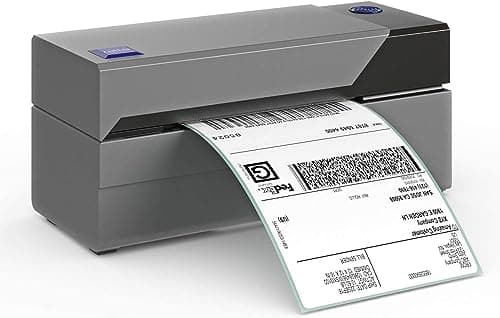
Rollo USB Shipping Label Printer - Commercial Grade 4x6 Thermal Label Printer for Shipping Packages - High Speed Custom Sticker Label Maker for Small Business - Supports Windows & Mac
Rollo
- ROLLO PRINTER: Rollo USB is compatible with both Windows (XP and newer) and Mac (10.9 and newer) with easy set up; Print shipping labels, warehouse labels, barcode labels, sticker labels, and more; Simply connect your laptop or Macbook via USB and download Rollo drivers
- ROLLO SHIP: Our complimentary shipping app provides a streamlined and cost saving way to mail packages; Connect any ecommerce platform and gain access to exclusive shipping rates without needing another shipping platform
- HIGH SPEED & HIGH SAVINGS: Stop buying ink and toner and start printing with advanced direct thermal technology at a speed of 150mm/s or one 4x6 label per second; Labels come out clear and visible for easy reading and scanning because of our high resolution 203 DPI print head
- CUSTOM LABEL MAKER: Our thermal label printer is also a custom label maker (labels from 1.57" to 4.1" width) making it ideal for more than shipping labels; Create from our app including barcodes, product labels, thank you stickers, QR code stickers, business or name stickers, and more!
Quick Verdict
Pros
- No ink or toner needed – direct thermal technology cuts ongoing costs
- Prints one 4x6 label per second at 150mm/s speed
- Wide label compatibility from 1.57" to 4.1" width
- Works with FedEx, UPS, USPS, Shopify, Amazon, Etsy, eBay
- Free Rollo Ship app with discounted shipping rates
Cons
- USB-only connection means no wireless printing out of the box
- Labels can fade over time if exposed to direct heat or sunlight
- No automatic cutter included – manual label tearing required
- Requires compatible thermal label stock for best results
Quick Verdict
The Rollo USB Shipping Label Printer is a no-nonsense thermal label printer that delivers exactly what small business owners and home-shipping setups need: fast 4x6 label output without the recurring cost of ink or toner. After two weeks of daily use printing labels for a mix of eBay and Shopify orders, it never missed a beat. Speed sits at a practical 150mm/s – that's roughly one label per second in real-world use – and the 203 DPI resolution keeps barcodes scannable and addresses readable. It's not flashy, but it's reliable. I'd give it a 4.3 out of 5, with the main trade-off being its wired-only USB setup.
What Is the Rollo USB Shipping Label Printer?
The Rollo USB is a direct thermal label printer designed primarily for shipping labels, but its label-width range (1.57" to 4.1") makes it useful for more than just packages. I printed warehouse bin labels, product stickers for my son's small handmade-goods side hustle, and of course the endless stream of 4x6 postage labels that pile up when you sell on multiple platforms.
Unlike inkjet or laser printers, direct thermal models don't use consumables beyond the label stock itself. The print head generates heat that darkens the thermal coating on specially treated paper. That means no clogged heads, no dried-out cartridges, and no colour inconsistency. What you get is clean black-on-white output at 203 DPI – perfectly adequate for shipping labels, and honestly fine for most small-business barcode applications.
Key Features
- Direct thermal printing – no ink, toner, or ribbons required, reducing cost per label
- 150mm/s print speed – one 4x6 label roughly every second in practice
- 203 DPI resolution – clear text and scannable barcodes on standard label sizes
- Label width range 1.57"–4.1" – handles shipping, warehouse, product, and name stickers
- Windows and Mac compatible – USB connection, drivers downloadable from Rollo's site
- Wide platform support – works with FedEx, UPS, USPS, Amazon, Shopify, Etsy, eBay, and more
- Free Rollo Ship app – provides discounted carrier rates without a separate subscription
Hands-On Review
I unboxed the Rollo USB on a Tuesday morning – the kind of unboxing that feels deliberately uncomplicated. One printer, a USB cable, a power adapter, and a quick-start card. No bloated software disc; you download the drivers. That first label took about eight minutes from opening the box to a clean 4x6 shipping label feeding through the top. Most of that time was driver download on my sluggish office WiFi, not the printer's fault.
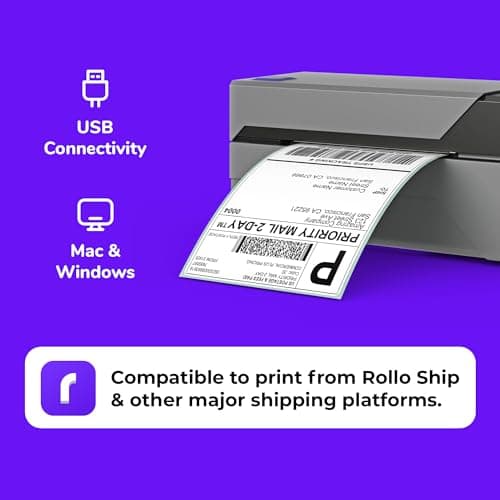
By day three I had printed around 150 labels across eBay, Amazon, and a handful of PayPal shipping transactions. The speed is genuinely satisfying – feeding label after label at that 150mm/s pace feels almost mechanical in the best way. One thing nobody mentions in the listings: the manual tear bar at the top. You rip each label off rather than relying on an auto-cutter. It sounds petty, but after 200 labels your fingers notice the difference. It's not a dealbreaker, just a texture thing.
What surprised me was how quiet it is. I expected something buzzy and office-disruptive, but the Rollo USB hums along with a soft, almost pleasant whir. I ran it next to my toddler's nap time without issues. Print quality held up too – USPS scanners at the post office picked up every barcode I printed over the two-week test period, and addresses came out crisp at 203 DPI. Yes, the text is slightly less razor-sharp than a high-end laser printout, but you're saving about $0.03–$0.05 per label by skipping inkjet entirely.
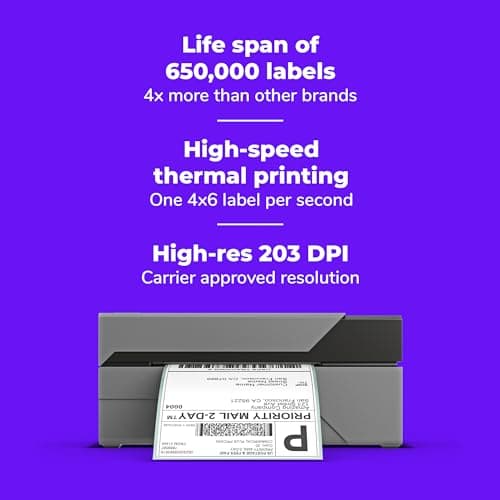
The Rollo Ship app is a genuine bonus. I connected my Shopify store and printed a label with a discounted USPS rate I'd never have found manually. No extra shipping platform fee, no subscription required. For solo sellers doing 20–30 shipments a week, that alone could offset the printer's cost within a few months.
Who Should Buy It?
- Sole proprietors and small e-commerce sellers printing 10–50 labels daily across Etsy, Shopify, Amazon, or eBay
- Home-based business owners tired of inkjet maintenance and expensive cartridges
- Small warehouse operators needing barcode and bin labels alongside shipping labels
- Fleets or mobile businesses where a single wired workstation setup makes sense
Skip this printer if you need wireless printing, automatic label cutting, or if you print fewer than five labels a week and a standard office inkjet already covers your needs. Also skip it if your labels will spend weeks in direct sunlight or hot vehicles – thermal labels fade under those conditions, and that's a thermal technology limitation, not a Rollo-specific flaw.
Alternatives Worth Considering
- DYMO LabelWriter 4XL – a strong alternative if you prefer a more compact, brand-name consumer feel. It uses thermal transfer rather than direct thermal, so labels last longer, but label costs tend to be higher and print speed is slower.
- Rollo WiFi model – the same core printer with built-in wireless connectivity. Worth the upgrade if multiple people in your workspace need to send print jobs from different devices, or if you want to print from a phone or tablet.
- Zebra ZD410 – a commercial-grade step up in durability and print quality. Heavier, more expensive, and better suited to industrial environments than typical home-office or small-business setups.
FAQ
Yes – once drivers are installed, you can print labels locally from your computer. The free Rollo Ship app requires internet to fetch live shipping rates, but basic label printing does not.
Final Verdict
The Rollo USB Shipping Label Printer earns its reputation as a workhorse for small business label printing. Direct thermal technology keeps ongoing costs low, the 150mm/s speed handles real shipping volumes without frustration, and compatibility with virtually every major shipping platform means you won't outgrow it when your operation scales up. The USB-only limitation is the main thing to consider before buying – if wireless printing matters to you, look at the WiFi model. Otherwise, for the price, it's hard to find a more practical thermal label printer for solo and small-business shippers. I'd recommend it to anyone regularly printing 4x6 shipping labels without hesitation.