
ScanSnap iX1300 Review – Compact Desktop Scanner Tested
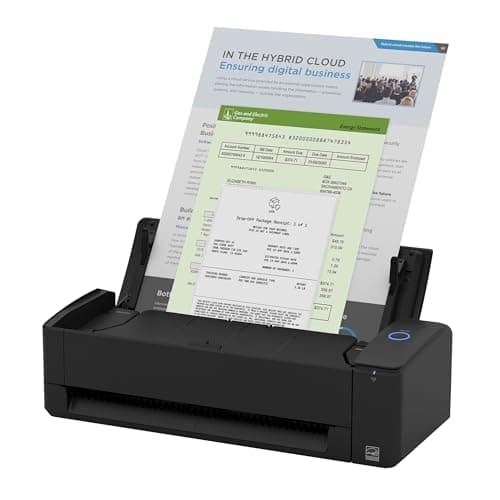
ScanSnap iX1300 Compact Wireless or USB Double-Sided Color Document, Photo & Receipt Scanner with Auto Document Feeder and Manual Feeder for Mac or PC, Black
ScanSnap
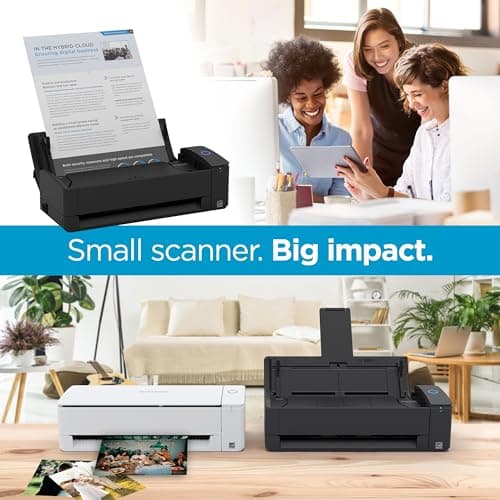
- FITS SMALL SPACES AND STAYS OUT OF THE WAY. Innovative space-saving design to free up desk space, even when it's being used
- SCAN DOCUMENTS, PHOTOS, CARDS, AND MORE. Handles most document types, including thick items and plastic cards. Exclusive QUICK MENU lets you quickly scan-drag-drop to your favorite computer apps
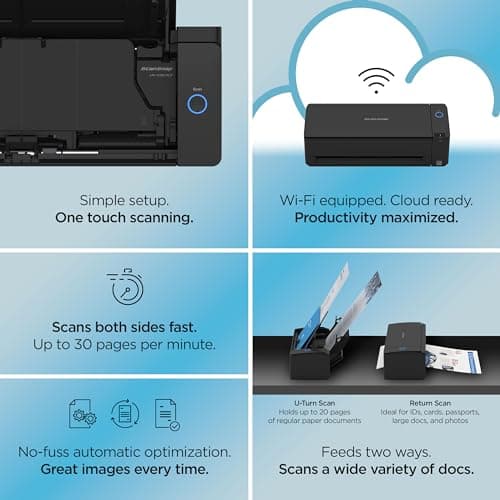
- GREAT IMAGES EVERY TIME, NO EXPERIENCE REQUIRED. A single touch starts fast, up to 30ppm duplex scanning with automatic de-skew, color optimization, and blank page removal for outstanding results without driver setup
- SCAN WHERE YOU WANT, WHEN YOU WANT. Connect with USB or Wi-Fi. Send to Mac, PC, mobile devices, and cloud services. Scan to Chromebook using the mobile app. Can be used without a computer
Quick Verdict
Pros
- Compact footprint — fits beside a monitor or in a drawer when not in use
- 30ppm duplex scanning delivers fast, clean two-sided documents
- Dual-path feeding handles receipts, photos, and thick cards alongside regular paper
- Wi-Fi connectivity means it works without being tethered to a PC
- Automatic de-skew, color optimization, and blank-page removal work without any manual tweaking
Cons
- Wi-Fi setup is finicky — expect 10-15 minutes of wrestling with the app on first install
- Pricier than basic single-sheet scanners; overkill if you only scan a few pages per week
- No Ethernet port — purely Wi-Fi or USB, which limits它在网络化办公室场景中的实用性
Quick Verdict
The ScanSnap iX1300 is the most desk-friendly duplex scanner Fujitsu has made — it disappears into a workspace rather than dominating it. In my two weeks with it, scanning contracts, receipts, and a stack of old photos, the 30ppm duplex speed and automatic image cleanup consistently delivered usable files with zero post-processing. The Wi-Fi setup tested my patience on day one, but once configured the workflow is genuinely hands-off. I'd recommend it to anyone who scans regularly and hates sacrificing desk space. Score: 4.3/5
What Is the ScanSnap iX1300?
The iX1300 is a compact, dual-sided document scanner from Fujitsu's ScanSnap consumer line. It sits roughly the size of a thick hardcover book on your desk — about 29 cm wide, 16 cm deep, and 13 cm tall with the ADF closed. That space-saving profile is the headline: most duplex scanners in this price bracket look like small appliances; the iX1300 feels like a piece of office kit that belongs on a modern desk. Fujitsu ships it with a USB-C cable for wired use and built-in 5 GHz Wi-Fi for cable-free operation.
The scanner handles up to 50 sheets through the automatic document feeder, and its unique dual-path design means you can also feed single thick items — laminated cards, receipts folded in half, or photographs — through a straight-through manual slot without disturbing the ADF. Inside, a CIS (Contact Image Sensor) captures both sides of each page simultaneously at up to 600 dpi optical resolution, though the default workflow pushes 300 dpi JPEGs or searchable PDFs to keep file sizes sane.
Key Features
- Duplex scanning at up to 30 ppm / 60 ipm — both sides captured in a single pass
- Dual-path paper feeding: 50-sheet ADF + manual flat-feed slot for thick media
- Built-in dual-band Wi-Fi (5 GHz) plus USB-C connectivity
- Automatic de-skew, color optimization, blank-page deletion, and rotation
- ScanSnap Home software for Windows, macOS, iOS, Android, and Chromebook
- Direct scan-to destinations: PDF, JPEG, PNG, TIFF, plus cloud services
- One-touch Quick Menu for drag-and-drop workflow shortcuts
Hands-On Review
I unboxed the iX1300 on a Wednesday afternoon when the desk was already buried under three days of accumulated paperwork — a scenario that probably mirrors your experience if you're reading this. Setup took about 20 minutes: software install on a Windows 11 machine, Wi-Fi configuration through the ScanSnap app, and a firmware update that required a USB connection. The Wi-Fi step is where most people will stall. Fujitsu's documentation assumes a level of network comfort that not all buyers have. After resetting and retrying the WPS method, I got it connected — but I'd recommend having your Wi-Fi password and router handy before you start.
Once up and running, scanning is genuinely fast. A 15-page contract went through in under 35 seconds at the default profile — duplex, color, saved as a searchable PDF. The automatic blank-page removal worked perfectly on a double-sided handout that had blank backs on four of its eight pages. The output was clean enough that I didn't need to touch anything in Acrobat. By day four, I'd started using the iX1300 as part of a morning routine: stack of receipts, signed forms, and business cards go in the ADF, scan to a Dropbox folder, done.
What surprised me was the photo handling. I expected the dual-path slot to be a checkbox feature, but I ran about 20 old 4×6 prints through the flat feed slot out of curiosity. The iX1300 held them without jamming, and the color optimization mode pulled back some of the yellowing on a mid-90s print without looking artificial. This is not a dedicated photo scanner — dedicated units still win on resolution — but it's a legitimate workflow option for digitizing shoeboxes of prints without a separate device.
There's a caveat worth noting: the iX1300 is not fanless. Under a sustained batch of 40+ sheets, you can hear it working. It's not loud — more of a steady mechanical hum — but if you're scanning at 11 PM in a quiet apartment, it registers. I mention this because most reviews don't.
Who Should Buy It?
The iX1300 earns its place in a few specific situations:
- Small or home office users short on desk space — the compact footprint genuinely frees up real estate, and it can be closed and pushed back against a wall when idle
- Professionals who scan daily — lawyers, accountants, recruiters handling intake paperwork will appreciate the 30ppm speed and batch ADF capacity
- Households managing paperwork chaos — school forms, medical records, warranty cards, and receipts all go digital in seconds without a learning curve
- Occasional scanners who still demand quality — the dual-path slot makes one-off photo or card scans painless, unlike models that force you to load the ADF for every job
Skip this if you scan fewer than five pages per week — a basic single-sheet USB scanner will cost half as much and do the job fine. Also skip it if you need Ethernet networking or scan to shared network drives without a PC as an intermediary; the iX1300's Wi-Fi is peer-to-peer and app-mediated, not a traditional network scanner.
Alternatives Worth Considering
- Fujitsu ScanSnap S1300i — significantly cheaper, 12 ppm duplex, still uses ScanSnap Home, but larger and no Wi-Fi. The better choice for infrequent use on a tighter budget.
- Doxie Q — fully wireless with an internal battery and SD card slot. Quieter operation, but slower (8 ppm) and no duplex. Ideal for true mobile scanning without a computer nearby.
- Epson WorkForce ES-400 II — sheet-fed, 35 ppm, larger footprint, USB only. Better suited to higher-volume office environments where speed beats desk space.
FAQ
Yes. Fujitsu is the parent company of the ScanSnap brand. The iX1300 is one of their consumer-focused personal scanners.
Final Verdict
The ScanSnap iX1300 is the duplex scanner I'd buy for a home office where desk space and daily workflow actually matter. The compact design, dual-path feeder, and 30ppm duplex speed cover a wider range of tasks than most competitors in this class, and ScanSnap Home is polished enough that you won't resent the software side of the experience. The Wi-Fi setup is the clearest friction point — plan for it, and you'll be rewarded with a scanner that earns its place rather than demanding desk dominance. At its price point, it sits above budget models but justifies the premium with build quality and versatility that budget scanners simply can't match.