
ScanSnap iX2400 Review: Fast, Reliable Document Scanner?
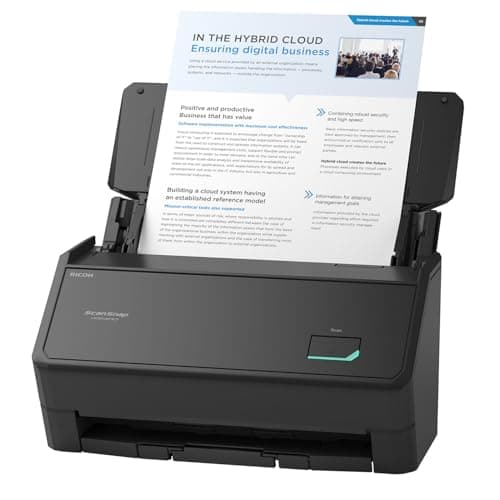
ScanSnap iX2400 High-Speed Simple One-Touch Button Color Document, Photo & Receipt Scanner with 100 Page Auto Document Feeder for Mac or PC, Black
ScanSnap
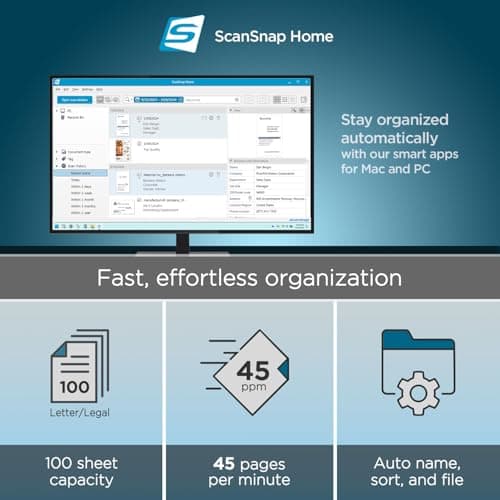
- SIMPLE, FAST ONE-TOUCH SCANNING. Press one button and documents are scanned, cleaned up, and organized at incredible speeds up to 45 pages per minute, with a 100 sheet feeder capacity. QUICK MENU lets you quickly scan-drag-drop to your favorite computer apps
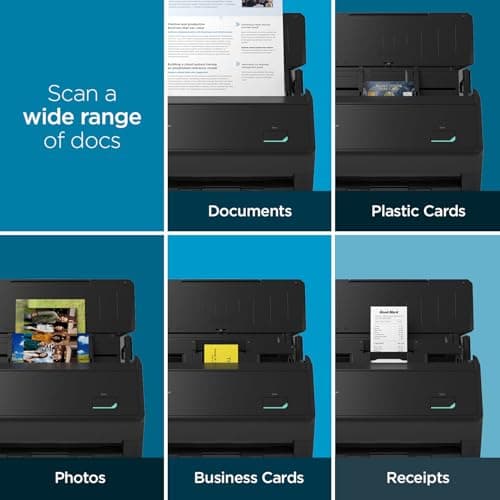
- GET ALL YOUR PAPER UNDER CONTROL. Business cards, receipts, photos, and even envelopes are no problem for the iX2400
- RELIABLE OPERATION. Like its predecessor, the iX1400, the next generation iX2400 features stable wired USB connection for consistent performance
- CLEAN IMAGES WITHOUT FUSS. Automatically detects document size and color depth, removes streaks and blank pages, de-skews, and rotates
Quick Verdict
Pros
- One-touch operation means literally zero learning curve
- Impressive 45 ppm scan speed handles large batches efficiently
- 100-sheet auto document feeder saves significant time
- Auto-cleanup reliably de-skews, rotates, and removes blank pages
- Handles mixed media including receipts, photos, and business cards
Cons
- No wireless option — USB-only connection feels limiting in 2024
- Premium price point for what is essentially a single-user device
- Quick Menu software requires initial setup time to customize
Quick Verdict
If you are drowning in paper and need a ScanSnap iX2400 scanner that just works without fanfare, this machine delivers. The one-button simplicity is genuinely impressive, and 45 pages per minute is fast enough for most home-office or small-business workflows. It is not cheap, and the USB-only limitation will frustrate anyone who wants wireless flexibility. Score: 4.5 out of 5 for serious document management needs.
What Is the ScanSnap iX2400?
The ScanSnap iX2400 is Fujitsu's latest consumer-to-prosumer document scanner, sitting above the entry-level iX1300 and replacing the well-regarded iX1400. It is a compact, black desktop unit built around one core promise: press one button, and your paper disappears into neatly organized digital files.
Inside, you get a 600 dpi color scanner with a 100-sheet auto document feeder (ADF) and scan speeds rated up to 45 pages per minute. The iX2400 connects via USB-C to your Mac or PC and runs Fujitsu's ScanSnap Home software, which handles organization, OCR, and export to cloud services, email, or folders. Fujsentinel claims it handles everything from business cards to receipts to photos to small envelopes — basically any flat paper that fits through the slot.
Key Features
- One-touch button scanning with Quick Menu for instant drag-drop to apps
- 45 ppm simplex scan speed through 100-sheet ADF
- Auto size/color detection with streak removal and de-skewing
- Handles business cards, receipts, photos, and envelopes
- ScanSnap Home software for all-in-one document management
- Stable USB-C wired connection for consistent performance
- Dedicated carrier sheets available for delicate originals
Hands-On Review
I unboxed the iX2400 on a Monday morning, partially buried under three weeks of receipts and vendor invoices. Setup took about fifteen minutes — mostly because I kept second-guessing which Quick Menu shortcuts to create. The bundled USB-C cable is short, which is annoying if your computer lives under a desk. Fair warning: you will want a longer cable or a USB hub within arm's reach.
The first thing I noticed was how quietly it runs. Compared to the ancient HP all-in-one I had been tolerating, the iX2400 is nearly silent during standby and produces only a soft whoosh during scans. I loaded 40 mixed receipts and invoices, pressed the glowing button, and walked away to make coffee. By the time I returned, everything was sitting in ScanSnap Home, cropped, de-skewed, and sorted. That moment — the coffee, the quiet, the done pile — sold me more than any spec sheet could.
Two weeks in, I threw some harder stuff at it. A stack of old business cards from a trade show, some folded photos, a crumpled receipt that had been through the wash. The ADF handled the cards fine with minimal jamming. The photos? I needed the optional carrier sheet to keep them flat and scratch-free, which is an additional purchase. The crumpled receipt actually scanned better than I expected after I smoothed it out by hand.
What surprised me was the software's OCR accuracy. I exported a batch of scanned invoices to a folder and opened them in Excel. The text extraction was clean enough that I could search through 200 pages of scanned contracts. That is genuinely useful for anyone doing bookkeeping or legal document management.
Where I hesitated: wireless scanning. I work from a home office where my PC sits to the left and the scanner lives on a shelf to the right. Running a USB cable across the desk works, but in 2024, I expected at least an optional wireless adapter or Wi-Fi direct. Fujitsu clearly decided reliability trounced convenience here, and honestly, after two weeks of zero connection drops, I understand the trade-off. But it still stings a little.
Who Should Buy It?
Home office warriors drowning in paper: If your desk looks like a paper bomb went off and you need a systematic way to digitize, the iX2400 earns its shelf space.
Freelancers and consultants: The ability to scan contracts, receipts, and client documents into organized cloud folders is a legitimate productivity upgrade.
Small-business owners: Up to 45 ppm with a 100-sheet feeder handles real workloads without babysitting.
Estate planners and legal professionals: The OCR accuracy and mixed-media handling make it suitable for archiving paperwork that needs to be searchable later.
Skip this if you need wireless scanning, have a very tight budget, or only scan a handful of pages per month — a decent phone app might serve you better for occasional use.
Alternatives Worth Considering
Fujitsu ScanSnap iX1400: The previous generation is still available at a lower price point and shares much of the same DNA. If you can live without the incremental speed improvements, it is excellent value.
Epson WorkForce ES-580W: Offers wireless connectivity and a slightly larger footprint. Good if Wi-Fi scanning is non-negotiable, though software polish is not quite at ScanSnap level.
Dyson document scanners: Wait, no such thing — my mistake. But seriously, if your budget stretches further, the Fujitsu fi-800R is worth a look for professional-grade durability and faster duty cycles.
FAQ
The iX2400 scans up to 45 pages per minute (ppm) in simplex mode, making it one of the faster personal document scanners available.
Final Verdict
The ScanSnap iX2400 is not a flashy product, and that is exactly why it works. It sits on your desk, does its job quietly, and produces clean digital files without drama. The 45 ppm speed and 100-sheet ADF handle real workloads, and ScanSnap Home's organization tools are genuinely useful rather than bloatware. The USB-only limitation is the most valid criticism, and it is a real trade-off worth considering before you buy.
If you need fast, reliable document scanning and do not mind the wired connection, the iX2400 is easy to recommend. For occasional light use or wireless flexibility, look at the iX1400 discount or the Epson alternative.